



zoogenhiemer
Members
-
Joined
-
Last visited
Everything posted by zoogenhiemer
-
-
it's still moving, slowly but surely. I now have a "driveable" model in game with full collision, which took me a while, but i finally got it all working. Now to get the lights going, material, etc. I'll post some pics once i get it looking pretty.
-
Awesome...looking forward to it!!
-
Just an FYI, you can spawn any vehicle you want at anytime by using the rage hook console. Just hit F4, then type Spawn [name of car]. No trainer needed.
-
Good suggestion, can you point me to that template? If it has enough coverage... i'll use it. I was planning on unwrapping everything, i want you guys to be able to paint every square inch of the exterior...just in case you want to do a D.A.R.E. wrap or something. ;) don't worry, i have no friends ;) so i'll definitely release it.
-
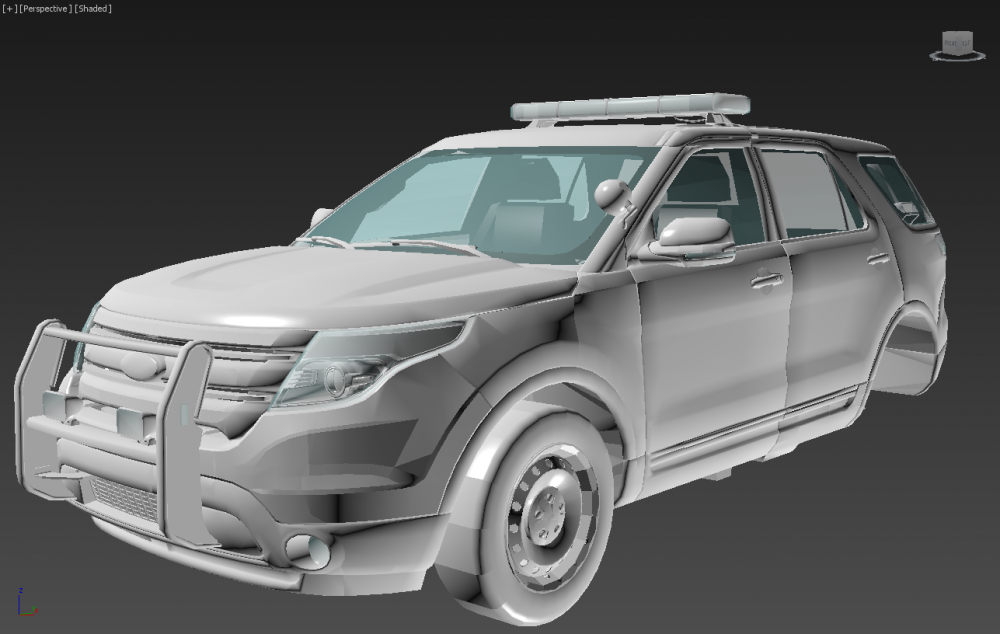
hmmmm... not sure how to edit posts on this forum. But here's pic so far.
-
This is my WIP thread for the 2012 FPIU. This is not a conversion from the GTAIV version.... I am starting from the base the 2012 NFS model, and building it up from there. I plan on making a custom detailed interior for 1st person mode. I will release it when its ready. I currently modifying and modeling in details to the exterior. Adding doors that can be opened, etc.
-
I am working on a 2012 ford PIU right now. I will release it as soon as I have it ready....Will post a wip thread soon.



