foggydewhurst
Members
-
Joined
-
Last visited
Everything posted by foggydewhurst
-
anyone got a good XML for stock vehicles? mine are all spawning too close, tried editing myself but just get errors ;D
-
 I think I've got it. minr="150" maxr="500" Gonna boot up now and test. Was annoying having units pop up in front of me even though I was in the middle of the wilderness or whatever
- 378 comments
- 23 reviews
-
I seem to be having trouble finding the min/max spawn distances as advertised, I've checked both custombackup.xml (stock as I don't use RDE) and the .ini config file
- 378 comments
- 23 reviews
-
 That's amazing, great to hear thanks! This is a must have, I hated how the default EMS magically spawned just down the road even if I was in a secluded area without any hospitals around. i felt like I permanently had an ambulance 200ft behind me stalking me around the map for when I needed it. Love the more realistic time of BetterEMS. Is there a way to get rid of the "EMS taking too long? Press <whatever> for it to warp closer"? I set it to NONE in the ini but the message still shows Other than those two comments thanks for one of the best mods I've downloaded yet!
- 781 comments
- 85 reviews
-
much better than default EMS except they don't talk, like if I call local EMS backup they say all cool stuff while trying to save the peds. "Don't you die on me!" These ones are dead silent
- 781 comments
- 85 reviews
-
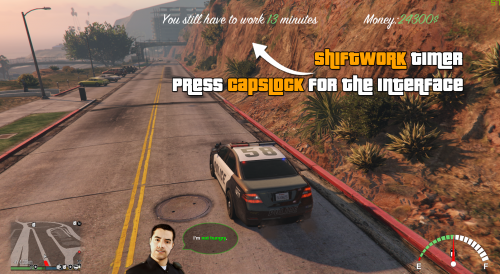 Shift is way too short, maybe double it to 16 in-game hours. Other than that, excellent mod!! A definite MUST have for LSPDFR Rpers
- 120 comments
- 13 reviews
-
 Yes it is, I have the latest RPH and it's working just fine. You haven't installed it correctly.
- 542 comments
- 98 reviews
-
It appears if you hold t Ah okay no problem, still a great mod and it's not too bad sometimes, if I spam the partner key sometimes he gets in the damn car ;D
- 542 comments
- 98 reviews
-
Wtf? But it's for LSPDFR GTAV, whats it got to do with GTA4? But cool, nice for having a gander appreciated!
-
My apologies if this is in the wrong section but it's something missing and could really come in handy. Is there currently a mod or is it moddable to have multiple waypoints on the map to set up a 'patrol route'? Thanks in advance for any replies
-
This is amazing but I'm having one small problem. My partner just stands there pointing his weapon at a car that's speeding off, I'm in my car honking my horn he just stands there pointing his gun for ages and ages until he finally gets in. Usually happens if I get out during a pursuit to deploy spikes then get back in if it didnt stop the car
- 542 comments
- 98 reviews
-
You've obviously got a mod or script causing this I make stops all the time where it just warranted a warning or simple citation. I often flag down a car that is driving suspiciously too slow or swerving a little. No alcohol in blood, fully MOT'd and insured, license valid etc. Turns out they were just on the phone or just sleepy or just a really bad driver. so I give them a warning, maybe a ticket if I've come across them before and off they go etc. List your scripts
-
 This mod is great, it's best fun to use with blips and on-screen messages turned off. It adds to immersion and realism when you're parked on a laybay watching cars go past, perhaps you suddenly see a car speeding past with a driver holding a phone to their ear, wobbling over the road a little. The violations are subtle but they are there. 5/5 thanks for a great mod.
- 3,646 comments
- 306 reviews
-
-

- 1
-
-
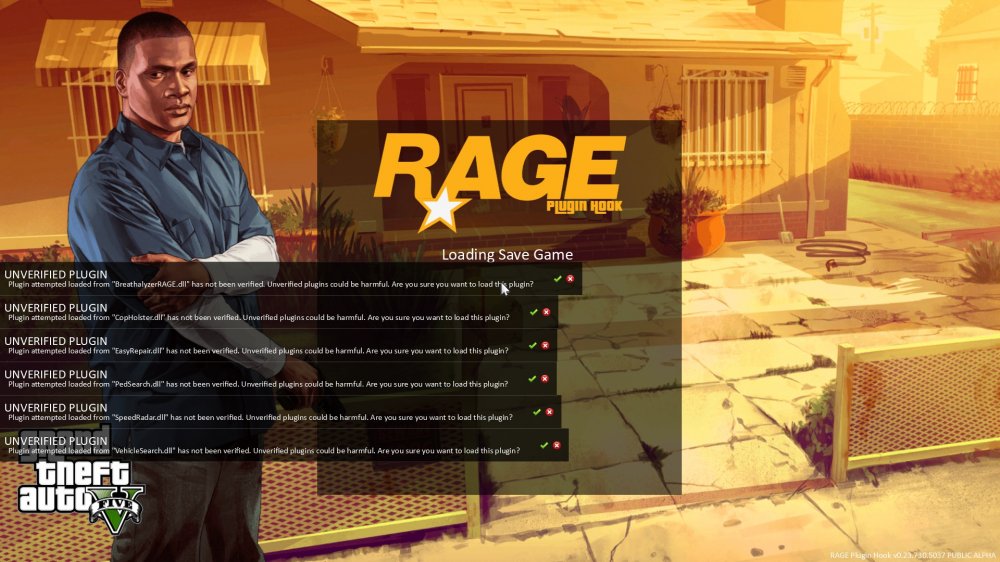
huh it is LSPDFR, it only happens when i load lspdfr plugins - including LSPDFR First Response..? now i'm just confused In the startup file: IsDeveloperModeEnabled True PluginTimeoutThreshold 10000 LoadPlugin "LSPD First Response.dll" LoadPlugin "BreathalyzerRAGE.dll" LoadPlugin "CopHolster.dll" LoadPlugin "EasyRepair.dll" LoadPlugin "PedSearch.dll" LoadPlugin "SpeedRadar.dll" LoadPlugin "SpikesBarrier.dll" LoadPlugin "Spotlight.dll" LoadPlugin "VehicleSearch.dll" I've added: IsDeveloperModeEnabled True PluginTimeoutThreshold 10000 WarnOnPluginLoad=False ShowOnScreenWarnings=False And reloading now to test
-
Is there a way to get rid of the "creating ,event>" message on-screen? It takes away from the immersion when it's constantly telling me it's artificially creating an event right in front of me I'm dumb: ShowAmbientEventDescriptionMessage=false Done Great mod thank you so much :)
- 3,646 comments
- 306 reviews
-
-
- 1
-
-
Did that, they're still showing up :/ I also set ShowOnscreenwarnings to then reloaded and they still show up too. My RPH file: [Miscellaneous] DisableCustomLoadingScreen=False DisableRenderVersionText=False WarnOnPluginLoad=False PluginTimeoutThreshold=10000 IsDeveloperModeEnabled=True ConsoleKey=F4 ShowOnScreenWarnings=False Ah fixed it sort of. I had to change the mouse input mode in GTA v settings, then the messages became clickable. Isn't there a way to disable the messages completely though or auto-confirm the loading of them so I don't have to do that everytime I load up? Thanks for your reply anyway by the way appreciated you trying to help :)
-
They take up my entire screen and i can't get rid of them, it won't let me click on them or anything this is so frustrating tried reloading the game to no avail help appreciated thank you