
PoliceWomen
Members
-
Joined
-
Last visited
Everything posted by PoliceWomen
-
cool wie bekomme ich die ? doch es gibt welche gib mal eine bei ragehook console giveweapon flare dann haste die fackeln
-
hm...schade müsste man mal fragen ob sich jemand ran machen würde diese zu erstellen wer ja mal geil
-
ja das weiss ich aber es gibt keine flares oder so die leuchten richtig ??
-
gibts sowas nicht für gta V weil wenn ich einen unfall gemeldet bekomme muss es doch eine möglichkeit geben das zu sichern ???
-
its coming ??
-
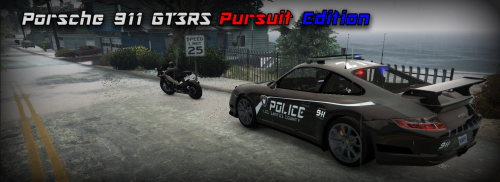 Property times the Porsche installed and am thrilled hammer horny part as Police 2 matches the new CVPI thanks
 -
-
alles nochmal neu installieren kann sein das du irgendwo eine datei vergessen hast etc ...
-
who can download the cvpi its nice
-
wenig informationen
-
use version 7 http://www.lcpdfr.com/files/file/7798-gta-8-realistic-american-sirens/ is better
-
wait for new els for gta v
-
ja den mod ordner erst erstellen wenn alles fertig ist
-
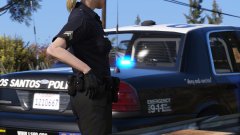 I also use now visual mod and I'm amazed what made the graphic at the operational vehicles rausholt are lights like the original shine on red and blue I can only recommend use that https://de.gta5-mods.com/misc/visualv its absolutely great
 -
have fbi slot
-
das könnte dir helfen :)) How do I download and install LSPDFR? Download the modification here: http://www.lcpdfr.com/files/file/7792-lspd-first-response/ Drag and drop all files into your GTA V directory. Please note that we do not support any other version of LSPDFR than LSPDFR 0.3. Where can I find the LSPDFR User Documentation? In LSPDFR 0.1 versions, the LSPDFR User Documentation can be found within the installation folder. In LSPDFR 0.2 and 0.3, it can be found here: http://www.lcpdfr.com/lspdfr/ How do I start LSPDFR? As of 0.1b, the LSPDFR plugin loads as soon as the game starts. If you need to reload the plugin for some reason, see “How do I start LSPDFR if it crashes?”. How do I start LSPDFR if it crashes? Launch GTA via RAGEPluginHook.exe, located in your GTA V directory. Once GTA V has completely loaded up (you’re in-game), press F4 and type the following: LoadPlugin “LSPD First Response.dll” (you must include the quotation marks!) The console allows you to autocomplete some commands by highlighting the option you want with the arrow keys and pressing TAB. This makes sure you don't make spelling errors. Help, the RAGE Plugin Hook didn't load? Try launching GTA V manually, then once you can see the start screen, ALT + TAB and launch the rage hook as an administrator. Additionally, be sure that all of the corresponding .DLL files have been unblocked for the Rage Hook and LSPDFR. In Windows 7: Right click > Properties > Unblock In Windows 8: The unblock button is missing, follow the instructions here. How can I receive support with RAGE Plugin Hook? Visit the RAGE Plugin Hook forums: http://forums.ragepluginhook.net/ How do I go on duty? Find the nearest police station on your map. Depending on the station you will either need to walk inside and press E when prompted, or press E by the outside door when prompted. Choose your officer and vehicle to start your patrol. How do I get a partner or other officers to help me? Partners are not supported at this time. You can call for backup using the Backup Menu How do I do a traffic stop? Pull up behind the car you want to stop. Press Shift, and a blip will appear for the car. Then, turn on your emergency lights, and they will pull over. If the suspect pulls over in an unfavourable place, honk your horn and they will attempt the pull over again. Follow the onscreen instructions; get out, approach on foot, and use the menu to interact with them. After the suspect has stopped, you can cancel the traffic stop by pressing Shift again. How do I turn off my siren while keeping the lights on? Press J to turn off the siren. If this doesn't work, you may be running multiple instances of the mod. Unload all plugins, and reload LSPD First Response.dll as well as any other modifications you use. Help, the name of the suspect disappears too fast! If you go into the pause menu, click brief and then click the notifications on the side bar it will display all notifications printed in game, including vehicle licence plates, callouts and ped ID's. How do I perform ID checks on foot? Press and hold the Context Action control while near a pedestrian: The nearby pedestrians will turn around and face you. Approach a stopped pedestrian and follow the in-game prompts and take their ID. Stopping people on foot currently works only in third-person mode and will not work in first-person. You can perform records checks by using the Police Radio in the Interaction Menu - choose Subject Records Check, type in the name of the subject, and press Enter. I'm having problems using the Police Computer. Crashes using the Police Computer: http://www.lcpdfr.com/forums/topic/52251-lspdfr-02-crash-when-entering-police-computer-pressing-e-when-stopped/ Problems as a result of typing into the Police Computer: http://www.lcpdfr.com/forums/topic/52437-have-problems-typing-into-the-police-computer-read-this/ How do I arrest someone? Aim at them with a gun, and press E. Follow the onscreen instructions; they will put their hands up, then you press E to make them kneel, then you walk up behind them and press E to cuff them, then press E to make them stand, then get in your car. Then, drive them to a jail. Whilst on foot, you can stop a ped by holding "E" (without aiming). Press 'E' to interact with a stopped ped just like you would on a traffic-stop. How do I get a prisoner transport unit? You can walk a suspect over to any police car and place them inside it. For example, call a Code 2 patrol unit, walk up to the door of that car and let the suspect in. The officers will then drive off with the suspect. With LSPDFR 0.3, you can call a dedicated unit for prisoner transport. How do I remove the suspects from my patrol car? Drive to the Police Station which has a jail cell marker on the map. Drive into the marker displayed on the map and the suspect will be taken to processing. What are the backup types? Pursuit: Officers will join the nearest pursuit. Code 2: Officers will respond to the player's location without using lights or sirens, and without urgency. During a traffic stop, officers will drive slowly up to the car that you've pulled over and wait until the traffic stop is over. Code 3: Officers will respond urgently to the player's location using lights and sirens. During a traffic stop, officers will urgently drive to your location and leave their vehicles with weapons drawn. Can I play LSPDFR Online? No, LSPDFR is single player only at this moment in time. This is partly because of Rockstar's stance on modifications, and also due to the fact that the RAGE Plugin Hook will not run in GTA Online. We would, however, like to make online versions of LSPDFR - sadly we can't due to these problems. Can I change LSPDFR's keybindings? There is currently no way to change LSPDFR's keybindings. You can, however, change GTA V's default keybindings by pressing ESC (Start on controllers), go to the Settings menu, and click Game Controls. Common Keys: GAME CONTROL KEYBOARD CONTROLLER FUNCTION Y Accept Callout Sprint SHIFT A Initiate traffic stop Point (GTA:O) B Right Thumbstick Backup Menu N Interaction Menu Menu up/down/left/right Arrow Keys D-Pad Buttons Navigate Menu (Up, Down, Left, Right) Menu Submit ENTER A / X Select (LSPDFR Menus) Menu Cancel BACKSPACE B / Circle Cancel (LSPDFR Menus) Context Action E Right D-Pad Action (Arrest, etc) X Force Callout F9 Force Duty. Press F9 while jumping. J Toggle Siren Sound On / Off Context Action E Left Bumper Activates police computer whilst in a police car Context Action E (hold) Right D-Pad Whilst on foot, stop a ped. Press 'E' to interact with a stopped ped *Most keys are bound to game keybindings - your keys may be different if you have modified GTA’s keybindings. **You can close any interaction menu (backup and interaction) by pressing the key that opened the menu. There is no need to press cancel How do I get LSPDFR Support? First off, ensure that you are running a supported version of LSPDFR. As of 2016-02-22 ONLY LSPDFR 0.3.1 is supported - No LSPDFR 0.2 plugins are supported for LSPDFR 0.3.1 unless otherwise stated! Ensure you have a folder titled "LSPDFR" and "plugins" in your root directory. The plugins folder should contain the following; LSPD First Response.dll A folder titled "LSPDFR" Please do so now and return to this topic when this is done and do the following; Give a clear, detailed description of the problem. Explain any circumstances surrounding the problem. State what solutions you have tried. State which version of the game you're using (Steam or Retail) Post the RagePluginHook.log in a spoiler tag (Please be courteous and only include the relevant information). Include as much information as possible. Post your system specifications. You need to meet the required system specifications for the mod to work properly. Post what other mods you are using. Post a screenshot of your GTA V Game directory. Failure to follow these instructions may result in topic closure. Radio Codes
-
Jedes mal wenn ich Lspdfr spiele stürtzt Lspdfr ab aber erst seit dem ich die neue RPH 37 nutze ??? hier meine Ragehook.text RagePluginHook.log funktioniert wieder dank albo / its works fine thx albo :))
-
 look at times the lights, to the not so think its time , or do I have the radiance mod also install so that the light correctly because the colors are very funny GTA5 2016-03-18 14-33-18-12.bmp
- 95 comments
- 29 reviews
-
nach der neuen RPH Installation und scripthook crasht gta v immer kurz bevor ich im game bin quasi noch beim rph fenster wo die plugins reingeladen werden weiss jemand einen rat ohne das ubdate lief es einwandfrei im offline modus RagePluginHook.log
-
-
 m going did think the error made by bebux 123 CVPI 1.04a to overwrite the files n folders patchday5 his place in the patchday5 from mod folder see if this works now
- 137 comments
- 25 reviews
-
can you tell me exactly say where what needs to go in the other vehicles all goes only in the not ... so step by step where the car over all must be pure
- 137 comments
- 25 reviews
-
-
yes no lights from lightbar , the lights do not work have new installed the car and have jet white lights
- 137 comments
- 25 reviews
-