


Kipila
Members
-
Joined
-
Last visited
Everything posted by Kipila
-
I use Albo's SirenMastery to control siren, KTFDO to keep door open, GrammarPolice, Policing Redefined, Legacy Radar, MTFO to manage traffic @ code3 run, and some most popular callouts. And since I am first and foremost simracer I use ikt's Manual transmission as steering wheel support tool (great FFB) along with his camera mod - DynamicVehicleFirstPerson, InversePower for better physics and persistent_wheels_v, to keep my front wheels turned if I left them like this when exiting wehicle. Last one, as handling mod - Drive V (which needs some adjustments to work on enhanced). I almost forgot - NVE, needed for Drive V
-
True, it can happen but then we can honk at him so he will find different spot as usual.
-
When we close distance to car ahead (without marking it with LShift yet), and turn on emergency lights (with siren muted), then he pulls over very well (as all traffic do). Unfortunately when we hit then LShift to initiate traffic stop (on a stopped car) than he drive off to struggle to find right spot... Maybe It would be possible to implement (even as an option) this reverted scenario: First turn on emergency lights, car ahead stops - no changes to code till now. Then hit LShift - LSPDFR should here check speed of marked car - if it's 0 then suspect is considered as stopped and we can approach to them.
-
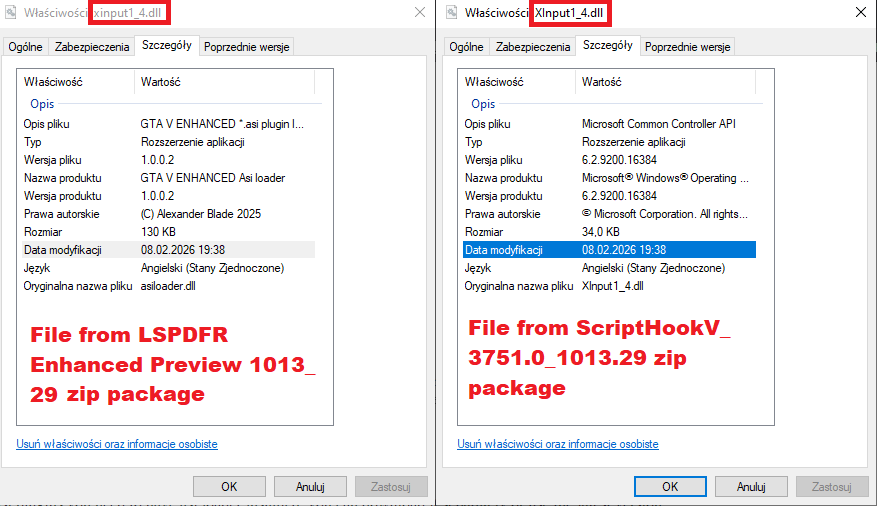
I'm struggling getting LSPDFR and NVE to work together as I used to successfully before January update. Both modifications works separately just fine. I found interesting (i think?) that files xinput1_4.dll included in latest LSPDFR Enhanced preview package and ScripthookV package are different (see attached image). Also xinput1_4.dll file included in NVE is the same as in ScripthookV source. Anyone knows if that difference matters?
-
-
-
I can recommend siren mastery by Albo https://www.lcpdfr.com/downloads/gta5mods/scripts/12577-siren-mastery-fully-master-your-siren-tones/
-
I didn't see anyone mention this so it seems there is a paid update on mod's author Patreon site.
-
 @outlook I had the same problem. Deleted lspdfr and started new character solved the problem.
- 1,524 comments
- 85 reviews
-
@gta5Bosnianpolicedesigns I tried most of handling and AI behaviour mods but the problem with "cheating" NPCs is unsolved and exists after applying mentioned mods. But maybe it is a good idea to write suggestion for lspdfr v 0.5 Devs. @GTAbear I think you explained the root problem - thank you.
-
I get your point @GTAbear. But the reasons for my questions lie elsewhere: As I try to tune GTA and LSPDFR to my needs (realistic handling and pursuits), I see a fleeing suspect not making turns or rear ending other NPCs due to the handling changes I made (lower grip, sharper grip curve, etc.). I'm not trying to make pursuits easier - just the opposite. Since last discuscusion here i found NPC are using given nodes instead of ai (yeah, they're quite brainless...) when calculating corner speed. Now I also found that the fleeing suspect uses some kind of magic on a given handlig.meta - The NPC applies certain multipliers to acceleration values and maximum speed. After the changes I made in handling.meta (as an experiment), I could reach max speed about 60 miles per hour in a given car while the fleeing from police suspect reach about 80 miles per hour in the same car. After all if fleeing suspect didn't cheat it would be easier to fine tune handling.meta with vehicleaihandling.info data to get realistic physics that NPC can handle.
-
I had same error after installation of NVE. Switching option "Main.DisableMultiplayerMap" to true in lspdfr.ini solved the problem.
-
Thanks for info. It's a pity there is no update so we have to download whole package once again
-
Try Killatomate's "Realistic Driving V" or PermissionToLand's "Drive V". Be aware of that leads to AI crashes due to reduced grip (rear ending, not making turns) I am experimenting with handling.meta (using Nathan Auckett's "GTA V Handling Editor" and I am also looking for good AI mod to keep them from crashing.
-
If there could be a setting so we could adjust: 1) general fleeing cars speed (aggressiveness) 2) PIT execution difficulty (how difficult is to rotate suspect) that would be handy. I am tuning my lspdfr in that area to fit into my likings togheter with handling.meta and vehicleaihandlinginfo.meta. I also read some post that one wants pusruits faster, other likes it slower or PIT is too easy/difficult - so maybe placing an option to adjust those settings would keep all of us happy 🙂
-
Since it's my first post - Hi 🙂 Just like KLEO wrote, I'm trying to make lspdfr as much realistic as I it is possible, and I see crazy pursuit the biggest issue for now. Does anyone know mod which will slow down suspects? Yea, I know, it's about chasing, but when it comes to realism (which I like most) speeds like 100+ mph should be seen occasionally. Now almost all of the chases end up with high speed in narrow city streets. Chris



