


OfficerArk
Insiders
-
Joined
-
Last visited
Everything posted by OfficerArk
-
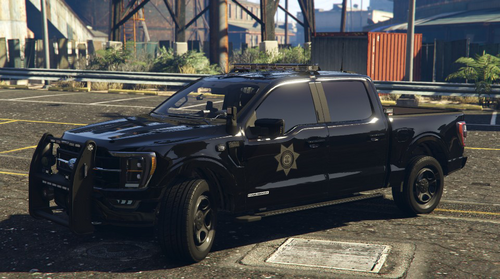 These are not small models, there is a lot of things stuffed into them. I haven't seen any issues with FPS drop (could be graphics card) but I will look into making them more optimized!
 -
Make sure you’ve installed all of the prerequisites, they are in the read me!
-
Introducing the San Andreas County Sheriff 2022 F150 --Features-- Ghosted Marked Unit - Red-Blue & Blue-Blue Variations. - Reflective Liveries - Removable Right Arges Spotlight (Extra_10) - PIP's ALPR's (I just like them too much) - Bobble Antennas - Full Scene Lighting Unmarked Unit - Red-Blue & Blue-Blue Variations. - Optional Back Rack Configuration (2 Separate Models) - Removable Right Arges Spotlight (Extra_10) - PIP's ALPR's (I just like them too much) - Bobble Antennas - Full Scene Lighting (Based off of certain sheriff vehicles near me)
-
 Can’t wait to try this out! Thank you for uploading this 🙂
 -
 Happy the RA worked! As @249Xeno has stated, the discord is being worked on! We just made it so we’re working the kinks out 🙂
- 477 comments
- 18 reviews
-
-

- 1
-
-
-
-
Yup! Just a little spring cleaning, and she’ll be back up. Thank you for your patience!
- 477 comments
- 18 reviews
-
-
- 1
-
-
There was issues with the car pack and I haven’t had time to fix it yet! Just need to check some things then it should be back up 🙂
- 477 comments
- 18 reviews
-
-
- 1
-
-
If he can hear the vanilla sirens then that shouldn’t be the issue. I use controller but J should activate siren sounds. If you are still having issues, please join our discord https://discord.gg/SCfsUsrN
- 477 comments
- 18 reviews
-
-
.thumb.png.656f907bc2febc81911b0b821cb502c8.png) Amazing work with this one. Once I saw this was released I had to try it and I’ve not had a single issue going forward. This adds so much depth to the gameplay and I have enjoyed every second using it. Keep up the great work!
Amazing work with this one. Once I saw this was released I had to try it and I’ve not had a single issue going forward. This adds so much depth to the gameplay and I have enjoyed every second using it. Keep up the great work!- 342 comments
- 43 reviews
-
-
- 1
-
-
-
 You’ll need to change the backup/agency files to allow AI to drive addon cars!
 -
-
The 16FPIU and FPIS are not modeled yet, the files have placeholders for them in the meantime!
- 477 comments
- 18 reviews
-
-
Due to the amount of vehicles included in the pack, I haven’t had time to sit down and make a replace pack for it. I’m in the middle of moving and once I finish that transition, I will look into a replace version!
- 477 comments
- 18 reviews
-
I’ll check these out and see, I appreciate you linking some! The few packs I’ve seen with both working, have no emis/light coming from the spotlight.
- 477 comments
- 18 reviews
-
My bad, didn’t even realize what cars we were talking about. This pack does not have takedowns or alley lights, this was mainly due to compatibility issues with the moving spotlight! I’ve still been looking for a way around it but currently nothing. I can add alleyslights but there is just so many vehicles. You’ll want to go to GTAV/lspdfr/backup From there you can change the names to models you want NPC’s to drive!
- 477 comments
- 18 reviews
-
The default takedown should be ] And scene lighting is alt+] I’m happy you’re enjoying the cars! 🙂
- 477 comments
- 18 reviews
-
-
This fix works with addon vehicles as well, the handling is linked to the “handlingID” line. You’ll look for the line in the “handling.meta” folder in the root GTA files, from there follow the video. It will work if you follow it correctly.
- 477 comments
- 18 reviews
-
-
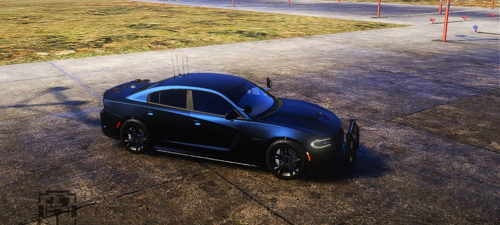 I’ve dealt with the transparent body panels on a car awhile back and it’s a pretty simple fix! I can help more once I get back to my computer, dm me and we can talk on discord. Beautiful car!

.thumb.png.656f907bc2febc81911b0b821cb502c8.png)
