
Gabri27
Members
-
Joined
-
Last visited
Everything posted by Gabri27
-
Hello everyone. I recently came back to LSPDFR with a new PC, my specs are: - Intel i7 10700k - RTX 3060 - OS installed on a Samsung 970 EVO and GTA V on a Barracuda Seagate. I can run GTA V at an immaculate framerate, with everything set to Ultra/High. Since I have copied GTA V to mod it, I've came into a bunch of problems: - At first, as soon as I started GTA V using the RPH.exe, the game would start with a 5 seconds black screen to then see RPH has crashed, giving me first an error along the lines of "Unknown game crash" and saying its generating a crash report (which it didn't, it never gave me a crash log), and then popping out with "Slow system or insufficient permission". (I had already set the Folder as an exception on WD and even disabled it). I even tried just starting up GTA V and then hooking RPH but it crashed anyway, with no log. This was later fixed, somehow, by a PC restart - After restarting, and trying again, the game started and base LSPDFR was running just fine (no plugins, no EUP, no LML or other). As soon as I installed 4 Bejoijo plugins (STP, UB, CL and SC) and EUP, the game decided to surprise me with an insane amount of lag as soon as I hook RPH (any way, both starting with RPH or hooking it later on), running at around 13 FPS and making it unplayable. After a while, the same issue said in the first paragraph decided to pop up, but just on startup: if I run GTA V and then hook the game it works. The lag still remains I tried anything that is humanly possible. (also known as: trying everything I could remember from my LSPDFR past bug fixing lol), such as: - Setting the threshold to 60k - Disabling the AV - Removing LSPDFR and all of its plugins - Removing the plugins but keeping base LSPDFR - Removing EUP - Lowering my graphics - Playing with RPH settings Note that I played LSPDFR just fine on a crap computer about 6 months, and all these issues are popping out just now and it's driving me nuts. TL;DR: My GTA runs just fine, but it lags like shit and it crashes if I start it with RPH instead of hooking it later on. Tried everything that I listed up there ^ Attaching my RPH.log Hope I can find some help there, as I always did 🙂 RagePluginHook.log
-
There is something called "memory overload", High Quality vehicles and texture eat your memory the more you play during the session. Usually each of these vehicles use about 20 MB of your memory, so the more you play, the more vehicles spawn, the more memory gets used. If you want a fix to this, you might want to check this out
-
I believe that - sadly - there is no other alternative other than American/British English as of the Vanilla LSPDFR. However, there are several plugins and callouts pack which support other language packs, made by the community of LSPDFR. One of these plugins is StopThePed made by Bejoijo, i have attached an example of language pack made by a community member. I believe that you can find several of these in the "Visual and Data File" and "Misc" sections of the download page. ES: Creo que, lamentablemente, no hay otra alternativa que no sea el inglés estadounidense / británico a partir del Vanilla LSPDFR. Sin embargo, hay varios "plugins" y paquetes de llamadas que admiten otros paquetes de idiomas, creados por la comunidad de LSPDFR. Uno de estos "plugins" es StopThePed creado de Bejoijo, he adjuntado un ejemplo de paquete de idioma creado por un miembro de la comunidad. Creo que puede encontrar varios de estos en las secciones "Visual and Data File" y "Misc" de la página de download. Lamento los errores en la traducción, no hablo español desde la escuela secundaria
-
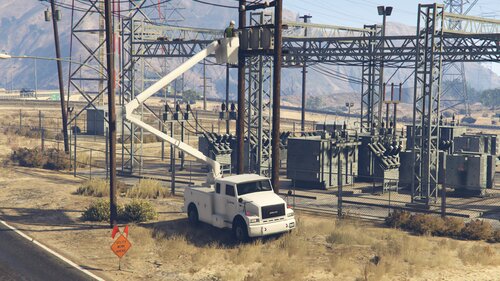 Hi Parks! Would it be possible someday in the future to also add an "extend" / "move forward/backwards" function? Or would that be impossible due to R* Limitations? Also, I've noticed that sometimes when I use a Scenario Action with the Menyoo Menu, my player falls off the bucket and a wooden crate pops out of the bucket, breaking the whole thing. (I suppose this is used to stand on the bucket and not clip off the bucket) - Is this normal? I will try to attach a screenshot later on during the day.
 -
Use a Trainer like Menyoo or SimpleTrainer; keep in mind the name of the ped you have replaced, it will pop up as that unless it's an add-on
-
Probably this has nothing to do with StopThePed, do you have any other LSPDFR Plugins (Callouts, tools, etc)? If so, please either list them or attach a screenshot of the folder. Secondly, any other major changes you have made to the game? (New vehicles, gameconfig etc)?
-
Ah, I see now, I updated it manually but apparently I had to do it via LML, I will try that. I will also try disabling the plugins folder, thank you!
-
Hello. As usual Rockstar updating their game breaks it completely. I haven't played LSPDFR in a while - about 5 months - came back after the Cayo Perico update and decided that I wanted to play some LSPDFR. Since 5 months have passed, I knew I had to update everything, starting from RPH down to the plugins. After updating everything, which took me about one hour, I was stressed out, decided to run the game and see if it worked, nothing. Infinite loading screen. Something came up on my mind and checked OpenIV, and noticed that I had to update the update.rpf in the mods folder, as usual after every update. Did so and restarted the game, nothing. At this time I tried reinstalling the update.rpf, nothing. I tried completely removing the folder, nothing. I tried booting via PlayGTAV.exe and also Rockstar Launcher, but nothing, still the loading screen, however, I could hear the in-game Audio, which was like Franklin's phone notification and I believe some random NPC chatter. I tried booting once again with RPH, waited a bit and same thing, I could hear the audio, I clicked F4 and the Console loaded all the plugins, just waiting for me to play, but I couldn't! Also, when I tried doing ALT+F4 (both vanilla and RPH), I could neither click Enter to quit the game, neither go back. Some stuff that you might want to know: - I tried changing the Plugin timeout threshold - Antivirus is disabled + exception made - Smashing my keyboard in hope that the screen would go away does nothing I have attached the RPH log just in case you could fine it useful. Note: This usually happened to me in the past, which was caused directly by some LSPDFR plugins or faulty mods folder, seems like its not it this time. Note 2: If this is the wrong sub-category let me know please, so that I can delete the post RagePluginHook.log
-
Hello. As usual Rockstar updating their game breaks it completely. I haven't played LSPDFR in a while - about 5 months - came back after the Cayo Perico update and decided that I wanted to play some LSPDFR. Since 5 months have passed, I knew I had to update everything, starting from RPH down to the plugins. After updating everything, which took me about one hour, I was stressed out, decided to run the game and see if it worked, nothing. Infinite loading screen. Something came up on my mind and checked OpenIV, and noticed that I had to update the update.rpf in the mods folder, as usual after every update. Did so and restarted the game, nothing. At this time I tried reinstalling the update.rpf, nothing. I tried completely removing the folder, nothing. I tried booting via PlayGTAV.exe and also Rockstar Launcher, but nothing, still the loading screen, however, I could hear the in-game Audio, which was like Franklin's phone notification and I believe some random NPC chatter. I tried booting once again with RPH, waited a bit and same thing, I could hear the audio, I clicked F4 and the Console loaded all the plugins, just waiting for me to play, but I couldn't! Also, when I tried doing ALT+F4 (both vanilla and RPH), I could neither click Enter to quit the game, neither go back. Some stuff that you might want to know: - I tried changing the Plugin timeout threshold - Antivirus is disabled + exception made - Smashing my keyboard in hope that the screen would go away does nothing I have attached the RPH log just in case you could fine it useful. Note: This usually happened to me in the past, which was caused directly by some LSPDFR plugins or faulty mods folder, seems like its not it this time. RagePluginHook.log
-
Alright, I'll check that out.
-
Thank you, I'll wait. So far the Mod runs smoothly, but there is still that annoying glitch, take your time 🙂
-
RagePluginHook.log