SuperPyroManiac
Community Team
-
Joined
-
Last visited
Everything posted by SuperPyroManiac
-
 Crash does not appear to have been caused by SuperCallouts. The error I saw usually comes from a rare case where STP crashed.
- 1,024 comments
- 63 reviews
-
-
You did not correctly update PyroCommon, it goes in the main GTA folder. Delete the old one.
- 1,024 comments
- 63 reviews
-
-

- 1
-
-
 Well this log shows it happened 1 time, looks like it was unable to find a valid spawnpoint near you which is odd. If it continues during a longer session id love to see that log too. Right now with it being a single instance, it looks normal. [5/13/2026 12:35:27 AM.984] SuperEvents: New events can now generate. [5/13/2026 12:35:28 AM.891] SuperEvents: Generating random event. [5/13/2026 12:35:28 AM.891] SuperEvents: Loading CarFire from SuperEvents, Version=4.0.1.0, Culture=neutral, PublicKeyToken=null [5/13/2026 12:35:28 AM.903] PyroCommon: Failed to find valid spawnpoint. Spawning on street. [5/13/2026 12:35:28 AM.904] SuperEvents: Event has been forcefully cleaned up. [5/13/2026 12:35:28 AM.904] SuperEvents: Ending Event. [5/13/2026 12:35:29 AM.900] SuperEvents: Event Timer started for: 291 seconds. [5/13/2026 12:35:42 AM.477] LSPD First Response: [TRACE] PlayerCharacterStatsManag
- 219 comments
- 22 reviews
-
-
Out of the years I have had this system, it has not been wrong once. Double check you followed the install instructions.
- 1,024 comments
- 63 reviews
-
If you could send your RagePluginHook.log I could look into it, sadly this comment provides 0 context so not a thing I can do.
- 219 comments
- 22 reviews
-
-
-
 A lot has changed in 6 years. I do not intend to add new features to my plugins for GTA5. Ill maintain support for bugfixes but I don't enjoy working with GTA5 anymore.
- 633 comments
- 56 reviews
-
-

- 2
-
-
-
It's possible but not easy, RPH itself is quite a task to run on Linux.
-
Its part of the pain of modding a game that doesn't support it while having 3 different hooks fighting to load at the same time. (SHV, RPH, SHVDN, etc)
-
-
You can select different levels of usage, its not just a yes or no option. It's required for files going forward when it comes to LLM written code. Stuff like the tab complete and just research itself needs no disclosure.
-
I'll be blunt here, as someone who is checking these files I find that most AI coded plugins have severe flaws and even performance issues. A big part of it is due to how lacking docs for RPH are. A very common thing I see is a loop in the main method to "keep the plugin alive" Frankly its not a 1 way mirror when it comes to transparency, especially since you can leave a note about what it's used for. There has been a total flood of plugins written by LLMs that do not even do what they claim so we have had to start handling those situations, and the other side is a whole lot that just barely function. The goal is to keep users who do not know better informed and allow them to easily make the choice themselves. Another situation is devs who spend months creating something by hand just to have someone else try and clone it feature wise with a couple prompts. It can be quite disheartening for those who create the quality code LLMs use to learn without permission. Think of the system like credits, you didn't write the code, an LLM simply just uses other people's code it was trained on to do it.
-
Stock LSPDFR should disable deadly tasers, it absolutely not a DW issue as I explicitly ignore tasers. If anyone can reproduce this with a stock LSPDFR and no other mods at all and see if it persists then I can bring it up to LMS.
- 633 comments
- 56 reviews
-
-
- 1
-
-
-
Even I am not able to access this, this means the author has deleted the file permanently.
-
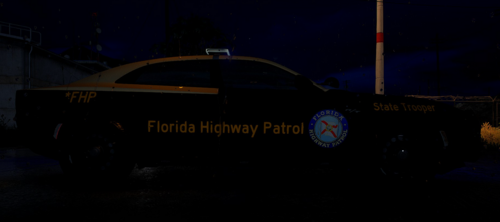 To be fair not everyone needs to make the exact same car. There is already an absolute ton of FHP cars that match.
 -
-
 Please ensure your description is made for the file that's actually uploaded. Your description is misleading and currently violates our guidelines.
 -
 Guys please be respectful to each other. First off it is most definitely not a copy of anything, I've gone over the code to ensure that. This file is not malicious and does not violate any guidelines. I checked that before approving it. A new system is in the works that I think will help, but of course not everyone will be happy. There is only so much we can do, and we are not going to just flat out ban AI mods. If it's used correctly it technically can make mods the work just fine, i'll continue to reject mods that do not function or entirely lie about what they do. This was a problem I had to deal with before AI became mainstream anyway. As for file names, well "Fuel System" is far to basic for any one author to claim as their own, I mean even on the official side, someone made a plugin called LSPDFR Enhanced, which is separate from LSPDFR Enhanced lol
- 17 comments
- 1 review
-
-
- 2
-
-
The file path will be like GTA5/Plugins/LSPDFR/SuperCallouts.dll You may need to make the LSPDFR folder inside of the plugins folder.
- 1,024 comments
- 63 reviews
-
 They can, he wouldn't stop talking about how cool it is for like 2 months lol