




Kilyin
Members
-
Joined
-
Last visited
Everything posted by Kilyin
-
-
-
-
 I deleted the other version because that invisible LOD bug was awful, but this is what they look like for me. Looking at your screenshot comparison more closely though, maybe he did change them, but I kinda like the way they look now. I don't think you have any bad .meta edits.
- 221 comments
- 34 reviews
-
That's correct. BTW in reference to your screenshot above, I didn't compare both versions side by side, but with RadianceV the dash lights seemed fine to me.
- 221 comments
- 34 reviews
-
-
Long as you got RPH working, and LSPDFR "trying" to work, you'll figure out the rest. Glad to hear it. ;)
-
 I thought I gave this 5 stars already. I give all of Albo1125's mods 5 stars, because... he is the greatest. Seriously. I was privileged enough to beta test this callout and was completely blown away. I also watched Albo1125 come up outta nowhere with his Jail Teleporter mod that eventually evolved into Arrest Manager, and he deserves every bit of respect he gets, no... he deserves even more. He works extremely hard and gets not a lot in return for it. This is the most polished callout plugin you will ever use.
- 1,081 comments
- 166 reviews
-
-

- 2
-
-
-
 This will do it... https://www.gta5-mods.com/scripts/simple-metric-speedometer in the event it doesn't get added to this plugin. Completely customizable. Simple Trainer also has a speedometer but I don't care for it.
- 200 comments
- 22 reviews
-
-
- 1
-
-
you are correct.
-
If you haven't figured this out yet - You can't run RPH from a copied folder. You'll have to rename the original folder to "Grand Theft Auto V.Vanilla" or something similar, and rename the copied folder to "Grand Theft Auto V".
-
We're gonna need some custom callouts to go with this, but I'm sure you got that on lockdown bro ;)
-
-
curious, what size limit for the model files do you consider to be too high poly? I might have to trim down some of my cars, though my game is fairly stable.
-
-
-
-
mpchristmas2 has a few models in it by default (4 to be precise). What I do is extract the current default carvariations.meta, make a copy of it for backup purposes, and then I make my edits to it, save and put it back in. Same with vehicles.meta. Then you just drag and drop the models into the xmas2vehicles.rpf in there.
-
 Correct. It's very bizarre because mpluxe2 was not patched, but it just stopped working after the latest Rockstar update. So I moved my .meta edits and models to mpchristmas2 and it works fine. Here is a thread about it: http://www.lcpdfr.com/forums/topic/57959-mpluxe2-vehicles-not-working/
- 371 comments
- 38 reviews
-
-
- 1
-
-
-
-
bump. might wanna sticky this.
-
I can't recall but if you are directing them to mpluxe2 for .meta files that no longer works for addon vehicles as of latest GTA update. Not sure why. I have to use mpchristmas2
- 371 comments
- 38 reviews
-
-
- 1
-
-
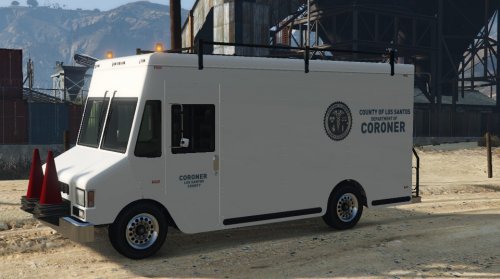 Yeah, set to CORBOXVILLE. in the Ragehook console (F4) you can spawn corboxville to doublecheck it's working.
- 46 comments
- 9 reviews


.thumb.jpg.4066677156985e22489bfecddc2f6c45.jpg)
