


TheReus
Members
-
Joined
-
Last visited
Everything posted by TheReus
-
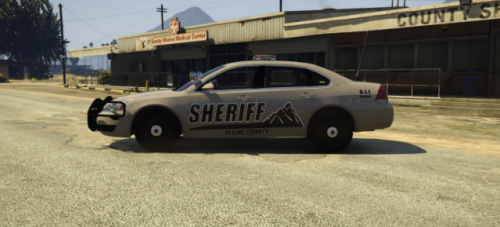 BLAINE COUNTY SHERIFF'S OFFICE MOUNT CHILIAD SKIN PACK This package contains skins for 6 different vehicles. More skins for other vehicles will be added in the future! NOTICE: There are NO VEHICLES in the package. Only skins for the vehicles listed below are in the package. The download contains 6 files and 2 documents. Each file contain a skin(s) and a document with a link to the model. The 2 documents provides an installation guide and a credits highlight. This skin pack is still in development and you may find small issues. Please write the issues you experience in the comment section and I'll take a look into it. Vehicles that I plan to make the skin for: - 2015 Tahoe - Silverado - (Caprice) - F150 - A supercar Please, if you have any vehicles that you would like me to make a skin for, please send me a private message and I'll look into it. Preferably with a link to a model from LSPDFR.com and the model being an ELS model. Also, please if you like these skins, leave a review! I hope you like the skins! Vehicles: NO MODELS ARE IN THE DOWNLOAD, YOU HAVE TO DOWNLOAD THE MODELS SEPERATELY!
- 1 comment
- 2 reviews
-
-

- 1
-
-
It's a little too late now, but thank you for taking your time trying to help me anyway. Because of my impatience, I decided I could try starting over with installing everything again, starting out with EUP and then it worked. I then tried to do it again the other way with the Emergency Services first and then the Menu, but it still worked. I don't know why it didn't work the first time, but my quess is it had something to do with my dlclist.xml not working properly. Anyway, thank you for trying to help me. :)
-
Hi, I just finished installing LSPDFR and all of my personal preferences in form of vehicles and various other things(including EUP) that help make LSPDFR a better experience. Although when I got into testing EUP, the menu worked, but it said that I didn't have the Emergency Services Pack... I therefore went on here and downloaded the EUP again and installed it automatically, started the game and were quite frustrated when it just came up with the same message when trying to go into the Emergency Apparel tab. I then tried to install it manually, but same outcome occured. Basically, I have installed the Emergency Services pack, but EUP thinks I haven't... I have checked that there is a folder called eup in dlcpacks and I have also checked that EUP is added in the dlclist.xml file. What could possibly cause this problem??? - TheNuttyDane
-
Hello everyone! So I recently got tired of constantly having to replace the standard police vehicles to other and better ones that fits my desire, so I went to the internet and I installed this pack which I know is a bit outdated and old, but I decided to give it a go. I then installed bxbugs' slicktop CVPI and followed the readme that comes with the pack, double checked everything and then when I go into the game and spawn the vehicle in, the vehicle is spawning with all the textures etc. - nothing wrong there, but when I press "E" or "1,2,3,4,5"(SirenMasterykeys) there is no lights or siren. I tried adding the car to the SirenMastery.xml file, but nothing changed. I also do use ELS, but I don't know if that has anything to do with it at all.. I did also check if it had the right flags and it did.. If someone out there knows what could be wrong here, please let me know in the comments. Also tell me if you need any screenshots or stuff like that. :) Thank you. - TheNuttyDane.
-
Thanks everyone for telling me what you think. I do have checked LSPS, however I am looking for something more than only escorting VIP's. Aswell with Assorted callouts I have checked, but again I am looking for more SWAT and NOOSE operations. However the Bank Heist in Assorted Callouts is very nice! "I feel as though these kind of fall out of the scope of LSPDFR" a bit, but why are we then able to play as Prison Guard already with LSPDFR? :P Sounds good! I'll edit my post saying you working on one! :)
-
Hello everyone! I haven't been that much active on this forum for quite a while, but I do have been playing some LSPDFR while I was away. I have been playing since the first version of LSPDFR, and in that period of time till now, I have been playing with plugins and mods. While I have been playing, I've been thinking about things I would like to see from the lovely community of modders in here. So I've made a list of my suggestions: Security Mod - A mod that allows the player to become a security guard, whether if it is guarding a bank, guarding a VIP, guarding the airport, or simply patrolling an area (possibly Vinewood Hills). Of course there could happen different things, that the player has to pay attention to, else it would be too boring - but I'll let you do the thinking about that. S.W.A.T/NOOSE callouts - I am sure someone is already thinking about this, if not, then now you can. Alexguirre is already working on one! :) DUI checkpoint - Ability to set up a DUI checkpoint without AI freaking out, aswell as having other officers assisting you. Maybe Albo1125's Traffic Policer will contain this in the future? Prison Guard - A mod that allows the player to become a prison guard. Move prisoners around, stop fightings etc. It kind of explains it self. Callout - People are protesting about [Insert what here] and are walking in the streets etc. Police are ready to respond to any of their crimes. Callout - A big fight at a party (or whatever) is going on, and you have to stop it. That is what I have for now, I might update it later on with some more ideas and suggestions. Of course some of these will take time to make, I am not a modder myself, but I do think some of these can be made. Please tell me what you think in the poll, and/or come with more suggestions in the comments below if you're interested. - TheNuttyDane.
-
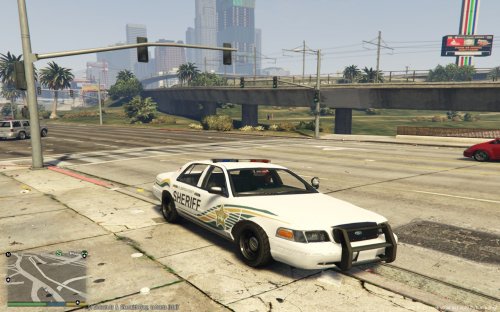 Whenever I try to spawn it in or find it in game, it's just the normal Stanier with flickering colours and conflicting textures. I putted the files in: openIV>GTAV>update>x64>dlcpacks>patchday3ng>dlc.rpf>x64>levels>gta5>vehicles.rpf Edit mode, and changed the files. I'm using Ragehook 22 but I don't know if that has anything to say? :)
- 22 comments
- 6 reviews
-
Thank god it isn't me who has to clean that mess up. Great video though.
-
Arhh okay, it was just since you wrote "Do i need to add callout .dll's to the Startup.rph file", so I thought you meant callouts.
-
I don't, and it works absolutely fine for me. Most of the callouts are having a ReadMe following, and all I did was to follow them. As it also says in some of the ReadMe's, the callout plugins will be loaded together with LSPDFR - Which also means that if your game crashes it could be something with a callout. :)
-
Uhmm my browser for some reason won't let me download the new update, it says it is dangerous.. Is this an error or what?
-
You have updated GTA 5 right? But I see a lot of people saying they have that problem. Try to look at the Support page, there might be someone who can help you better than me. ;)
-
Yeah GTA updated like a week ago, I think. And yes there is a new RageHook for it. :)
-
Is your GTA V up to date? Cause right now GTA is on version 393 I think.
-
JASONROCKS1998
-
I know that Native Trainer should work, are you sure you have Scripthook and all that stuff?
-
I am sure they are not only firing at you, cause I've seen many other officers in my pursuits getting killed by them. And also in real life you can't just be supercop and go up and pit them and then arrest them, without getting shot at... I like the "Pursuit of armed suspects" they make you think strategic, and also that you need to be tactic to stop them, before they kill too many - In case you roleplay :P And also they might be very accurate with their bullets, but keep in mind the mod is still in beta, and I think it's way better that they see you as a cop, instead of just acting like you wasn't there as they did in 0.1e.
-
Well I experienced that while I was in a pursuit a unit who just really wanted to be the primary chase car, actually made a pit on me, so I spun out and went directly into a fuel tank... I don't think I have to tell you what happend afterwards..
-
Don't ask me that :P I know very little about computer stuff. :P
-
Press and hold "E" and then do what is says further..
-
Loving the new update so far! Can't really find any problems than when on foot, and want to check a pedestrians name on the radio, I don't get any reply. Now I haven't tried doing it while on the Police Computer while in the vehicle though. Also I have to try many times, when trying to stop a pedestrian on foot, I press and hold E, but nothing happens before I've tried multiple times and different locations around the pedestrain. But honestly I love this mod, it's great, I especially love the fact that the pulled over suspect are able to run away, as soon as you approach them, I've tried it a few times now :P And also to anyone who might be interested: 1. Replaced my GTA backup (Newest patch) with the current folder where LSPDFR 0.1e was in 2. Dragged the LSPDFR 0.2 files over. (So only LSPDFR 0.2 is in the folder) 3. Unblocked every single .dll file by right clicking on it and went to properties and unblocked it. 4. Started RagePluginHook after pressing "yes" to the message, and that's it. That's what I did.
-
OMG! Is it live!?! See ya! You won't see me for a while! Nah just kidding once again. :P
-
I can't wait pulling someone over checking their license plate on the Police Computer! :P
-
Now I am extra extra excited!
-
Love you too :P

