
S0berDrunk
Members
-
Joined
-
Last visited
Everything posted by S0berDrunk
-
Nah im good, I like to have things my way :)
-
Looks like they have some good looking cars! Might create a pack for delaware when im done with the AST pack :)
-
-
 Correct me if im wrong, but I believe ive fixed the issue. Currently testing the hotfix.
- 54 comments
- 12 reviews
-
-
I'm planning on doing Ford Explorer skins in the future. Glad you like my textures :)
- 54 comments
- 12 reviews
-
-

- 2
-
-
Unfortunetly I can´t fix this problem because the Taurus is not my mod. What you can try is to install the carvariations and vehicles.meta of this car: http://www.lcpdfr.com/files/file/9359-ford-police-interceptor-2012-model/ and use the car that I linked you. If that doesn't work you can replace the Taurus that I linked you in the police2 slot. Or you can just use the original model. Hope I helped you on this one :)
- 54 comments
- 12 reviews
-
Im not that big on the Tahoe but ill consider adding it in the next update.
- 54 comments
- 12 reviews
-
-
- 1
-
-
I really wanted to do something christmasy and this was the first thing that came to mind, glad you like it :)
- 54 comments
- 12 reviews
-
-
- 3
-
-
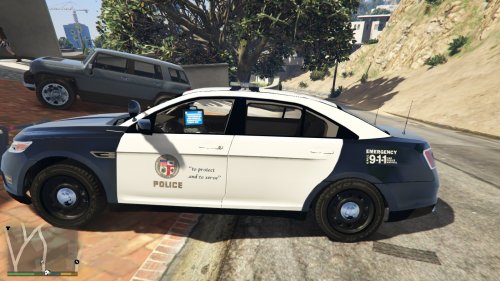 Its very important to not get a small sized logo and make it bigger. You should get a bigger logo and make it smaller, because photoshop keeps it in good shape when you do this. Heres is an image that might help you https://www.google.nl/url?sa=i&rct=j&q=&esrc=s&source=images&cd=&cad=rja&uact=8&ved=0ahUKEwicyZnH4dnJAhXCeQ8KHcHvBosQjRwIBw&url=http%3A%2F%2Fwww.scpr.org%2Fnews%2F2013%2F10%2F17%2F39870%2Fappeals-court-grants-temporary-stay-for-lapd-s-veh%2F&psig=AFQjCNEyZboQHvLgxGcL9-IqMAqTB8uLqQ&ust=1450127895834526 havent tested this logo out my self so it might be to small, if this is the case go on google and find a better one. Good luck :)
- 10 comments
- 2 reviews
-
You have to go to image/resize and then make it 4096x4096 (this will make your skin 4k). One last tip, please redo your skin when you resize the template to 4096x4096 or else it will get a very low quality.
- 10 comments
- 2 reviews
-
Oh now I get it ;). You have to replace the texture(s) in the police.ytd file.
- 54 comments
- 12 reviews
-
-
- 1
-
-
-
I´d recommend you first get a little better with software like photoshop and paint.net because this is just the wrong way to make a skin. So im gonna try and help you a little. Assueming that you want to make this skin as realistic as possible. You have to go on google and find some good pictures of an LAPD Ford Taurus. After that find some good door decals and proper fonds (also recommend that you make your skins 4096x 4096x). After that go and put everything toggether. Might take some time to learn but its deffently worth it :) (Also, dont rush things. People are way better of with good quality skins and less errors in the texture)
- 10 comments
- 2 reviews
-
Download this trainer: https://www.gta5-mods.com/scripts/simple-trainer-for-gtav and go to vehicle options, then you´ll see an option called vehicle alpha (or something like that) press that 2 times and the snow is gone. There is one little bug though and thats that other vehicle light will shine through your car.
- 54 comments
- 12 reviews
-
-
- 2
-
-
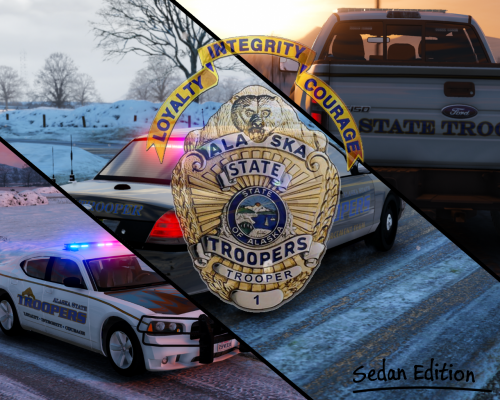
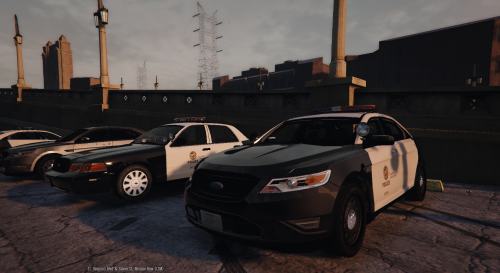
MADE BY: S0berDrunk PART 1/2 (Sedan Edition) IF YOU LIKE MY WORK, PLEASE CONSIDER LEAVING A DONATION OR REVIEW. ---------------------------------------------------------------------------------------------------------------------------------------------------------------------------------- CREDITS ---------------------------------------------------------------------------------------------------------------------------------------------------------------------------------- PartyPandazz: Special thanks to PartyPandazz for making the amazing AST PED skins included in my mod pack! LINK: http://www.lcpdfr.com/files/file/9895-alaska-state-trooper/ Rosebuddy: Special thanks to Rosebuddy for making the amazing AST PED skins included in my mod pack! LINK: http://www.lcpdfr.com/files/file/12052-★ast-peds➤semi-real➤rekrams-model-texture✔★/ SerekgPL: Special thanks to my bud SerekgPL for testing out my skins and maing the BEAUTIFULL screenshots. LINK: http://www.lcpdfr.com/profile/228252-serekgpl/ F5544/POLICECO: Thanks to F5544 and POLICECO for making and modifying a cool looking Ford Taurus. LINK: http://www.lcpdfr.com/files/file/9427-2012-lspd-ford-taurus/ martinct: Thanks to martinct (again :P) for making a cool dodge charger 2012 LINK: http://www.lcpdfr.com/files/file/9263-2011-dodge-charger-ppv/ POLICECO: Thanks to POLICECO for making the CVPI used in the screenshots! LINK: https://www.gta5-mods.com/vehicles/lspd-cvpi Alexander123: Thanks to Alexander123 for making a good looking dodge charger. LINK: http://www.lcpdfr.com/files/file/9304-lapd-2010-charger-ppv-rims-fedsig-arjent-fixed-hood/ Yard1: Thanks to Yard1 for making a UV mapping of the police maverick LINK: https://www.gta5-mods.com/vehicles/police-maverick-mapped BxBugs123: Thanks to BxBugs for making a sick CVPI! LINK: http://www.lcpdfr.com/files/file/9726-2011-crown-victoria-lasdlssd/ BxBugs123/Carperino: Thanks to these guys for making an awesome Charger! LINK: http://www.lcpdfr.com/files/file/10482-2014-dodge-charger-marked-rx/ or http://www.lcpdfr.com/files/file/10478-lspdlssd-2014-dodge-charger-pursuit/. ---------------------------------------------------------------------------------------------------------------------------------------------------------------------------------- INSTALATION TUTORIAL ---------------------------------------------------------------------------------------------------------------------------------------------------------------------------------- CVPI: STEP 1: Find a CVPI of your choice and install it. STEP 2: Go to the location where you´ve installed the CVPI and open the .YTD file. Find the main texture and replace it with mine. STEP 3: Close OpenIV and your done with the installation! ---------------------------------------------------------------------------------------------------------------------------------------------------------------------------------- CVPI (BxBuggs123): STEP 1: Download and install BxBuggs123´s CVPI. Link:http://www.lcpdfr.com/files/file/9726-2011-crown-victoria-lasdlssd/ STEP 2: Go to the location where you´ve installed the CVPI and open the .YTD file. Find the main texture and replace it with mine. STEP 3: Close OpenIV and your done with the installation! ---------------------------------------------------------------------------------------------------------------------------------------------------------------------------------- Ford Taurus: STEP 1: Find a Taurus of your choice and install it. STEP 2: Go to the location where you´ve installed the Taurus and open the .YTD file. Find the main texture and replace it with mine. STEP 3: Close OpenIV and your done with the installation! ---------------------------------------------------------------------------------------------------------------------------------------------------------------------------------- Dodge Charger (2012): STEP 1: Find a Charger (has to be a 2012 version) of your choice and install it. STEP 2: Go to the location where you´ve installed the Charger and open the .YTD file. Find the main texture and replace it with mine. STEP 3: Close OpenIV and your done with the installation! ---------------------------------------------------------------------------------------------------------------------------------------------------------------------------------- Helicopter: STEP 1: Install the uv mapped maverick Yard1 made. Link: https://www.gta5-mods.com/vehicles/police-maverick-mapped STEP 2: Go to the location where you´ve installed the helicopter and open the .YTD file. Find the main texture and replace it with mine. STEP 3: Close OpenIV and your done with the installation! ---------------------------------------------------------------------------------------------------------------------------------------------------------------------------------- PartyPandazz/Rosebuddy´s AST PED Skins PartyPandazz MALE s_m_y_sheriff_01.ytd to x64e.rpf\models\cdimages\componentpeds_s_m_y.rpf\ FEMALE s_f_y_sheriff_01.ytd to update\x64\dlcpacks\patchday6ng\dlc.rpf\x64\models\cdimages\patchday6ng.rpf\ PEDPROPS s_f_y_sheriff_01_p.ytd and s_m_y_sheriff_01_p.ytd to x64e.rpf\models\cdimages\pedprops.rpf\ Rosebuddy´s 1. Select your options to replace the Cop, the HwayCop, or the Sheriff. 2. Navigate to C:\Program Files (x86)\Steam\steamapps\common\Grand Theft Auto V\mods\update\x64\dlcpacks\patchday9ng\dlc.rpf\x64\models\cdimages\patchday9ng.rpf\ and drag and drop. ---------------------------------------------------------------------------------------------------------------------------------------------------------------------------------- Dodge Charger (2010): STEP 1: Install the Dodge Charger that Alexander123 made. (NOT THE ONE USED IN THE SCREENSHOTS, THE ONE USED IS PRIVATED!) Link: http://www.lcpdfr.com/files/file/9304-lapd-2010-charger-ppv-rims-fedsig-arjent-fixed-hood/ STEP 2: Go to the location where you´ve installed the Charger and open the .YTD file. Find the main texture and replace it with mine. STEP 3: Close OpenIV and your done with the installation! ---------------------------------------------------------------------------------------------------------------------------------------------------------------------------------- OTHER FILES! ---------------------------------------------------------------------------------------------------------------------------------------------------------------------------------- ---------------------------------------------------------------------------------------------------------------------------------------------------------------------------------- If you have any suggestions, leave a comment on my file and ill make sure to reply :) ATTENTION! Any modifications made to my content without permission of me (S0berDrunk) will result into punishment. (THESE GUIDELINES DO NOT APPLY FOR PRIVATE USE!)
- 54 comments
- 12 reviews
-
-
- 9
-
-
 Is it possible to edit the textures youve provided in you mod? I wanted to re-skin them and use them for my next skin pack (giving you credit of course)
- 2,346 comments
- 236 reviews
-
 Can you please make a version with the arjent that you´ve used on your cvpi and maybe remove the lights on the sides?
- 36 comments
- 13 reviews
-
-
- 1
-
-
Hey everybody. I dont quite know if this is the right topic. If not please correct me. But I was planning on making some k-9 Ford Explorer skins but I dont quite know if they have a unit number? Same for the k-9 bomb detection unit, so if anyone can help me with this it would be much appreciated.
-
It might be cool if you can somehow intergrade this mod into the lspdfr using theyre api.
-
-
 Next time just ask nicely its not that hard you know. and I dont need to have your permission to edit skins on the template that was not created by you. my skin is compatible with almost all cvpi models out there so there´s no need to specificly ask you for permission. ill credit you for your car in the screenshots but next time just ask and dont be so demanding..
- 6 comments
- 3 reviews
-
CALIFORNIA POLICE PACK: AUTHENTIC LAPD MADE BY: S0berDrunk Credits: SerekgPL: Special thanks to SerekgPL for testing out my skins! Bxbugs123: He created the cool looking Chevy Impala model. martinct: He created the much wanted Dodge Charger model. Desmond98: This is the guy who created the awesome Ford Explorer Model. FCVP71: He created the awesome CVPI model used in the screenshots F5544: He made the cool looking Ford Taurus. HOW TO INSTALL: CROWN VIC: STEP 1: Navigate to x64e.rpf STEP 2: replace police.ytd, police.yft, police_hi.yft, police+hi.ytd. With a Crown Vic of your choise. STEP 3: Then open police.ytd and search for the main skin. When you've found that replace the texture with the one I created and your done! °°°°°°°°°°°°°°°°°°°°°°°°°°°°°°°°°°°°°°°°°°°°°°°°°°°°°°°°°°°°°°°°°°°°°° CHEVY IMPALA: STEP 1: Install Bxbuggs 123´s Chevy Impala link: http://www.lcpdfr.com/files/file/8952-2014-chevrolet-impala-lspdlssd/ STEP 2: Then open police2/3.ytd and search for the main skin. When you've found that replace the texture with the one I created and your done! °°°°°°°°°°°°°°°°°°°°°°°°°°°°°°°°°°°°°°°°°°°°°°°°°°°°°°°°°°°°°°°°°°°°°° FORD EXPLORER: STEP 1: Install Desmond98´s Ford Explorer link: http://www.lcpdfr.com/files/file/9136-ford-explorer-lapd-2010-2015/ STEP 2: Then open police3.ytd and search for the main skin. When you've found that replace the texture with the one I created and your done! °°°°°°°°°°°°°°°°°°°°°°°°°°°°°°°°°°°°°°°°°°°°°°°°°°°°°°°°°°°°°°°°°°°°°° DODGE CHARGER 2011: STEP 1: Install Martinct´s Dodge Charger link: http://www.lcpdfr.com/files/file/9289-dodge-charger-2011-arjent-lspd/ STEP 2: Then open police2.ytd and search for the main skin. When you've found that replace the texture with the one I created and your done! °°°°°°°°°°°°°°°°°°°°°°°°°°°°°°°°°°°°°°°°°°°°°°°°°°°°°°°°°°°°°°°°°°°°°° RIOT TRUCK: STEP 1: Install Yard1´s UV Mapped Riot Truck link: https://www.gta5-mods.com/vehicles/brute-riot-mapped-default-style STEP 2: Then open riot.ytd and search for the main skin. When you've found that replace the texture with the one I created and your done! °°°°°°°°°°°°°°°°°°°°°°°°°°°°°°°°°°°°°°°°°°°°°°°°°°°°°°°°°°°°°°°°°°°°°° FORD EXPLORER: STEP 1: Install F5544´s Ford Taurus link: http://www.lcpdfr.com/files/file/9359-ford-police-interceptor-2012-model/ STEP 2: Then open police3.ytd and search for the main skin. When you've found that replace the texture with the one I created and your done! °°°°°°°°°°°°°°°°°°°°°°°°°°°°°°°°°°°°°°°°°°°°°°°°°°°°°°°°°°°°°°°°°°°°°° If you have any feedback or buggs please leave it in the comments or private message me.
- 6 comments
- 3 reviews
-
-
- 2
-
-
-
 Is there any chance that we can also get a steelrim version of this car? I´d love to use the model for sheriff1 aswel :)
- 139 comments
- 38 reviews
-
-
- 1
-