


Aryto
Members
-
Joined
-
Last visited
Everything posted by Aryto
-
I had a feeling... I have just been renaming to create addon vehicles out of everything and don't have any issues at all with any of them. Once you get into the groove of what's needed, LML is a really fast way to have a lot of vehicles available and switch them up easily! I never thought OpenIV editing was all that difficult, but it meant fully replacing the mod folder copies completely with custom ones and finding that one little xml bug in a file is a lot more time consuming than troubleshooting an LML loaded asset! Thanks for your work. I hope it'll become even more user friendly with more things available in the GUI like deleting mods from the list, renaming, etc. As well as some more documentation and examples of what is available to the install.xml (like how you explicitly mention you can use update: but I found that if I need to replace something in common.rpf, common: works but isn't mentioned) will be awesome. I know digging through Coastal Callouts is a good learning tool, but the wiki documentation is easier reading for starting out and could use more lists of data file types, etc. 😉 Now that I'm more comfortable, I can more easily see at a glance what is going on in a more complex install.xml. But really, thanks again for this! Once up the learning curve it really is much more rapid to pull something you want off the site and get it into the game.
-
Sure, see above. I was trying to replace "pranger" with the chevy silverado out of this pack. When that didn't work, I started over and tried to use the default "sheriff2" that it would normally replace. As @TheUniT mentioned, I was also able to get it to work as an addon as well, after fixing a typo in the install xml and reloading it into the game, so that's good news! The only issue I'm having is with replacements, and yes, it's all around larger than GTA's typical filesize at >10MB each file. However, I can export the textures and scale them down, save as DDS and reimport to cut the filesize of the ytd down to under 10MB and the crash persists so there might be some low cutoff point.
-
Addendum: Changing the loading type to an addon and renaming everything (veh files, meta, install, etc) to a new name does not cause a crash on attempt to spawn the vehicle, but the vehicle never spawns. The game stalls for a second or so, then it resumes with nothing having been spawned. (note that I did not rename the folder "replace," as that doesn't really matter). New Install.xml
-
Heya, I've been dabbling with LML in an attempt to use it to replace vehicles with downloaded ones that do not have LML data. Every time I do, GTA V will consistently crash to desktop with an ERR_GEN_ZLIB_2 error. If I disable the vehicle in LML, or remove the vehicle mod entirely, then the crashing stops and the game is totally stable so I know it's related to adding vehicles and that there aren't corrupted core game files. Another resource on this error from 2017 suggests that textures cannot be larger than 1024 (except we've been using larger textures than that forever in GTA V modding) and must be a specific DDS format. I've done all that as well, but the problem persists. If I add the vehicle normally through OpenIV, it loads in just fine. Exact Error message: Attached are relevant files and logs. Vehicle.meta for the vehicle included in the spoiler, which is copied out of the file that came with the vehicle pack: I'll continue to try and troubleshoot and experiment with a few different things. Let me know if you see anything weird in the install xml and vehicles meta. I tried to follow the wiki instructions and a few other threads here in building them but this is my first day messing with LML. RagePluginHook.log vfs.log ModManager.log install.xml
-
This is pretty awesome. I do have a question as to if you're considering adding the ability to customize the frequency of a responding unit from the pool of units for a particular backup type? For example, if I want Highway Patrol bikes to respond 25% of the time and some other unit to spawn 75% of the time, or... for unmarked units to spawn and respond 10% of the time within Los Santos, etc. It'd be nice to be able to do in order to have both variety and realistic proportions of units within an agency.
-
 Stealth's callouts are easily the ones with the most depth to them out of any available right now. From little, but powerful touches like being able to move the peds, to subject interviews, there's nothing quite as solid or as immersive as Code 3 Callouts at the moment. It used to cause crashes for me before, but has since been updated and I've found it works flawlessly now so if you had issues in the past definitely give it another try now! If you don't have this callout pack in your game, you're really missing out on some of the best quality of work you can add to LSPDFR!
- 423 comments
- 73 reviews
-
-

- 1
-
-
Just reporting back that I was able to play with the latest update of these callouts for several hours straight without crashing. Love it!
- 423 comments
- 73 reviews
-
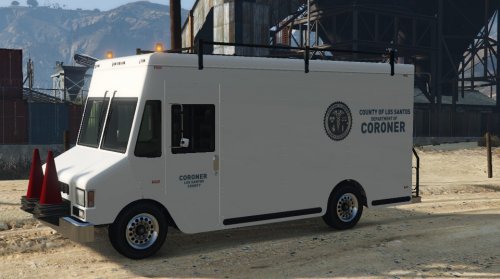 Nice addition, works great with FinKone's Police Radio mod. The warning lights are a nice touch of detail and everything's well-done. Can be a little daunting to add if you're new to OpenIV and have a lot of other vehicle mods, but that's no fault of the mod itself! Kind of funny, but if you use it with Police Radio, this vehicle is much heavier and will literally shove aside cars to get to the scene
- 46 comments
- 9 reviews
-
-
- 1
-
-
 I held off on this until all the major features were implemented and I gotta say it's really well done. Sometimes the van spawns in a weird spot, but because it warps nearby when it detects being stuck, it always arrives. New jail locations work flawlessly (and they don't leave your prisoner doors open!), but I found myself calling the van over and over--it's so reliable! In 4 hours of playing, I managed to crash 4 plugins, but not this one! It seems to be very stable and can handle all the madness that can happen in GTA.
- 1,915 comments
- 242 reviews
-
-
- 1
-
-
 Really such a subtle thing, but one of those subtle things that DOES make a difference! PLUS the extra "intimidation" animation and keybindings in the ini, you can't go wrong. Add it and forget that the game doesn't do this by default.
- 560 comments
- 97 reviews
-
I'd agree with this. It also crashes my game entirely, and the audio I get from it is often choppy. Back in 0.2a, I was running it without crashing for a while but in 0.2b, it pretty much crashes immediately upon completing the savegame load. The Ragehook logs pretty much have nothing crash-related in them at all, though they do show the callout plugin loading with LSPDFR successfully. Anyway, the reason I suspect it's audio related, is because the last time I used a callout plugin which used the NAudio.dll method, which I believe was Luke's CalloutsV, it ALSO crashed my game constantly. When that callout was updated to use the API audio functions, it no longer crashed my game. I suspect that switching to the API method and tossing your audio files in with the LSPDFR\Police Radio directory structure will solve a lot of these crashes for people, but I don't know how difficult of a change that might be. It's a shame because I loved these callouts! I've gotten to play about 3 of them in the past; it's really top-notch. Thanks for working on them!
- 423 comments
- 73 reviews
