



lilmisschloe
Members
-
Joined
-
Last visited
Everything posted by lilmisschloe
-
Hello, Im going to be without internet from the 12th till 29th Sept, and I would like to play SINGLE PLAYER during this time....however I tried to play without signing into Rockstar Social and I could not play unless I signed in.... Is there any way what so ever to play GTA V 100% offline? I hope so cause Ill miss my patrols so much.
-
Yeah they tend to show the texture on a vehicle model that its designed for rather than show you a flat texture as it is in the files. I can see how you may have been confused.
-
These two mods have custom lightbars, so it is possible.
-
https://www.gta5-mods.com/vehicles/1999-ford-crown-victoria-police I just thought I would show you guys this Crown Vic, the model quality is really good with nice attention to detail inside & out. Lots of you are asking where to get it, and this version is very very well done.
-
https://www.gta5-mods.com/vehicles/1999-ford-crown-victoria-police Im using that mod for the crown Victoria its a 1999 model.
-
I was thinking about that, I guess I could try it & if it messes anything up I can just put the low ones back in. UPDATE: There does not seem to be a police_hi.ytd file, so not sure why the lights do what they do at distance, the car livery stays the same from what I can tell, hmmm.
-
Further question: Is there a way to prevent it from using low detail textures? As its quite noticeable especially on this vehicle and the headlights/turn signals...
-
I found my issue haha its kind of bad on my part....I only checked out in the country to see what cars were spawning/patrolling....I totally forgot they are sheriff.ytd etd and not police.ytd haha Thanks guys for helping me realise my mistake :) I also deleted the sheriff liveries on police.ytd and deleted the city liveries on sheriff.ytd so they stick to their assigned jurisdictions.
-
Hello, so far I have replaced the AI police cars for the interceptor and the buffalo by simply following the install instructions that came with those mods. However I cannot seem to be able to change the Vapid Stanier (Police1) I have put the crown vic in several locations but can't seem to find the one the game uses to spawn the AI Vapid Staniers (police1) Anyone got any idea as to how to replace it for the crown vic? i.e the correct file path (I hope this makes sense)
-
Use Simple Trainer v2.1 or newer - you can make the notifications last up to 10 seconds.
-
Just get HeroCop mod - and use your dog to get the suspect haha
-
This can be done via Traffic Policer
-
 Great mod, I hope it can focus on K-9 related callouts etc. Great to see additional callouts too, heck you should get this mod just for the callouts alone! Nice to have a dog partner, I dont feel as lonely and as much in danger. This passively solves the long foot pursuits too which is nice. Overall 4/5
- 542 comments
- 98 reviews
-
Thank you so much guys for your input and clarification :) I updated to 0.24
-
I want to use HeroCop 0.2 but apparently I need RageHook 0.24 :(
-
I currently have 0.22 of RageHook, my question is, if I update it to 0.24 will it break mods that work on 0.22? I know that The upgrade from 0.20 to 0.22 broke a lot of animations, will the upgrade from 0.22 to 0.24 break them once again?
-
Dont rush it - we would much rather wait and have a more polished mod with clean code. :)
-
Issues I have experienced so far.... The cops I have patrolling LS stop driving, they try to drive but get stopped instantly ONLY when this mod is running.Pressing F6 to go off duty does not end the mod and when you go back on duty the mod thinks its running multiple times.Lots of GUI flickering.When reviving peds, the progress bar goes up regardless of what you do.That same progress bar can only fit approx 70% then goes off the edge of the GUI...
-
 Some of the emergency lights dont light up for me!! Is it because Im trying to replace the interceptor?
- 95 comments
- 38 reviews
-
https://www.gta5-mods.com/vehicles/semi-realistic-car-physics-v
-
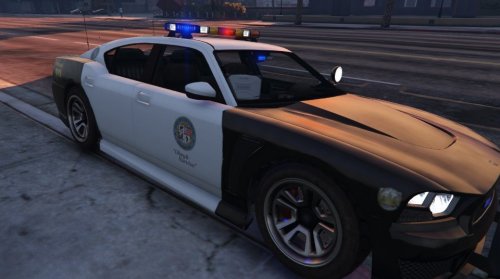 I love this vehicle, and that lightbar is exactly what I've been wanting since the game came out. I love how it has a high beam and turn signals on it!! My only critic is that when you have parking lights on vehicles via the visualsettings.ini (another lighting mod) the amber lights on the lightbar remain on, maybe this is by design? Either way I know how to fix this so s'all good. When the lights flash the texture on the light =bars plastic covers over the lights look fantastic and very real IMO. Very very good mod overall especially if you want the new Buffalo S model too like me. Suggestion = Change the livery to a stock city one? Rather than a beach one? Overall 4/5
- 54 comments
- 19 reviews
-
PLEASE add a laptop and this lightbar to the other police vehicles? Is that something you plan on doing?
- 54 comments
- 19 reviews
-
I got a feeling this will be ready this week!?
-
Ive backed up my game fully modded using RageHook 0.22 To be safe xD Thanks
-
There is another ScriptHook and Rage released today.... I know I wont be updating it anytime soon, Im sick of them breaking mods, we go through this every two weeks now its getting stupid. Does anyone else get frustrated when your constantly setting up mods, making sure you have them all working, and keeping them up to date day after day after day? Its becoming a bit of a chore IMO and to be quite honest, the devs of the mods usually can't keep up. I mean we still have mods from back in July that arnt compatable with anything anymore, and when they do get updated, another Rage or ScriptHook will come along to out date it again....grrrrr.


