
HANAKO
Members
-
Joined
-
Last visited
Reputation Activity
-
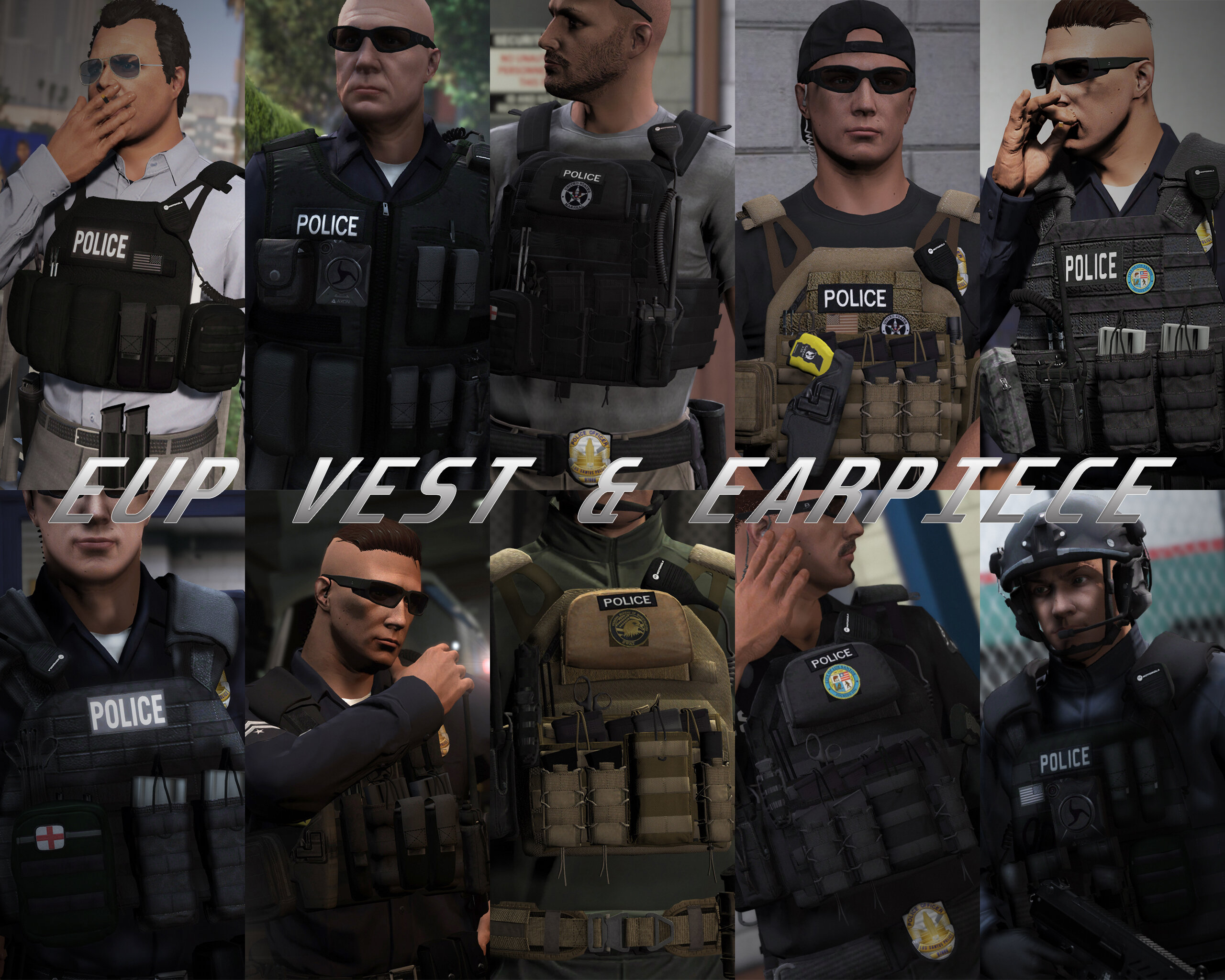
 HANAKO got a reaction from Skydrohz for a file, EUP VEST&EARPIECEAwesome showcase video by Alex Preacher
Thanks to all of you, total downloads have now exceeded 60,000!
I hope you continue to enjoy this mod!
Description
This mod adds police vests, belts, and other equipment to GTA V.
Features
The vests fit properly with various outfits! No awkward gaps or improper sizing!
Realistic gear such as earpieces and realistic vests!
List of included vests
Installation
First, install EUP.
To use the new vests, you must install this mod too.
It is strongly recommended to back up the original files before installation!
Open the File folder.
Using OpenIV, navigate to:
Grand Theft Auto V\mods\update\x64\dlcpacks\eup\dlc.rpf\x64\eup_componentpeds.rpf
Open the corresponding folder (e.g., vest, earpiece, etc.), and place the folder (e.g., mp_m_freemode_01_mp_m_vinewood) that contains the files you want to use.
In-game, change the TASK category.
If your character’s vest (or other item) has changed to the one you installed, the installation was successful.
If installed correctly, the added folders should look like this:
Installation Q&A
Version History
DO NOT ASK
Requests for custom textures Requests to unlock the model Requests for DEV models Questions about installing this mod on FiveM Credits
Rockstar Games
Activision / Infinity Ward
Call of Duty: Modern Warfare (2019) Assets
DICE / Electronic Arts
Battlefield 4 Assets
Ubisoft
Ghost Recon: Wildlands Assets
Rainbow Six: Siege Assets
Battlestate Games
Escape From Tarkov Assets
Contributors
Hanako (me)
Xiphos
Hussky9
CG ARTStudio
Oleg
ericapg
Code4Mods
Alex Ashfold
Beta Testers (crunchycat, Howard)
Special Thanks
crunchycat, Theofficialthrowaway, gabe., Alex Preacher
(for taking many screenshots)
Attention
Do not unlock, edit, or sell models.
Do not attempt to profit from any part included in this mod.
Please follow these rules when releasing textures for this mod:
Always credit all names listed in this mod.
Do not include any files other than texture files (PNG, DDS).
Including any other files violates the guidelines and may result in your mod being deleted and disciplinary action taken.
Do not profit from retextures of my publicly released mods.
Do not release textures on any sites other than LSPDFR and GTA5-Mods.
Looking for the same quality PEDs?👉 Check this out!
Highly Recommended
-
HANAKO got a reaction from Fedeik423 for a file, EUP VEST&EARPIECEAwesome showcase video by Alex Preacher
Thanks to all of you, total downloads have now exceeded 60,000!
I hope you continue to enjoy this mod!
Description
This mod adds police vests, belts, and other equipment to GTA V.
Features
The vests fit properly with various outfits! No awkward gaps or improper sizing!
Realistic gear such as earpieces and realistic vests!
List of included vests
Installation
First, install EUP.
To use the new vests, you must install this mod too.
It is strongly recommended to back up the original files before installation!
Open the File folder.
Using OpenIV, navigate to:
Grand Theft Auto V\mods\update\x64\dlcpacks\eup\dlc.rpf\x64\eup_componentpeds.rpf
Open the corresponding folder (e.g., vest, earpiece, etc.), and place the folder (e.g., mp_m_freemode_01_mp_m_vinewood) that contains the files you want to use.
In-game, change the TASK category.
If your character’s vest (or other item) has changed to the one you installed, the installation was successful.
If installed correctly, the added folders should look like this:
Installation Q&A
Version History
DO NOT ASK
Requests for custom textures Requests to unlock the model Requests for DEV models Questions about installing this mod on FiveM Credits
Rockstar Games
Activision / Infinity Ward
Call of Duty: Modern Warfare (2019) Assets
DICE / Electronic Arts
Battlefield 4 Assets
Ubisoft
Ghost Recon: Wildlands Assets
Rainbow Six: Siege Assets
Battlestate Games
Escape From Tarkov Assets
Contributors
Hanako (me)
Xiphos
Hussky9
CG ARTStudio
Oleg
ericapg
Code4Mods
Alex Ashfold
Beta Testers (crunchycat, Howard)
Special Thanks
crunchycat, Theofficialthrowaway, gabe., Alex Preacher
(for taking many screenshots)
Attention
Do not unlock, edit, or sell models.
Do not attempt to profit from any part included in this mod.
Please follow these rules when releasing textures for this mod:
Always credit all names listed in this mod.
Do not include any files other than texture files (PNG, DDS).
Including any other files violates the guidelines and may result in your mod being deleted and disciplinary action taken.
Do not profit from retextures of my publicly released mods.
Do not release textures on any sites other than LSPDFR and GTA5-Mods.
Looking for the same quality PEDs?👉 Check this out!
Highly Recommended
-
HANAKO got a reaction from Zaylikespatrol for a file, EUP VEST&EARPIECEAwesome showcase video by Alex Preacher
Thanks to all of you, total downloads have now exceeded 60,000!
I hope you continue to enjoy this mod!
Description
This mod adds police vests, belts, and other equipment to GTA V.
Features
The vests fit properly with various outfits! No awkward gaps or improper sizing!
Realistic gear such as earpieces and realistic vests!
List of included vests
Installation
First, install EUP.
To use the new vests, you must install this mod too.
It is strongly recommended to back up the original files before installation!
Open the File folder.
Using OpenIV, navigate to:
Grand Theft Auto V\mods\update\x64\dlcpacks\eup\dlc.rpf\x64\eup_componentpeds.rpf
Open the corresponding folder (e.g., vest, earpiece, etc.), and place the folder (e.g., mp_m_freemode_01_mp_m_vinewood) that contains the files you want to use.
In-game, change the TASK category.
If your character’s vest (or other item) has changed to the one you installed, the installation was successful.
If installed correctly, the added folders should look like this:
Installation Q&A
Version History
DO NOT ASK
Requests for custom textures Requests to unlock the model Requests for DEV models Questions about installing this mod on FiveM Credits
Rockstar Games
Activision / Infinity Ward
Call of Duty: Modern Warfare (2019) Assets
DICE / Electronic Arts
Battlefield 4 Assets
Ubisoft
Ghost Recon: Wildlands Assets
Rainbow Six: Siege Assets
Battlestate Games
Escape From Tarkov Assets
Contributors
Hanako (me)
Xiphos
Hussky9
CG ARTStudio
Oleg
ericapg
Code4Mods
Alex Ashfold
Beta Testers (crunchycat, Howard)
Special Thanks
crunchycat, Theofficialthrowaway, gabe., Alex Preacher
(for taking many screenshots)
Attention
Do not unlock, edit, or sell models.
Do not attempt to profit from any part included in this mod.
Please follow these rules when releasing textures for this mod:
Always credit all names listed in this mod.
Do not include any files other than texture files (PNG, DDS).
Including any other files violates the guidelines and may result in your mod being deleted and disciplinary action taken.
Do not profit from retextures of my publicly released mods.
Do not release textures on any sites other than LSPDFR and GTA5-Mods.
Looking for the same quality PEDs?👉 Check this out!
Highly Recommended
-
HANAKO reacted to BlueGhost for a file, [ELS] Unmarked 2019 Ford Taurus Limited (OUTDATED)GET THE UNMARKED PACK HERE:
Although Ford have discontinued production of the Taurus after the 2019 model year, the Police Interceptor variant still sees extensive use in the fleets of most law enforcement agencies around the world. This variant is a Taurus, the standard CIVILIAN version, with the Limited trim level. You'll have no issues blending in with the flow of traffic, because this Taurus features the body colored grille, upscale interior, LED tail lights, and LED daytime running lights. All of these features make the Taurus a perfect candidate for undercover police work.
The lighting package includes a flowing traffic advisor, front/side/rear lighting, single or three stage activation, and three primary LED & warning strobe patterns in the scan pool. Comsetic extras are MPH900 ALPR as extra ten, and an antenna cluster as extra 12.
The siren controller has been resized, contrary to the screenshots. The video shows the up-to-date version.
THIS VEHICLE IS ONLY AVAILABLE AS AN ADD-ON. DO NOT ASK ME TO MAKE A REPLACEMENT VERSION. DO NOT ATTEMPT TO USE THE TAURUS AS A REPLACEMENT. IT IS NOT DESIGNED TO FUNCTION AS A REPLACEMENT. THE TAURUS IS DESIGNED TO UTILIZE THE PROVIDED LIGHTING PACKAGE. DO NOT MODIFY THE VCF.
LINK TO THIS FILE IF YOU USE IT IN A YOUTUBE VIDEO. YOU KNOW WHO YOU ARE.
Installation:
1. Navigate to your dlpacks folder, located at
mods\update\x64\dlcpacks
2. Enable Edit Mode
3. Drag and drop the "taupol" folder inside the dlcpacks folder
4. Navigate to your data folder, located at
mods\update\update.rpf\common\data
5. Locate your dlclist.xml, then right click and click "Edit"
6. Directly after the latest entry in the XML, you must put the following line:
<Item>dlcpacks:/taupol/</Item>
7. Click Save
8. Drag and drop the desired VCF.XML file to the pack_default folder located at
Grand Theft Auto V\ELS\pack_default
9. Start GTA V. Spawn name is "taupol".
-
 HANAKO got a reaction from Benjamin Compton for a file, EUP VEST&EARPIECEAwesome showcase video by Alex Preacher
Thanks to all of you, total downloads have now exceeded 60,000!
I hope you continue to enjoy this mod!
Description
This mod adds police vests, belts, and other equipment to GTA V.
Features
The vests fit properly with various outfits! No awkward gaps or improper sizing!
Realistic gear such as earpieces and realistic vests!
List of included vests
Installation
First, install EUP.
To use the new vests, you must install this mod too.
It is strongly recommended to back up the original files before installation!
Open the File folder.
Using OpenIV, navigate to:
Grand Theft Auto V\mods\update\x64\dlcpacks\eup\dlc.rpf\x64\eup_componentpeds.rpf
Open the corresponding folder (e.g., vest, earpiece, etc.), and place the folder (e.g., mp_m_freemode_01_mp_m_vinewood) that contains the files you want to use.
In-game, change the TASK category.
If your character’s vest (or other item) has changed to the one you installed, the installation was successful.
If installed correctly, the added folders should look like this:
Installation Q&A
Version History
DO NOT ASK
Requests for custom textures Requests to unlock the model Requests for DEV models Questions about installing this mod on FiveM Credits
Rockstar Games
Activision / Infinity Ward
Call of Duty: Modern Warfare (2019) Assets
DICE / Electronic Arts
Battlefield 4 Assets
Ubisoft
Ghost Recon: Wildlands Assets
Rainbow Six: Siege Assets
Battlestate Games
Escape From Tarkov Assets
Contributors
Hanako (me)
Xiphos
Hussky9
CG ARTStudio
Oleg
ericapg
Code4Mods
Alex Ashfold
Beta Testers (crunchycat, Howard)
Special Thanks
crunchycat, Theofficialthrowaway, gabe., Alex Preacher
(for taking many screenshots)
Attention
Do not unlock, edit, or sell models.
Do not attempt to profit from any part included in this mod.
Please follow these rules when releasing textures for this mod:
Always credit all names listed in this mod.
Do not include any files other than texture files (PNG, DDS).
Including any other files violates the guidelines and may result in your mod being deleted and disciplinary action taken.
Do not profit from retextures of my publicly released mods.
Do not release textures on any sites other than LSPDFR and GTA5-Mods.
Looking for the same quality PEDs?👉 Check this out!
Highly Recommended
-
HANAKO got a reaction from MiBombo for a file, EUP VEST&EARPIECEAwesome showcase video by Alex Preacher
Thanks to all of you, total downloads have now exceeded 60,000!
I hope you continue to enjoy this mod!
Description
This mod adds police vests, belts, and other equipment to GTA V.
Features
The vests fit properly with various outfits! No awkward gaps or improper sizing!
Realistic gear such as earpieces and realistic vests!
List of included vests
Installation
First, install EUP.
To use the new vests, you must install this mod too.
It is strongly recommended to back up the original files before installation!
Open the File folder.
Using OpenIV, navigate to:
Grand Theft Auto V\mods\update\x64\dlcpacks\eup\dlc.rpf\x64\eup_componentpeds.rpf
Open the corresponding folder (e.g., vest, earpiece, etc.), and place the folder (e.g., mp_m_freemode_01_mp_m_vinewood) that contains the files you want to use.
In-game, change the TASK category.
If your character’s vest (or other item) has changed to the one you installed, the installation was successful.
If installed correctly, the added folders should look like this:
Installation Q&A
Version History
DO NOT ASK
Requests for custom textures Requests to unlock the model Requests for DEV models Questions about installing this mod on FiveM Credits
Rockstar Games
Activision / Infinity Ward
Call of Duty: Modern Warfare (2019) Assets
DICE / Electronic Arts
Battlefield 4 Assets
Ubisoft
Ghost Recon: Wildlands Assets
Rainbow Six: Siege Assets
Battlestate Games
Escape From Tarkov Assets
Contributors
Hanako (me)
Xiphos
Hussky9
CG ARTStudio
Oleg
ericapg
Code4Mods
Alex Ashfold
Beta Testers (crunchycat, Howard)
Special Thanks
crunchycat, Theofficialthrowaway, gabe., Alex Preacher
(for taking many screenshots)
Attention
Do not unlock, edit, or sell models.
Do not attempt to profit from any part included in this mod.
Please follow these rules when releasing textures for this mod:
Always credit all names listed in this mod.
Do not include any files other than texture files (PNG, DDS).
Including any other files violates the guidelines and may result in your mod being deleted and disciplinary action taken.
Do not profit from retextures of my publicly released mods.
Do not release textures on any sites other than LSPDFR and GTA5-Mods.
Looking for the same quality PEDs?👉 Check this out!
Highly Recommended
-
HANAKO reacted to C.Snake for a file, EUP Sheriff S.W.A.T Tactical VestThis vest was not made by me, you can find the link for the vest below.
This file only contains a texture for the vest below so you will have to place it onto the vest yourself.
If you do not know how to do this, there is a short read me in the file saying how to do so. Also a link to my discord is in the read me
There are 5 Textures for the one vest in this download (all of them are shown in the screen shots)
They include...
Sheriff S.W.A.T,
Sheriff S.W.A.T Trainee,
Sheriff S.W.A.T Trainer,
Sheriff S.W.A.T K-9 and
Sheriff S.W.A.T Command Staff.
There are 2 other listing for a CHP vest and LAPD vest!
(These are not meant to be 100 percent realistic)
https://discord.gg/aX8ptwk
This was a quick mess around so don't complain that its not perfect, apart from that I hope you enjoy😉
-
HANAKO reacted to undeadXpotato for a file, Jumpable Plate Carrier Trooper VestTrooper Plate Carrier Also works with Big JPC
There are lots more to come working on a pack right now should be really great. But here's a sneak peek of what's to come.
Big thanks to HANAKO for releasing these vest. these vest are on point cuh.
Planned Vest:
work in progress : Patricktan112 : Sheriff,State Trooper,LSPD,K-9,Gang,Swat,multi agency
work in progress : HANAKO's : Sheriff,State Trooper,LSPD,K-9,Gang,Agent,multi agency,Swat
Done : SimplisticDesigns : Sheriff,State Trooper,LSPD,K-9,Gang,Swat,multi agency
Done: HANAKO's Pd Gang.
How to: install replace with 008 or 009 they both use the same texture.
C:\Program Files (x86)\Steam\steamapps\common\Grand Theft Auto V\mods\update\x64\dlcpacks\eup\dlc.rpf\x64\eup_componentpeds.rpf\mp_m_freemode_01_mp_m_vinewood
-
HANAKO got a reaction from TheRealRGTV for a file, EUP VEST&EARPIECEAwesome showcase video by Alex Preacher
Thanks to all of you, total downloads have now exceeded 60,000!
I hope you continue to enjoy this mod!
Description
This mod adds police vests, belts, and other equipment to GTA V.
Features
The vests fit properly with various outfits! No awkward gaps or improper sizing!
Realistic gear such as earpieces and realistic vests!
List of included vests
Installation
First, install EUP.
To use the new vests, you must install this mod too.
It is strongly recommended to back up the original files before installation!
Open the File folder.
Using OpenIV, navigate to:
Grand Theft Auto V\mods\update\x64\dlcpacks\eup\dlc.rpf\x64\eup_componentpeds.rpf
Open the corresponding folder (e.g., vest, earpiece, etc.), and place the folder (e.g., mp_m_freemode_01_mp_m_vinewood) that contains the files you want to use.
In-game, change the TASK category.
If your character’s vest (or other item) has changed to the one you installed, the installation was successful.
If installed correctly, the added folders should look like this:
Installation Q&A
Version History
DO NOT ASK
Requests for custom textures Requests to unlock the model Requests for DEV models Questions about installing this mod on FiveM Credits
Rockstar Games
Activision / Infinity Ward
Call of Duty: Modern Warfare (2019) Assets
DICE / Electronic Arts
Battlefield 4 Assets
Ubisoft
Ghost Recon: Wildlands Assets
Rainbow Six: Siege Assets
Battlestate Games
Escape From Tarkov Assets
Contributors
Hanako (me)
Xiphos
Hussky9
CG ARTStudio
Oleg
ericapg
Code4Mods
Alex Ashfold
Beta Testers (crunchycat, Howard)
Special Thanks
crunchycat, Theofficialthrowaway, gabe., Alex Preacher
(for taking many screenshots)
Attention
Do not unlock, edit, or sell models.
Do not attempt to profit from any part included in this mod.
Please follow these rules when releasing textures for this mod:
Always credit all names listed in this mod.
Do not include any files other than texture files (PNG, DDS).
Including any other files violates the guidelines and may result in your mod being deleted and disciplinary action taken.
Do not profit from retextures of my publicly released mods.
Do not release textures on any sites other than LSPDFR and GTA5-Mods.
Looking for the same quality PEDs?👉 Check this out!
Highly Recommended
-
HANAKO reacted to undeadXpotato for a file, Jumpable Plate Carrier Trooper K-9 VestTrooper K-9 Plate Carrier Also works with Big JPC
There are lots more to come working on a pack right now should be really great. But here's a sneak peek of what's to come.
Big thanks to HANAKO for releasing these vest. these vest are on point cuh.
Planned Vest:
work in progress : Patricktan112 : Sheriff,State Trooper,LSPD,K-9,Gang,Swat,multi agency
work in progress : HANAKO's : Sheriff,State Trooper,LSPD,K-9,Gang,Agent,multi agency,Swat
Done : SimplisticDesigns : Sheriff,State Trooper,LSPD,K-9,Gang,Swat,multi agency
Done: HANAKO's Pd Gang.
How to: install replace with 002 or 003 they both use the same texture.
C:\Program Files (x86)\Steam\steamapps\common\Grand Theft Auto V\mods\update\x64\dlcpacks\eup\dlc.rpf\x64\eup_componentpeds.rpf\mp_m_freemode_01_mp_m_vinewood
-
HANAKO reacted to undeadXpotato for a file, Jumpable Plate Carrier Sheriff VestSheriff Plate Carrier
There are lots more to come working on a pack right now should be really great. But here's a sneak peek of what's to come.
Big thanks to HANAKO for releasing these vest. these vest are on point cuh.
Planned Vest:
work in progress : Patricktan112 : Sheriff,State Trooper,LSPD,K-9,Gang,Swat,multi agency
work in progress : HANAKO's : Sheriff,State Trooper,LSPD,K-9,Gang,Agent,multi agency,Swat
Done : SimplisticDesigns : Sheriff,State Trooper,LSPD,K-9,Gang,Swat,multi agency
Done: HANAKO's Pd Gang.
How to: install replace with 002 or 003 they both use the same texture.
C:\Program Files (x86)\Steam\steamapps\common\Grand Theft Auto V\mods\update\x64\dlcpacks\eup\dlc.rpf\x64\eup_componentpeds.rpf\mp_m_freemode_01_mp_m_vinewood
-
HANAKO got a reaction from DanielJrZzSwat for a file, EUP VEST&EARPIECEAwesome showcase video by Alex Preacher
Thanks to all of you, total downloads have now exceeded 60,000!
I hope you continue to enjoy this mod!
Description
This mod adds police vests, belts, and other equipment to GTA V.
Features
The vests fit properly with various outfits! No awkward gaps or improper sizing!
Realistic gear such as earpieces and realistic vests!
List of included vests
Installation
First, install EUP.
To use the new vests, you must install this mod too.
It is strongly recommended to back up the original files before installation!
Open the File folder.
Using OpenIV, navigate to:
Grand Theft Auto V\mods\update\x64\dlcpacks\eup\dlc.rpf\x64\eup_componentpeds.rpf
Open the corresponding folder (e.g., vest, earpiece, etc.), and place the folder (e.g., mp_m_freemode_01_mp_m_vinewood) that contains the files you want to use.
In-game, change the TASK category.
If your character’s vest (or other item) has changed to the one you installed, the installation was successful.
If installed correctly, the added folders should look like this:
Installation Q&A
Version History
DO NOT ASK
Requests for custom textures Requests to unlock the model Requests for DEV models Questions about installing this mod on FiveM Credits
Rockstar Games
Activision / Infinity Ward
Call of Duty: Modern Warfare (2019) Assets
DICE / Electronic Arts
Battlefield 4 Assets
Ubisoft
Ghost Recon: Wildlands Assets
Rainbow Six: Siege Assets
Battlestate Games
Escape From Tarkov Assets
Contributors
Hanako (me)
Xiphos
Hussky9
CG ARTStudio
Oleg
ericapg
Code4Mods
Alex Ashfold
Beta Testers (crunchycat, Howard)
Special Thanks
crunchycat, Theofficialthrowaway, gabe., Alex Preacher
(for taking many screenshots)
Attention
Do not unlock, edit, or sell models.
Do not attempt to profit from any part included in this mod.
Please follow these rules when releasing textures for this mod:
Always credit all names listed in this mod.
Do not include any files other than texture files (PNG, DDS).
Including any other files violates the guidelines and may result in your mod being deleted and disciplinary action taken.
Do not profit from retextures of my publicly released mods.
Do not release textures on any sites other than LSPDFR and GTA5-Mods.
Looking for the same quality PEDs?👉 Check this out!
Highly Recommended
-
HANAKO got a reaction from nel4127 for a file, EUP VEST&EARPIECEAwesome showcase video by Alex Preacher
Thanks to all of you, total downloads have now exceeded 60,000!
I hope you continue to enjoy this mod!
Description
This mod adds police vests, belts, and other equipment to GTA V.
Features
The vests fit properly with various outfits! No awkward gaps or improper sizing!
Realistic gear such as earpieces and realistic vests!
List of included vests
Installation
First, install EUP.
To use the new vests, you must install this mod too.
It is strongly recommended to back up the original files before installation!
Open the File folder.
Using OpenIV, navigate to:
Grand Theft Auto V\mods\update\x64\dlcpacks\eup\dlc.rpf\x64\eup_componentpeds.rpf
Open the corresponding folder (e.g., vest, earpiece, etc.), and place the folder (e.g., mp_m_freemode_01_mp_m_vinewood) that contains the files you want to use.
In-game, change the TASK category.
If your character’s vest (or other item) has changed to the one you installed, the installation was successful.
If installed correctly, the added folders should look like this:
Installation Q&A
Version History
DO NOT ASK
Requests for custom textures Requests to unlock the model Requests for DEV models Questions about installing this mod on FiveM Credits
Rockstar Games
Activision / Infinity Ward
Call of Duty: Modern Warfare (2019) Assets
DICE / Electronic Arts
Battlefield 4 Assets
Ubisoft
Ghost Recon: Wildlands Assets
Rainbow Six: Siege Assets
Battlestate Games
Escape From Tarkov Assets
Contributors
Hanako (me)
Xiphos
Hussky9
CG ARTStudio
Oleg
ericapg
Code4Mods
Alex Ashfold
Beta Testers (crunchycat, Howard)
Special Thanks
crunchycat, Theofficialthrowaway, gabe., Alex Preacher
(for taking many screenshots)
Attention
Do not unlock, edit, or sell models.
Do not attempt to profit from any part included in this mod.
Please follow these rules when releasing textures for this mod:
Always credit all names listed in this mod.
Do not include any files other than texture files (PNG, DDS).
Including any other files violates the guidelines and may result in your mod being deleted and disciplinary action taken.
Do not profit from retextures of my publicly released mods.
Do not release textures on any sites other than LSPDFR and GTA5-Mods.
Looking for the same quality PEDs?👉 Check this out!
Highly Recommended
-
HANAKO got a reaction from SB Modifications for a file, EUP VEST&EARPIECEAwesome showcase video by Alex Preacher
Thanks to all of you, total downloads have now exceeded 60,000!
I hope you continue to enjoy this mod!
Description
This mod adds police vests, belts, and other equipment to GTA V.
Features
The vests fit properly with various outfits! No awkward gaps or improper sizing!
Realistic gear such as earpieces and realistic vests!
List of included vests
Installation
First, install EUP.
To use the new vests, you must install this mod too.
It is strongly recommended to back up the original files before installation!
Open the File folder.
Using OpenIV, navigate to:
Grand Theft Auto V\mods\update\x64\dlcpacks\eup\dlc.rpf\x64\eup_componentpeds.rpf
Open the corresponding folder (e.g., vest, earpiece, etc.), and place the folder (e.g., mp_m_freemode_01_mp_m_vinewood) that contains the files you want to use.
In-game, change the TASK category.
If your character’s vest (or other item) has changed to the one you installed, the installation was successful.
If installed correctly, the added folders should look like this:
Installation Q&A
Version History
DO NOT ASK
Requests for custom textures Requests to unlock the model Requests for DEV models Questions about installing this mod on FiveM Credits
Rockstar Games
Activision / Infinity Ward
Call of Duty: Modern Warfare (2019) Assets
DICE / Electronic Arts
Battlefield 4 Assets
Ubisoft
Ghost Recon: Wildlands Assets
Rainbow Six: Siege Assets
Battlestate Games
Escape From Tarkov Assets
Contributors
Hanako (me)
Xiphos
Hussky9
CG ARTStudio
Oleg
ericapg
Code4Mods
Alex Ashfold
Beta Testers (crunchycat, Howard)
Special Thanks
crunchycat, Theofficialthrowaway, gabe., Alex Preacher
(for taking many screenshots)
Attention
Do not unlock, edit, or sell models.
Do not attempt to profit from any part included in this mod.
Please follow these rules when releasing textures for this mod:
Always credit all names listed in this mod.
Do not include any files other than texture files (PNG, DDS).
Including any other files violates the guidelines and may result in your mod being deleted and disciplinary action taken.
Do not profit from retextures of my publicly released mods.
Do not release textures on any sites other than LSPDFR and GTA5-Mods.
Looking for the same quality PEDs?👉 Check this out!
Highly Recommended
-
HANAKO got a reaction from ashefell for a file, EUP VEST&EARPIECEAwesome showcase video by Alex Preacher
Thanks to all of you, total downloads have now exceeded 60,000!
I hope you continue to enjoy this mod!
Description
This mod adds police vests, belts, and other equipment to GTA V.
Features
The vests fit properly with various outfits! No awkward gaps or improper sizing!
Realistic gear such as earpieces and realistic vests!
List of included vests
Installation
First, install EUP.
To use the new vests, you must install this mod too.
It is strongly recommended to back up the original files before installation!
Open the File folder.
Using OpenIV, navigate to:
Grand Theft Auto V\mods\update\x64\dlcpacks\eup\dlc.rpf\x64\eup_componentpeds.rpf
Open the corresponding folder (e.g., vest, earpiece, etc.), and place the folder (e.g., mp_m_freemode_01_mp_m_vinewood) that contains the files you want to use.
In-game, change the TASK category.
If your character’s vest (or other item) has changed to the one you installed, the installation was successful.
If installed correctly, the added folders should look like this:
Installation Q&A
Version History
DO NOT ASK
Requests for custom textures Requests to unlock the model Requests for DEV models Questions about installing this mod on FiveM Credits
Rockstar Games
Activision / Infinity Ward
Call of Duty: Modern Warfare (2019) Assets
DICE / Electronic Arts
Battlefield 4 Assets
Ubisoft
Ghost Recon: Wildlands Assets
Rainbow Six: Siege Assets
Battlestate Games
Escape From Tarkov Assets
Contributors
Hanako (me)
Xiphos
Hussky9
CG ARTStudio
Oleg
ericapg
Code4Mods
Alex Ashfold
Beta Testers (crunchycat, Howard)
Special Thanks
crunchycat, Theofficialthrowaway, gabe., Alex Preacher
(for taking many screenshots)
Attention
Do not unlock, edit, or sell models.
Do not attempt to profit from any part included in this mod.
Please follow these rules when releasing textures for this mod:
Always credit all names listed in this mod.
Do not include any files other than texture files (PNG, DDS).
Including any other files violates the guidelines and may result in your mod being deleted and disciplinary action taken.
Do not profit from retextures of my publicly released mods.
Do not release textures on any sites other than LSPDFR and GTA5-Mods.
Looking for the same quality PEDs?👉 Check this out!
Highly Recommended
-
HANAKO reacted to Rich for a file, Automatic Siren CutoutMerged into Rich's Police Enhancements v1.6
About
Automatic Siren Cutout is a plugin created primarily for ELS users. This script will automatically turn off your sirens while keeping your emergency lights on when you get out of emergency vehicles. Be advised, this will not work if you use your mouse to exit your vehicle or toggle your lights. Keyboard or controller only.
Included Features
Friendly Honk: A fun little feature that makes other emergency vehicles honk their horn or blip their siren at you if you honk or blip your siren at them. Traffic Light Control: Turn traffic lights green as you approach intersections with stage 3 lighting enabled. This does not affect AI traffic. Traffic Yielding AI will drive around your vehicle when you are stopped with stage 3 lighting on. -
HANAKO reacted to Chicken Grease for a file, HANAKO MiX TexturesThis is a Green/black Police texture and a Black/green sheriff texture for HANAKO's EUP VEST. Figured other people could benefit.
I also included the original textures from HANAKO's EUP VEST as credits and for your convenience.
Would like to say thank you to HANAKO for his kind donation to the community with his vest and ear piece beta, Available here... THANK YOU!
-
HANAKO reacted to undeadXpotato for a file, HANAKO Vest PD gang packDrug unit vest for Lspd
There are lots more to come working on a pack right now should be really great. But here's a sneak peek of what's to come.
Big thanks to HANAKO for releasing these vest. these vest are on point cuh.
Planned Vest:
work in progress : Patricktan112 : Sheriff,State Trooper,LSPD,K-9,Gang,Swat,multi agency
work in progress : HANAKO's : Sheriff,State Trooper,LSPD,K-9,Gang,Agent,multi agency,Swat
Done : SimplisticDesigns : Sheriff,State Trooper,LSPD,K-9,Gang,Swat,multi agency
Done: HANAKO's Pd Gang.
How to: install replace with 002 or 003 they both use the same texture.
C:\Program Files (x86)\Steam\steamapps\common\Grand Theft Auto V\mods\update\x64\dlcpacks\eup\dlc.rpf\x64\eup_componentpeds.rpf\mp_m_freemode_01_mp_m_vinewood
-
HANAKO reacted to undeadXpotato for a file, Drug Unit Tac-VestDrug unit vest for Lspd
There are lots more to come working on a pack right now should be really great. But here's a sneak peek of what's to come.
Big thanks to HANAKO for releasing these vest. these vest are on point cuh.
Planned Vest:
work in progress : Patricktan112 : Sheriff,State Trooper,LSPD,K-9,Gang,Swat,multi agency
work in progress : HANAKO's : Sheriff,State Trooper,LSPD,K-9,Gang,Agent,multi agency,Swat
Done : SimplisticDesigns : Sheriff,State Trooper,LSPD,K-9,Gang,Swat,multi agency
-
HANAKO got a reaction from Julian Tillman for a file, EUP VEST&EARPIECEAwesome showcase video by Alex Preacher
Thanks to all of you, total downloads have now exceeded 60,000!
I hope you continue to enjoy this mod!
Description
This mod adds police vests, belts, and other equipment to GTA V.
Features
The vests fit properly with various outfits! No awkward gaps or improper sizing!
Realistic gear such as earpieces and realistic vests!
List of included vests
Installation
First, install EUP.
To use the new vests, you must install this mod too.
It is strongly recommended to back up the original files before installation!
Open the File folder.
Using OpenIV, navigate to:
Grand Theft Auto V\mods\update\x64\dlcpacks\eup\dlc.rpf\x64\eup_componentpeds.rpf
Open the corresponding folder (e.g., vest, earpiece, etc.), and place the folder (e.g., mp_m_freemode_01_mp_m_vinewood) that contains the files you want to use.
In-game, change the TASK category.
If your character’s vest (or other item) has changed to the one you installed, the installation was successful.
If installed correctly, the added folders should look like this:
Installation Q&A
Version History
DO NOT ASK
Requests for custom textures Requests to unlock the model Requests for DEV models Questions about installing this mod on FiveM Credits
Rockstar Games
Activision / Infinity Ward
Call of Duty: Modern Warfare (2019) Assets
DICE / Electronic Arts
Battlefield 4 Assets
Ubisoft
Ghost Recon: Wildlands Assets
Rainbow Six: Siege Assets
Battlestate Games
Escape From Tarkov Assets
Contributors
Hanako (me)
Xiphos
Hussky9
CG ARTStudio
Oleg
ericapg
Code4Mods
Alex Ashfold
Beta Testers (crunchycat, Howard)
Special Thanks
crunchycat, Theofficialthrowaway, gabe., Alex Preacher
(for taking many screenshots)
Attention
Do not unlock, edit, or sell models.
Do not attempt to profit from any part included in this mod.
Please follow these rules when releasing textures for this mod:
Always credit all names listed in this mod.
Do not include any files other than texture files (PNG, DDS).
Including any other files violates the guidelines and may result in your mod being deleted and disciplinary action taken.
Do not profit from retextures of my publicly released mods.
Do not release textures on any sites other than LSPDFR and GTA5-Mods.
Looking for the same quality PEDs?👉 Check this out!
Highly Recommended
-
HANAKO got a reaction from kobeys123 for a file, EUP VEST&EARPIECEAwesome showcase video by Alex Preacher
Thanks to all of you, total downloads have now exceeded 60,000!
I hope you continue to enjoy this mod!
Description
This mod adds police vests, belts, and other equipment to GTA V.
Features
The vests fit properly with various outfits! No awkward gaps or improper sizing!
Realistic gear such as earpieces and realistic vests!
List of included vests
Installation
First, install EUP.
To use the new vests, you must install this mod too.
It is strongly recommended to back up the original files before installation!
Open the File folder.
Using OpenIV, navigate to:
Grand Theft Auto V\mods\update\x64\dlcpacks\eup\dlc.rpf\x64\eup_componentpeds.rpf
Open the corresponding folder (e.g., vest, earpiece, etc.), and place the folder (e.g., mp_m_freemode_01_mp_m_vinewood) that contains the files you want to use.
In-game, change the TASK category.
If your character’s vest (or other item) has changed to the one you installed, the installation was successful.
If installed correctly, the added folders should look like this:
Installation Q&A
Version History
DO NOT ASK
Requests for custom textures Requests to unlock the model Requests for DEV models Questions about installing this mod on FiveM Credits
Rockstar Games
Activision / Infinity Ward
Call of Duty: Modern Warfare (2019) Assets
DICE / Electronic Arts
Battlefield 4 Assets
Ubisoft
Ghost Recon: Wildlands Assets
Rainbow Six: Siege Assets
Battlestate Games
Escape From Tarkov Assets
Contributors
Hanako (me)
Xiphos
Hussky9
CG ARTStudio
Oleg
ericapg
Code4Mods
Alex Ashfold
Beta Testers (crunchycat, Howard)
Special Thanks
crunchycat, Theofficialthrowaway, gabe., Alex Preacher
(for taking many screenshots)
Attention
Do not unlock, edit, or sell models.
Do not attempt to profit from any part included in this mod.
Please follow these rules when releasing textures for this mod:
Always credit all names listed in this mod.
Do not include any files other than texture files (PNG, DDS).
Including any other files violates the guidelines and may result in your mod being deleted and disciplinary action taken.
Do not profit from retextures of my publicly released mods.
Do not release textures on any sites other than LSPDFR and GTA5-Mods.
Looking for the same quality PEDs?👉 Check this out!
Highly Recommended
-
HANAKO reacted to Maarten1605 for a file, RandomCallsThis Calloutpack includes
-Fight
-Suspecious bike
-Reckless driver
-Someone is shooting
These plugins are the ones you need to have for the ultimate l experience
Stop the Ped
PoliceSmartradio by albo1125
-
HANAKO got a reaction from orange123 for a file, EUP VEST&EARPIECEAwesome showcase video by Alex Preacher
Thanks to all of you, total downloads have now exceeded 60,000!
I hope you continue to enjoy this mod!
Description
This mod adds police vests, belts, and other equipment to GTA V.
Features
The vests fit properly with various outfits! No awkward gaps or improper sizing!
Realistic gear such as earpieces and realistic vests!
List of included vests
Installation
First, install EUP.
To use the new vests, you must install this mod too.
It is strongly recommended to back up the original files before installation!
Open the File folder.
Using OpenIV, navigate to:
Grand Theft Auto V\mods\update\x64\dlcpacks\eup\dlc.rpf\x64\eup_componentpeds.rpf
Open the corresponding folder (e.g., vest, earpiece, etc.), and place the folder (e.g., mp_m_freemode_01_mp_m_vinewood) that contains the files you want to use.
In-game, change the TASK category.
If your character’s vest (or other item) has changed to the one you installed, the installation was successful.
If installed correctly, the added folders should look like this:
Installation Q&A
Version History
DO NOT ASK
Requests for custom textures Requests to unlock the model Requests for DEV models Questions about installing this mod on FiveM Credits
Rockstar Games
Activision / Infinity Ward
Call of Duty: Modern Warfare (2019) Assets
DICE / Electronic Arts
Battlefield 4 Assets
Ubisoft
Ghost Recon: Wildlands Assets
Rainbow Six: Siege Assets
Battlestate Games
Escape From Tarkov Assets
Contributors
Hanako (me)
Xiphos
Hussky9
CG ARTStudio
Oleg
ericapg
Code4Mods
Alex Ashfold
Beta Testers (crunchycat, Howard)
Special Thanks
crunchycat, Theofficialthrowaway, gabe., Alex Preacher
(for taking many screenshots)
Attention
Do not unlock, edit, or sell models.
Do not attempt to profit from any part included in this mod.
Please follow these rules when releasing textures for this mod:
Always credit all names listed in this mod.
Do not include any files other than texture files (PNG, DDS).
Including any other files violates the guidelines and may result in your mod being deleted and disciplinary action taken.
Do not profit from retextures of my publicly released mods.
Do not release textures on any sites other than LSPDFR and GTA5-Mods.
Looking for the same quality PEDs?👉 Check this out!
Highly Recommended
-
HANAKO got a reaction from matcin113 for a file, EUP VEST&EARPIECEAwesome showcase video by Alex Preacher
Thanks to all of you, total downloads have now exceeded 60,000!
I hope you continue to enjoy this mod!
Description
This mod adds police vests, belts, and other equipment to GTA V.
Features
The vests fit properly with various outfits! No awkward gaps or improper sizing!
Realistic gear such as earpieces and realistic vests!
List of included vests
Installation
First, install EUP.
To use the new vests, you must install this mod too.
It is strongly recommended to back up the original files before installation!
Open the File folder.
Using OpenIV, navigate to:
Grand Theft Auto V\mods\update\x64\dlcpacks\eup\dlc.rpf\x64\eup_componentpeds.rpf
Open the corresponding folder (e.g., vest, earpiece, etc.), and place the folder (e.g., mp_m_freemode_01_mp_m_vinewood) that contains the files you want to use.
In-game, change the TASK category.
If your character’s vest (or other item) has changed to the one you installed, the installation was successful.
If installed correctly, the added folders should look like this:
Installation Q&A
Version History
DO NOT ASK
Requests for custom textures Requests to unlock the model Requests for DEV models Questions about installing this mod on FiveM Credits
Rockstar Games
Activision / Infinity Ward
Call of Duty: Modern Warfare (2019) Assets
DICE / Electronic Arts
Battlefield 4 Assets
Ubisoft
Ghost Recon: Wildlands Assets
Rainbow Six: Siege Assets
Battlestate Games
Escape From Tarkov Assets
Contributors
Hanako (me)
Xiphos
Hussky9
CG ARTStudio
Oleg
ericapg
Code4Mods
Alex Ashfold
Beta Testers (crunchycat, Howard)
Special Thanks
crunchycat, Theofficialthrowaway, gabe., Alex Preacher
(for taking many screenshots)
Attention
Do not unlock, edit, or sell models.
Do not attempt to profit from any part included in this mod.
Please follow these rules when releasing textures for this mod:
Always credit all names listed in this mod.
Do not include any files other than texture files (PNG, DDS).
Including any other files violates the guidelines and may result in your mod being deleted and disciplinary action taken.
Do not profit from retextures of my publicly released mods.
Do not release textures on any sites other than LSPDFR and GTA5-Mods.
Looking for the same quality PEDs?👉 Check this out!
Highly Recommended
-
HANAKO reacted to undeadXpotato for a file, EUP Tac-Vest Sheriff K-9 (Broken)K-9 Unit Vest for Sheriff
There are lots more to come working on a pack right now should be really great. But here's a sneak peek of what's to come.
Planned Vest:
Patricktan112 : Sheriff,State Trooper,LSPD,K-9,Gang,Swat,multi agency
HANAKO's : Sheriff,State Trooper,LSPD,K-9,Gang,Agent,multi agency
SimplisticDesigns : Sheriff,State Trooper,LSPD,K-9,Gang,Swat,multi agency