Skip to content
View in the app

A better way to browse. Learn more.

LCPDFR.com

A full-screen app on your home screen with push notifications, badges and more.

To install this app on iOS and iPadOS
  1. Tap the Share icon in Safari
  2. Scroll the menu and tap Add to Home Screen.
  3. Tap Add in the top-right corner.
To install this app on Android
  1. Tap the 3-dot menu (⋮) in the top-right corner of the browser.
  2. Tap Add to Home screen or Install app.
  3. Confirm by tapping Install.

EUP Tac-Vest Sheriff K-9 (Broken) 1.0.0

(0 reviews)

2 Screenshots

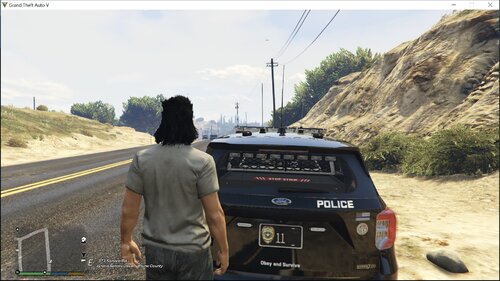
K-9 Unit Vest for Sheriff

There are lots more to come working on a pack right now should be really great. But here's a sneak peek of what's to come.

Planned Vest:

Patricktan112 : Sheriff,State Trooper,LSPD,K-9,Gang,Swat,multi agency

 HANAKO's Sheriff,State Trooper,LSPD,K-9,Gang,Agent,multi agency

SimplisticDesigns : Sheriff,State Trooper,LSPD,K-9,Gang,Swat,multi agency


User Feedback

Recommended Comments

tylervoisine

Members

doesnt seem to work for me, when i replace the texture in task_diff_002_a_uni.ytd it doesnt load onto the vest correctly

MythicReaper

Members

7 minutes ago, tylervoisine said:

doesnt seem to work for me, when i replace the texture in task_diff_002_a_uni.ytd it doesnt load onto the vest correctly

I'm trying to figure it out too. I think if you change the letters it will load in (im new at textures for peds). Also, how did you get it to a ytd format?

tylervoisine

Members

2 minutes ago, MythicReaper said:

I'm trying to figure it out too. I think if you change the letters it will load in (im new at textures for peds). Also, how did you get it to a ytd format?

i had opened it with 3d paint and saved it as new it let me save it as a jpg file i think it was and then replace i could use it in open iv

MythicReaper

Members

1 minute ago, tylervoisine said:

i had opened it with 3d paint and saved it as new it let me save it as a jpg file i think it was and then replace i could use it in open iv

Gotcha, just figured it out too. I appreciate the help my man.

stylez

Members

i believe this skin is made for the one without the taser but overall i think the sheriff sign in the back could be adjusted a bit more to the left, nice work tho

2zero

Members

how do you change the file form .png to YTD to work in open IV


undeadXpotato

Members Author

1 hour ago, 2zero said:

how do you change the file form .png to YTD to work in open IV


Just relpace it 

Exemplification

Members

Where does this get installed to?


2zero

Members

9 hours ago, undeadXpotato said:

Just relpace it 

It gets replaced in open Iv right? When I download it it’s the wrong format so it won’t replace it just drops the file at the bottom of the page 

undeadXpotato

Members Author

6 hours ago, 2zero said:

It gets replaced in open Iv right? When I download it it’s the wrong format so it won’t replace it just drops the file at the bottom of the page 

I'll make a video on how to replace it.

2zero

Members

4 hours ago, undeadXpotato said:

I'll make a video on how to replace it.

thanks man I appreciate it 

Kato27

Members

For those of you that are having issues with this vest texture I figured it out. so basically, the texture is made for task_diff_001_a_uni.ytd. if you take a look at the first image that show the vest from the back side it looks just like the  task_diff_001_a_uni.ytd  but like I mentioned after I realize that I replace it and it worked. I hope this help some of you guys!!

Create an account or sign in to comment

Account

Navigation

Search

Search

Configure browser push notifications

Chrome (Android)
  1. Tap the lock icon next to the address bar.
  2. Tap Permissions → Notifications.
  3. Adjust your preference.
Chrome (Desktop)
  1. Click the padlock icon in the address bar.
  2. Select Site settings.
  3. Find Notifications and adjust your preference.