


gangrenn
Members
-
Joined
-
Last visited
Everything posted by gangrenn
-
 Looks nice !
 -
![[TEASER - DAY #5] "Medical run"](//s3-gallery.int-cdn.lcpdfrusercontent.com/gallery/album_547/sml_gallery_2101_547_381900.png)
From the album: Gangrenn album
to be continued ... WIP by me Subscribe for exclusive previews: http://www.youtube.c...4HLRVZG4g7F0eTw -
![[TEASER - DAY #4] "My equipment"](//s3-gallery.int-cdn.lcpdfrusercontent.com/gallery/album_547/sml_gallery_2101_547_3146388.png) Yes I am the only one working on it.
Yes I am the only one working on it. -
I will eventually release it.
-
Thanks ! Thanks ^^ This one: http://www.gta4-mods.com/misc/cryenb-v1-1070eflc-f27070
-
From the album: Gangrenn album
to be continued ... WIP by me Subscribe for exclusive previews: http://www.youtube.c...4HLRVZG4g7F0eTw -
 Well done !
 -
![[TEASER - DAY #3] "flashlight POWA"](//s3-gallery.int-cdn.lcpdfrusercontent.com/gallery/album_547/sml_gallery_2101_547_150973.png) Thanks.
Thanks. -
From the album: Gangrenn album
to be continued ... WIP by me Subscribe for exclusive previews: http://www.youtube.c...4HLRVZG4g7F0eTw -
![[TEASER - DAY #2] "Selecting my unit, is important"](//s3-gallery.int-cdn.lcpdfrusercontent.com/gallery/album_547/sml_gallery_2101_547_212858.png)
From the album: Gangrenn album
"The secret to humor is surprise, but what will be the next surprise ?†to be continued ... WIP by me Subscribe for exclusive previews: http://www.youtube.c...4HLRVZG4g7F0eTw -
![[TEASER - DAY #1] "This is my house"](//s3-gallery.int-cdn.lcpdfrusercontent.com/gallery/album_547/sml_gallery_2101_547_1133871.png) Thanks, but the best is to come (and trust me, THAT will be the real deal). Vehicles on the pictures, are from OpenIV yes.
Thanks, but the best is to come (and trust me, THAT will be the real deal). Vehicles on the pictures, are from OpenIV yes. -
From the album: Gangrenn album
“Each day holds a surprise, what will be the next one ?†to be continued ... WIP by me Subscribe for exclusive previews: http://www.youtube.c...4HLRVZG4g7F0eTw -
 Well done !
 -
![[WIP] Proper Explorer Utility](//s3-gallery.int-cdn.lcpdfrusercontent.com/gallery/album_2692/sml_gallery_138650_2692_783028.jpg) looks nice, but could you upload pictures from the other sides of the vehicle (rear, interior, etc.) ? And did you convert it by yourself, or are you editing the unlocked version available on the download section ?
looks nice, but could you upload pictures from the other sides of the vehicle (rear, interior, etc.) ? And did you convert it by yourself, or are you editing the unlocked version available on the download section ? -
 Looks nice, well done !
 -
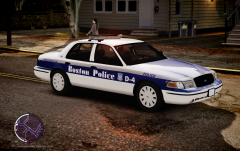 Thanks. I released this car a year ago, not today, but I'll remove the trims if I ever release a CVPI again.
 -
From the album: Gangrenn album
-
-
I Indeed left a comment about his profile picture (Lindsay), but then took it off.
-
'?do=embed' frameborder='0' data-embedContent>> <- there is already a topic, about 3d creation sharing ;)
-
![[REL] 2013 Ferrara 100' Aerial Ladder - FDNY - Version 2 [with working ladder] 2.0](//s3-gallery.int-cdn.lcpdfrusercontent.com/gallery/album_547/sml_gallery_2101_547_1259015.png)
From the album: Gangrenn album
-
General information: This is a 2013 Ferrara 100' Aerial Ladder of the Fire Department City of New York (FDNY) Installation: 1) Use OpenIV to replace the corresponding files within vehicles.img with the .wft and .wtd files provided in this package. 2) Open the vehicles.ide file in your Grand Theft Auto IVcommondata folder, find the lines beginning with the names of the appropriate models, and at the end of those lines add +livery. Files included: - firetruk.wtd - firetruk.wft - Template FEATURES: - working ladder - Multi-Livery enabled (4 included); - Working taillights (on the sides of the model); - Accurate Model; - TEMPLATE included, to make liveries; - ELS-Enabled model; _______________________________________________________________________________________________________ Ladder Operations instructions: To raise the ladder up: Open the trunk using the trainer, to raise down the ladder: close the trunk; to rotate the ladder: Open / close the hood using the trainer ; _______________________________________________________________________________________________________ Official media: Official media (photos, videos) provided by gangrenn, subscribe for exclusive previews of WIP: https://www.youtube.com/watch?v=IOrLRXT0gLc _________________________________________________________________________________________________________ Credits: -Model made by gangrenn; -Whelen Inner Edge models made by Bxbugs123; -wheels made by gtapolicetrucker; -interior is default GTA IV made by rockstar; UPLOADING AND OR EDITING THIS FILE WITHOUT PERMISSION IS FORBIDDEN! YOU MAY EDIT TEXTURES FOR PERSONAL USE!
- 16 comments
- 3 reviews
-
Here is a tutorial: http://www.lcpdfr.com/page/tutorials/index.action/_/texturing-tips-and-tutorials/how-to-make-a-texture-for-firetruck-ambulance-police-r18
-
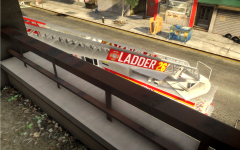
From the album: Gangrenn album
Ladder 26 on scene, running a primary search. -
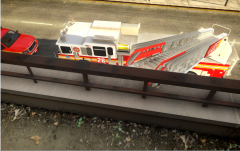
From the album: Gangrenn album
Ladder 26 on scene, running a primary search.

![[TEASER - DAY #5] "Medical run"](http://s3-gallery.int-cdn.lcpdfrusercontent.com/gallery/album_547/sml_gallery_2101_547_381900.png)
![[TEASER - DAY #4] "My equipment"](http://s3-gallery.int-cdn.lcpdfrusercontent.com/gallery/album_547/sml_gallery_2101_547_3146388.png)

![[TEASER - DAY #3] "flashlight POWA"](http://s3-gallery.int-cdn.lcpdfrusercontent.com/gallery/album_547/sml_gallery_2101_547_150973.png)
![[TEASER - DAY #2] "Selecting my unit, is important"](http://s3-gallery.int-cdn.lcpdfrusercontent.com/gallery/album_547/sml_gallery_2101_547_212858.png)
![[TEASER - DAY #1] "This is my house"](http://s3-gallery.int-cdn.lcpdfrusercontent.com/gallery/album_547/sml_gallery_2101_547_1133871.png)
![[WIP] Proper Explorer Utility](http://s3-gallery.int-cdn.lcpdfrusercontent.com/gallery/album_2692/sml_gallery_138650_2692_783028.jpg)
![[REL] 2013 Ferrara 100' Aerial Ladder - FDNY - Version 2 [with working ladder] 2.0](http://s3-gallery.int-cdn.lcpdfrusercontent.com/gallery/album_547/sml_gallery_2101_547_1259015.png)
