juncar
Members
-
Joined
-
Last visited
Everything posted by juncar
-
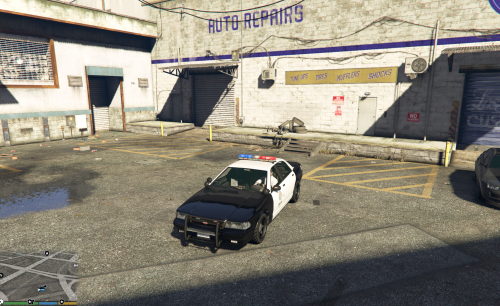 You have outdone yourself once again. Thank you for sharing all of these great models!
- 19 comments
- 5 reviews
-
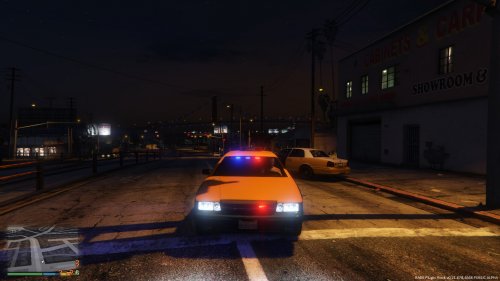 It is blue and yellow. I was putting the vehicles.meta in the gta5/levels folder in x64, not common. Works fine now. Thanks!
- 19 comments
- 2 reviews
-
-
 Follow me isn't working for me after the update. The animation and message appear but the car does not actually follow me anymore.
- 3,646 comments
- 306 reviews
-
Yes, assuming that the readme is correct. I also restored my mpchristmas2 file and tried to reinstall the car but ran into the same problems with the game not finding the model. Hello Friend. This is the "fixed" version. First go to Grand Theft Auto V\update\x64\dlcpacks\mpchristmas2\dlc.rpf\x64\levels\gta5\vehicles\xmas2vehicles.rpf\ Import the police5 files here. Then go to Grand Theft Auto V\update\x64\dlcpacks\mpchristmas2\dlc.rpf\common\data Import the carvaration.meta file Go to levels/gta5 Import vehicles.meta Done. This is what I get when I try to extract the files from LCPDFR.com too. No problems with gta5-mods.
- 19 comments
- 2 reviews
-
Installed exactly as you stated. 2 things I can think of: I use the templated Stainer by LtMatt. and I was using 2 SAHP addon cars too. Even when using the templated Stainer I was able to spawn the old, non templated SAHP addon car tho. "Model POLICE5 not found" is the exact error message I get. It shows up great in the openIV model viewer tho.
- 19 comments
- 2 reviews
-
Ok I see the thing about the carvariations file spawning it with the correct colors. However when I try to spawn the car I get "file Police5 not found" or something similar
- 19 comments
- 2 reviews
-
Download doesn't work. It works on gta5-mods but its the white version... ! C:\Users\J\Downloads\undercover_taxi_beta (2).7z: Unknown method in undercover taxi beta\Readme.txt ! C:\Users\J\Downloads\undercover_taxi_beta (2).7z: Unknown method in undercover taxi beta\carvariations.meta ! C:\Users\J\Downloads\undercover_taxi_beta (2).7z: Unknown method in undercover taxi beta\vehicles.meta ! C:\Users\J\Downloads\undercover_taxi_beta (2).7z: Unknown method in undercover taxi beta\police5.yft ! C:\Users\J\Downloads\undercover_taxi_beta (2).7z: Unknown method in undercover taxi beta\police5_hi.yft ! C:\Users\J\Downloads\undercover_taxi_beta (2).7z: Unknown method in undercover taxi beta\police5+hi.ytd ! C:\Users\J\Downloads\undercover_taxi_beta (2).7z: Unknown method in undercover taxi beta\police5.ytd ! C:\Users\J\Downloads\undercover_taxi_beta (2).7z: Error - operation failed
- 19 comments
- 2 reviews
-
-
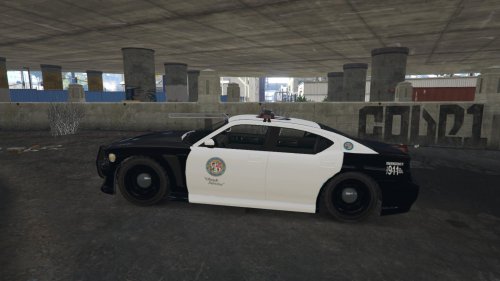 This is a good first start. The "Obey and Survive" is slightly crooked on the driver side of the car. Little things like adding "Police" on the hood and back bumper would be nice along with maybe a DARE or MADD bumper sticker in place of the default cruiser bumper stickers. Thank you for making this. I look forward to seeing what else you do with it!
 -
 To the folks having issues with crashing: Restart your computer and the crashing should stop. I played for two hours crash free before calling it a night after several restarts due to initial crashing. It is not an issue with the callout pack itself and I experienced similar problems when I first started using CallOutsV. Hope this helps!
- 423 comments
- 73 reviews
-
This is a great addition to LSPDFR. Automatically adding the waypoint/navigation is a really nice touch. Most if not all of the callouts feature audio throughout the entire scenario as dispatch and other officers communicate with you thru the radio, and there are few callouts within the pack that essentially amount to "kill X target and move on." Everything from the audio, navigation, and character interaction during the callouts is great. This callout pack is the most realistic one yet in my opinion and a must have addition to LSPDFR.
- 423 comments
- 73 reviews
-
-

- 2
-