hhtesntwr
Members
-
Joined
-
Last visited
Everything posted by hhtesntwr
-
Hi, thank you for all work you have been doing with this mod. I just updated to 0.4 and the new version of this. for some reason whenever I pull up computer+ all of my keyboard controls are completely disabled and I have to restart the game. This has happened more than once, thanks again.
-
-
 how did you get it to look like that? It opens in Notepad++ for me, so I don't know if that's the problem, or if I don't have the right view setting. Because right now it looks exactly the same as if I took all of my .ini's and just pasted them into one file.
- 10 comments
- 7 reviews
-
 @Justin991q hey I was having the opposite problem from the guy above. It seems pretty hit and miss with a lot of the plugins you say it supports. Right now I am looking and I see Agency Callouts, Search Warrant, among others say they are up to date, even though the file version I have is actually NEWER than the 'newest version' listed right beside it. Could we get an update for this? Is it an issue with the plugins themselves? Would be nice.
- 136 comments
- 30 reviews
-
 I actually did just find the fillable forms again - under the id lookups. Silly me. Now I didn't realize you could actually serve people with the traffic tickets you wrote in there - i thought it was just a way to enhance the roleplaying experience. So I was pleasantly surprised when I just today realized you can do that. However, what about the arrest reports - can you serve those? How much can this be extended?
- 1,742 comments
- 172 reviews
-
It better be gigantic. It's been over a year since they said anything at all!
- 1,742 comments
- 172 reviews
-
Hi - can I ask, are you talking about the simple notepad that you just type in and doesn't give you fields to fill out? Or something more form-like? Because I've been trying to figure out what happened to something like what you're describing that i downloaded. I think it might be PolicingMDT. I don't know why I would have gotten rid of it, but when I went to find and redownload it to see if that was the right one, I was told Fiskey had taken it down. Do you guys know anything about this? http://www.lcpdfr.com/files/file/11478-lspdfr-policingmdt-integrated-mobile-data-terminal-police-notebook/ I'm too afraid to ask this on the forums and get banned because it's off topic or something like that.
- 1,742 comments
- 172 reviews
-
-
Oh my fucking god... Thank you. I'm an idiot. EDIT: I just wanted to clarify I didn't mean that sarcastically. Legitimately, thank you! I actually did not realize that.
- 1,742 comments
- 172 reviews
-
Thank you. I understand that, but could you tell me how I can download 1.3.3.0? The only thing downloadable on this page is the latest beta build.
- 1,742 comments
- 172 reviews
-
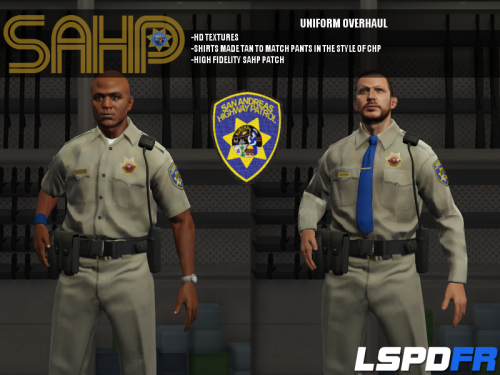 sorry, but where are these supposed to be found in-game? I installed and couldn't find any evidence of the new models in the vehicle selection screen for going on duty, but I was eventually able to using the spawn command on RAGE's command console - but the names are completely random strings of characters, so I don't know if I'll be able to find them all, and I definitely won't remember them - Is there supposed to be an easier way?
- 95 comments
- 17 reviews
-
Sorry, but what is the latest STABLE version of this mod? I'm looking at the history, it looks like 1.3.3.0 is the last one that doesn't say "open beta" - I have 1.3.2.1 and would really like to upgrade to 1.3.3.0 without getting a version that could be unstable. Can anyone link me?
- 1,742 comments
- 172 reviews
-
Still having no luck. Well, I guess vanilla will have to do for now until there is either a patch or until my problem is identified.
-
Okay so I tried some other things like installing only the DLL like you said, I've tried installing ALL components. When that didn't work, I uninstalled them like you said. But I'm still having the same issue every time. RAGE launches the game, but after that point you would think that it was completely vanilla. Now I have the steam digital copy of GTA 5. I copied the original GTA 5 directory to a completely different folder because I didn't want to mess with the original files. Is that a possible cause? Do these files HAVE to be in the same as the original? Like I said, this all worked fine with 0.1 Well like I also said, I had gotten a scripthook/native trainer combo BEFORE I had downloaded LSPDFR 0.1 so maybe I need to just get that? But it should be the same version of scripthook... I don't see how the trainer would change anything.
-
Thank you for responding! When you said to download scripthook, I realized that I had previously had a combination of the native trainer and scripthook. I didn't notice a dinput8.dll in my directory. I opened OpenIV, and the 2 plugins were already uninstalled, so I installed them again and noticed that dinput8.dll popped back up in the GTA 5 directory. I thought maybe that was supposed to happen and launched RAGE. It still didn't work for me. I think I will try some different things, like maybe downloading all of scripthook or only downloading the OpenIV asi. I can't test it for a little while though so I will let you know if I figure it out. Thanks again.
-
I'm having problems! I extracted everything to the root GTA 5 folder, made sure I had the NET framework 4.5 installed and everything. I unblocked all of the components in properties when I downloaded it, and I ran the RAGE puglin hook as an administrator. It showed the logo glowing and the disclaimer about how it is 'intended to be helpful' (I wasn't putting that in quotes to be sarcastic, just in case you were wondering). It launches the game and loads up story mode. However, I can't bring up RAGE by hitting F4. F4 doesn't do anything! Also, I notice that in the corner, the text that shows "RAGE PUBLIC ALPHA..." is not present. So I guess it is functional enough to serve as a launcher for the game but it won't bring up the console. P.S. - I didn't have this problem with 0.1 Thanks in advance.
-
You know the U.S. is virtually the ONLY country in the world that uses that format. I prefer the US format too, but I think that the best thing would be to pick which one you want. But I think that is the last thing on the devs.' minds right now, and rightly so. Just a quick question for anyone who might know, I made a backup of all the RPF files in the GTA 5 directory because I heard that something like this might start happening with updates that Rockstar releases. When LSPDFR 0.2 is released, should I place it with the files from the previous update because it will perform better, or put it with the latest updated files? I guess 0.2 is being optimized for the latest version of GTA but I'm guessing performance would be better on a previous build regardless???
-
I really need help - I backed up maps and replaced it with the new one. When I started the game, Nico's apartment was completely black, and I couldn't see anything. I teleported outside, and it was also impossible to see anything. Could you give me details on how exactly to install it, because the way I'm doing must not be right.
- 73 comments
- 76 reviews
-
Every siren mod I have tried downloading says I need to replace HORNS.ivaud with it. And everyone says to use SparkIV. I use OpenIV, and it never works, just makes the game crash. Do you have to use Spark for this? Please help me, nothing is working short of downloading SparkIV, and the reason I haven't is because it's way too complicated for me to use. OpenIV has a more simplistic layout. Also, why would you replace an entire sound BANK with a single audio file? Please help me.
- 13 comments
- 27 reviews
-
Thanks. I don't know how I could have missed the tutorial. Probably because I always force duty.
-
This isn't working for me. - I backed up the original HORNS sound bank. (THANK GOD) and replaced it with the new one. When I launched GTA, the screen went black after I clicked play offline in the social club menu, like it was about to start the game, and then it immediately crashed back to the desktop. I put back the original HORNS file, and the game launched fine. So then I tried adding the new HORNS sound file to the RESIDENT folder, alongside with the original one. The game launched fine again, but when I went to check the sirens, they were still vanilla, and I could have sworn I heard a slight buzzing while the game was loading.
- 10 comments
- 4 reviews
-
I'd really like to know what feature this is, since it sounds like it could be helpful. I have tried the game with and without it and don't notice what the difference is. I have looked on forums, and I've even googled it using every keyword I could think of. I would really appreciate if someone could tell me what this was. I found it in the lcpdfr.ini settings file. Thank you.
-
 Okay, so I just downloaded this, but I have no idea where to install it or where to put the files, because all the readme says is " Oh, make sure to give me all the credit! "
- 16 comments
- 2 reviews
-
Don't use the regular .exe, GTAIV.exe, use LaunchGTAIV.exe, and make sure to run it as an admin., of course