


officerAMR
Members
-
Joined
-
Last visited
Everything posted by officerAMR
-
 Yah its best if you dont add anything on top of the standalone meta, i tried it your game will break. All the cars can be manually included in the replace version. You can pick and choose from there. All the cars use light setting 1 expect for the Vector so it should be fine to place them wherever you would like. Open the replace folder and you'll see a file which is called "Vehicles" open it and you can choose which ones to install if you'd so choose
- 501 comments
- 104 reviews
-
That good news, thats narrowed down the issue. What you need to do now is place all the cars back into mpchristmas 2 and install each of these one at a time (make backups of the original) Just so you're clear Install the carvariations meta into Mpchristmas2 and check if it loads. If it does still load, place the vehicles meta into mpchristmas2 and see if that also loads. carvariations.meta vehicles.meta
- 501 comments
- 104 reviews
-
No it shouldn't but you never know. I'm thinking that somethings weird with my DLC.rpf thats not agreeing with other peoples dlc,rpf
- 501 comments
- 104 reviews
-
Possibly. Though unlikely. If this doesn't fix it i have no clue what will. What i need you to do is extract all the addon cars into a folder or desktop. get the original uneditied Mpchristmas2 folder and place it in your mods folder (if you have one) or verify integrity of chache to give you back the unedited version, load the game up and check that its working. If it doesn't work tell me at that point If it does load come back and i'll give you the two files and that go into mpchristmas2 and then you'll have to place the cars back into mpchristmas2 and check if it loads then. Which is should
- 501 comments
- 104 reviews
-
What game version are you running? is it V1.0.791.2? And is it steam or the retail version?
- 501 comments
- 104 reviews
-
If its not that it could be that we're running on different game versions. I'm running on V1.0.791.2 Steam.
- 501 comments
- 104 reviews
-
oh...well its not that then XD if the files above dont work try placing this in update>update>common>data>levels>gtav I'm sorry this is taking time to fix, i'm not getting the issue on my end so its hard for me to source the issue. vehicles.meta
- 501 comments
- 104 reviews
-
How much ram do your computers have? It could be the game struggling to load the Mpchristmas2 Okay try this, i've removed some things from Mplux Test fix.zip
- 501 comments
- 104 reviews
-
This is really strange, some people crash others dont. What other vehicle mods do you use?
- 501 comments
- 104 reviews
-
I reinstalled the pack again and I'm not having any issues loading the game. Do you have any other vehicle mods installed addon or other? If you add or have anything else included on the mpchristmas2 carvariations and possibly vehicles meta the game will crash right at the end of the loading screen (after LSPDFR gets loaded). Sorta like if you add more then 15.7gb of files to the Vehicles.oac it will mute the file Thats why i had to switch to Mplux for the final 4 cars What did you change it to? If Baller doesn't work try Police3 or Gresley
- 501 comments
- 104 reviews
-
-
Thats because the vehicles meta in your addon is not the one for MPchristmas2 its the one for update>update>common>data you need to place the original or addon mpchristmas2 meta back into Mpchristmas2
- 501 comments
- 104 reviews
-
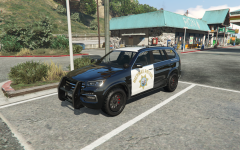 To me it looks like a BMW X5
 -
Fix has been sent to Thurk, will be uploaded soon go into the vehicles meta, find the vehicle name (FBI2 i believe) and you'll see <handlingid>vehicle<handlingid> change it to Gresley or baller
- 501 comments
- 104 reviews
-
Theres one in my download and the F350 is a normal vehicle its spawned as "policeold" strange, i'll give you my one. Goes in MPchristmas2>common>data. All the other cars are working fine? carvariations.meta
- 501 comments
- 104 reviews
-
-
when you installed the carvariation meta for MPlux did you drag and drop it into the folder or edit it in (copy and pasted the new lines into your carvariations meta)?
- 501 comments
- 104 reviews
-
Which explorer are you referring to, theres 3 :P this is your answer. Either rename to baller or if you like having a twitchy death machine you can rename it back to police3
- 501 comments
- 104 reviews
-
Whats wrong with the lights? the carvariations.meta is correct for the vehicle.
- 501 comments
- 104 reviews
-
-
-
-
its a model issue not the vehicles meta. You'd have to resize it for the animation to fit the wheel
- 501 comments
- 104 reviews
-
I couldn't get them to sit on the wheel because its bigger then the GTA V default cars so theres no animation to fit it sadly
- 501 comments
- 104 reviews
-
-

- 1
-
-
I made it replace all the RDE vehicles before i switched to making it replace the default vehicles. You'll have to use the index and rename each vehicle accordingly no vehicles are provided in this RAR file only the left over files. You'll need to download one of the two versions first then rename CHP with RDE.zip
- 501 comments
- 104 reviews
-
-
- 1
-

