officerAMR
Members
-
Joined
-
Last visited
Everything posted by officerAMR
-
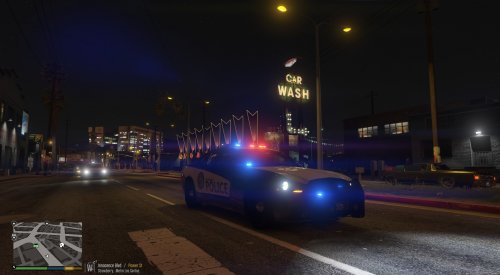 You mean LSPD not LCPD right?
 -
I do like some of the older cars, Lundys currently making a 1993 LAPD Crown Vic
-
Nobodys stopping you from doing so, all the police cars on LSPDFR are non-els. And having ELS installed doesn't stop you from playing the story
-
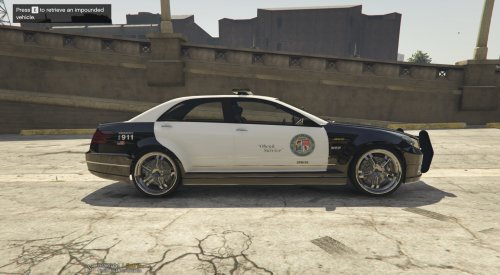 Not bad, interior is HQ. I would improve upon it in 2 ways 1- Move the LSPD roundel and text back down the door 2- give it Police rims
- 3 comments
- 3 reviews
-
-

- 2
-
-
 Will it have a Whelen Edge option too?
 -
They can't let everyone on the testing team
-
Hes making cars adapted for ELS
-
Thats not Bay Area Bugs, thats Bxbugs the modder He has ELS because he can makes car mods and i think hes friends with LT Cain
-
What do you mean, BXbugs posted this a week ago
-
 Exactly, so if you wanted a unmarked car to replace FBI2 you would do <handlingId>POLICE2</handlingId> Some additional information if you want it
- 126 comments
- 41 reviews
-
Its the Police3 handling i added to it. I personally prefer it because its AWD. Its very very easy to change. And a good thing to know. 1- Open up the vehicles meta 2- Press L-CTRL+F and type >pranger< 3- on the 3rd line you should see <handlingId>POLICE3</handlingId> 4- Replace it with the vehicle you desire So if you wanted the original type <handlingId>SHERIFF2</handlingId> If you wanted it to have Adders handling for some reason change it too <handlingId>ADDER</handlingId> 5- Save the fly and place it back in. +The vehicles weight may cause the car too roll easily regardless of its handling when you place it over another car, happens a lot with the Taurus for some reason
- 126 comments
- 41 reviews
-
-
Where did it crash in the load screen? Did it crash on the Populating game part? or at the very start if the game crashes on the populating game part its because of the carvariations meta and if it crashes right at the start its the veh meta yes, i would use patchday 8 but anything past patchday 3 is fine
- 126 comments
- 41 reviews
-
no, Vehicles meta goes in Update>update>common>data>levels>gtav And the carvariations goes in mpluxe>common>data
- 126 comments
- 41 reviews
-
-
-
Here you go Vehicles.meta goes in update>update>common>data>levels>gtav Carvariations goes in mplux>common>data carvariations.meta vehicles.meta
- 126 comments
- 41 reviews
-
Its likely that you may have deleted something, i'll make them for you. One sec
- 126 comments
- 41 reviews
-
Nice, i like the "objects in mirror are closer then they appear" Nice touch
-
Got to extras, in the vehmet and carvar txt files, rename the <modelname> to Pranger in both the files Once thats done, copy the carvar and place it in MPlux carvariations meta and copy the vehmet and place it in vehicle meta update>update>common>data>levels>gtav. Make sure you overwrite the old Pranger files
- 126 comments
- 41 reviews
-
-
-
-
Did you add a second livery? Theres only one in the YTD? I took the livery out, renamed it and as you can see by the number in the top left hand side of the screen it changes. I renamed it to explor_sign_2
- 126 comments
- 41 reviews
-
Goes in update>update>common>data>levels>gtav Whats changed: 1- Added FWD and made faster 2- Uses the standard police siren 3- Handling is way better 4- Proper flagging vehmet.txt I tried to make the Explorer spawn in white but to no avail
- 126 comments
- 41 reviews