


OfficerFive0
Members
-
Joined
-
Last visited
Everything posted by OfficerFive0
-
the blue lights cant be changed with a texture. you have to change that in zmodeler
-
looks awesome!
-
sorry im not planning to make any lapd cars (besides the detective/slicktop) for a long time.
-
i said that in the previous post. i wouldn't use an avenger seeing as they don't and never have used an avenger. depends on the car and how complicated it would be
-
ok i found out they are made by coplite. whn i have the chance ill make them
-
can you show me a picture as an example? if im not mistaken the steady burn in the front is an older model. besides i think they have pretty strict contracts with fedsig,so they wouldn't be using whelen products.
-
sadly i dont know what ligt they use. if i find out and make it ill add i as a extra
-
red/blue mix (the newer one)
-
. if its only removing the dash deck lights. then its no problem im already planning on making a actual lapd slicktop/unmarked cvpi with proper lighting
-
depends on the vehicle what is it?
-
thanks!
-
 how did u do this? i tried doing it before but it would be limited t only one livery
 -
brother pocketjet printer
-
made some antennas
-
some upcoming projects
-
finishing up on a whelen cencom
-
added a stand for it
-
finished the genesis
-
you probably have to change the carvariations line for police3
-
working on a decatur genesis II atm
-
made ion, dominator, slimlighter whelen par46 spotlight with noptic thermal camera WIP par36 foglight needs a better texture and some touchups Whelen sa314b speaker code 3 squad 3 shield
-
o that one well thanks!
-
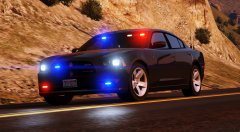 if u want i can send u some lights msg me
 -
are you using the default lights?
-
what car is that?


