


OfficerFive0
Members
-
Joined
-
Last visited
Everything posted by OfficerFive0
-
.thumb.png.04a1687a445e54a18a959b7926b87d7b.png) non, they are just differently named. its this was so its easiest for everyone.
non, they are just differently named. its this was so its easiest for everyone.- 217 comments
- 38 reviews
-
yes, these are els cars. there are no files in this thats going to edit the sounds files, either it wasnt working before or you didnt install it correctly that doesnt tell me anything, but chances are you didnt install it correctly did you install the line into the vehicles.meta? yes i designed it that way.
- 217 comments
- 38 reviews
-
-

- 2
-
-
ill have to look into it, becuase even if i edit the textures to all blue, the coronas would still be red/blue
- 217 comments
- 38 reviews
-
no read the description. "It seems there are problems with downloading the files, until its fixed you can get them here https://mega.nz/#F!gQ5T1SrL!oKualxMgsR7DuCmAdx41xw "
- 217 comments
- 38 reviews
-
-
-
-
hm, i seem to be having the same issue, if need be ill upload it to another site until its working again
- 217 comments
- 38 reviews
-
-
- 1
-
-
Los Santos County Sheriffs Office Pack. This pack includes a Crown Victoria and Tahoe, with working spotlights, takedowns/scene lights and cruise lights. Includes full interior equipment. If you dont install the vehicles.meta line then the lightbar glass on the Tahoe will be dark. If you are using RDE download the rde version, if not download the non-rde version Known bugs: to make the spotlights work i had to move the dummy on top of the driver seats, therefore when at a distance looking into the car you may see something like this If you find any bugs or problems dont leave it in a review let me know in the comments. thanks to thehurk for letting me know how to get the spotlights working. Screenshots by @Problematic @steinberg4145 and @thegreathah Planned Features: add in gunracks into both cars. Read the readme for installation instructions Credits
- 217 comments
- 38 reviews
-
-
-

-

- 42
-
-
if all goes well, expect a release real soon. currently installing the havis console for the tahoe
-
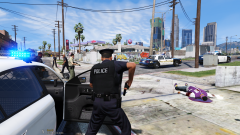
From the album: Five0 WIP
updated the cvpi, tahoe is next. made proper stands for genesis antennas. added console with laptop and interior equipment. set up working spotlights -
currently non, i have no need for extras with these cars
-
this better? ive since updated the textures and model so they should both be good now screenshots by @Problematic
-
hm whats this?
-
ok so the past few days its been (for the most part) nonstop modeling the havis console and parts. im almost done with both consoles. i also have an idea on how to get the spotlights to work
-
takedowns is extra 11 scene lights are extra 12 scene lights shine to the side, while takedowns shine to the front
-
^
-
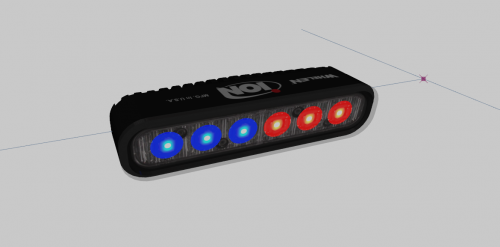 this looks really nice! only thing is, id suggest changing the emis texture to something more like this
 -
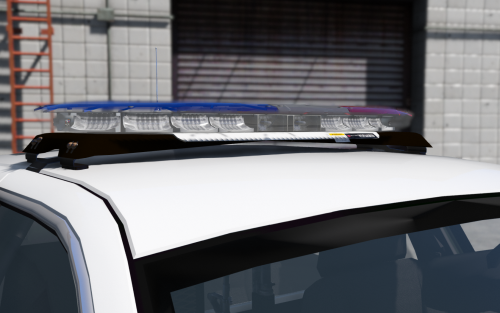 this is the closest to els compatible that ull get, just rename the emis to what u need misread your post. but still the same thing. when i model a light i dont set it up for anything. i set the lights were they would shine and thats it.
 -
ok release most probably wont be done tonight. as im still modeling stuff for the consoles
-
ok so the els pack is really close to release. perhaps tonight or tomorrow. the only thing i need to do is finish modeling the consoles and install them in the vehicles along with the equipment like radios and such
-
yea make sure the emis materials are above the glass materials
-
ive already tried that. and to set up takedowns, i can only suggest reading the user guide
-
here a little present for me to you, a FedSig Arjent SL and S2. theres also a extended version for tahoes/vans. I plan on updating this, potentially restarting from scratch, until i do, here's an updated texture for the SL. Make sure to rename it to "arjent_sl" you also need to download this file, as it includes some basic textures that i always use. "NSA" fictional lightbar by EVI. modified into a Fedsig arjent by Five0 new modules, lamps and misc parts scratch modeled by Five0 converted to gta 5 by Five0 when using this lightbar make sure to use the complete list of credits not just, "fedsig arjent by officerfive0" By downloading this file, you agree not to redistribute as your unlocked resource, unless permission is granted by the Author (Five0/OfficerFive0) Please DO NOT claim you "Heavily Edited" this file, if all you did was move some vertices, or scale.
-
 @NefariousBonne any word on the extralights turning on when els is activated?
- 1,515 comments
- 85 reviews

.thumb.png.04a1687a445e54a18a959b7926b87d7b.png)
