




RyWilson
Members
-
Joined
-
Last visited
Everything posted by RyWilson
-
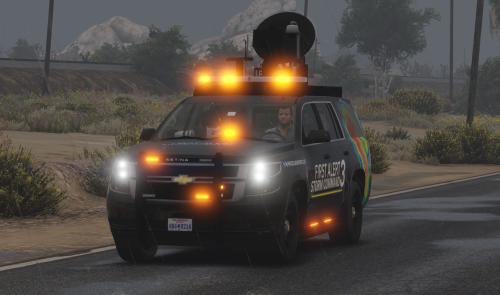 hey Joshua. just wanted to post and let ya know i loved using your truck. was definitely a nice edition to the game for roleplay..hopefully more people start using that tornado mod so this truck can get some more exposure 🙂
- 15 comments
- 10 reviews
-
Howdy guys 😄 Tonight we did something a little different..i installed the Tornado mod and grabbed a very nice Storm Chaser truck from the forum, and off we went 😄 I used a Weazel News chopper to add to the realism and you can also find that here on the forum. I hope you enjoy because i had a blast using this mod and these vehicles 🙂
-
make sure you have installed the original EUP Menu first. that is required for ANY EUP uniform pack. once this is done, it will create an EUP folder in your dlc packs. then install Serve and Protect, it is an ovi file and will auto install. Now, installing some uniforms is time consuming because you have to browse to your EUP folder, then to componentpeds, find the slot you need, click to edit, then install each item individually. it will take a bit if you are installing a uniform with multiple pieces. its more than just dropping those files in that are included. Now, provided you did the above correctly, there is STILL a possibility that the EUP uniform you are using was created a long time ago..and everytime GTA updates it moves pieces around..so you will have an enormous task in finding the "new location" of some of those files. if you are using an EUP pack from 2018 i would just let it go lol.
-
make sure you installed your vehicles into the latest patchday update, which is patchday22. also make sure you are installing the ELS vlc files through OpenIV. also make sure you are installing REPLACEMENT cars instead of ADD ON cars..which require you to spawn them to use them.
-
did you get your issue fixed? did you remember to remove any ELS vlc files from your Open IV? if you have a VLC file still installed for that police slot, the game will recognize that and your non ELS will not work.
-
okay i noticed you said you installed the game, then installed your mods. did you try to run the game before you installed any mods? if not, i'll ask ya to remove your mod folder to your desktop then try to launch LSPDFR. if the game/police mod loads up, you have a corrupt file in your mod folder. I would delete that and start over with your mod folder. I recently installed an RCMP pack and it corrupted my entire game. as i researched the problem, Rockstar's own response to this issue is "related to a corrupt game/file". Their advice is to verify your files through Steam..if you are using the retail disc verion these are the steps they recommend: 1. Go into your install directory and create a shortcut for GTAVLauncher.exe 2. Right-click on the new shortcut and go to Properties 3. On the Shortcut tab, add -verify to the end of the Target text box. For example, if your shortcut has "C:\Program Files\Rockstar Games\Grand Theft Auto V\GTALauncher.exe" to start, then it should look like this with the new flag "C:\Program Files\Rockstar Games\Grand Theft Auto V\GTALauncher.exe" -verify 4. Hit OK 5. Run this shortcut (may have to run as administrator)
-
hello echo. there isnt too much that can cause ELS not to work. so i'll go through the obvious steps just to make sure ya did all those. make sure you have the latest version of Scripthook V for ELS to work. double check your ELS installation to make sure you copy/pasted the files correctly. it's very easy to copy and paste into another folder in your GTA main menu if you aren't paying real close attention. Make sure any meta files included in the vehicle is installed correctly, if any. Make sure the car is ELS enabled. If you are seeing other lights on the car and not the lightbar, make sure your window tint is set to stock or none. sometimes the tint on the vehicle will keep you from seeing lights on the lightbar, and sometimes even interior lights. if you have already followed all of that, maybe post a screenshot so i can have a look at what you are seeing...then go from there.
-
Howdy guys. Tonight we tried out Planos new LSPDFR Fire Script!! It comes with ten callouts (i also used other rescue/medic calls from other callouts) and you get to use your saw to really cut doors off cars!! You can create your own immersion using props, bodyguards, choppers, etc to make your scene bigger or look super legit. Thanks for checking me out.
-
 i loved this! i can't wait to see what the future holds for your mods!! i used this in conjunction with the air paramedic, bodyguards, and edited other callout ini to only accept fire/rescue calls. i also used barriers, cones, signs, etc to "create" a better scene..so good job and i hope there is more to come 😄
- 365 comments
- 19 reviews
-
Hello guys 😄 Thanks for checking out my thread. hope you are doing good. its freezing, windy, and rainy here in Ohio..so i figured i'd get us a stream out to keep us occupied. We patrolled as Alabama State Patrol. it was a very nice patrol..we did mostly traffic out by Grapeseed and Paleto along the One!
-
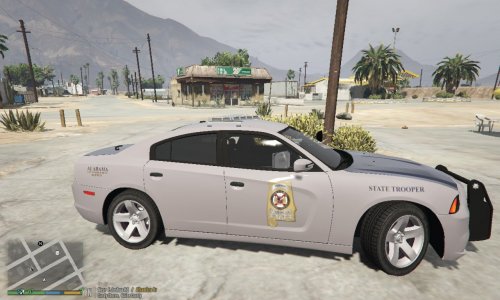 hey buddy. wanted to come give a review. these skins worked just fine for my stream. i did use some different cars (with all blues) and anyone can look in the video description for the links. thanks for making these 🙂
 -
as a group, we are incredibly grateful that you have created this mod. we have needed something like this for so long, i really hope everyone supports you and your future work here.
- 365 comments
- 19 reviews
-
-

- 1
-
-
 i just love the look of these. there are alot of eye candy extras here and they look legit. i will be back with a review after i stream them 🙂
 -
happy easter guys 😄 Today we did a patrol on a very nice BMW motorcyle. i think the best parts of the stream were the calls from United Callouts. really enjoyed using those interiors that we don't get a chance to see in the game.
-
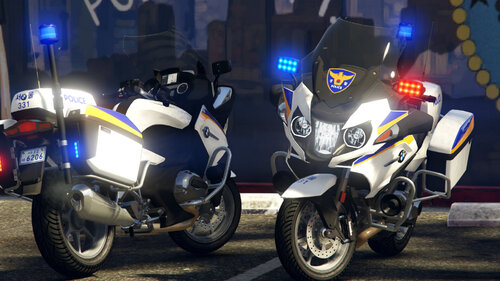 hey just wanted to come and leave a review. i liked the bike and i actually liked that skin..gave it a Vespucci Beach feel lol. it also had great handling..i mean really good for the way i was driving. thanks for the hard work 🙂
- 4 comments
- 1 review
-
hey guys..an impromptu stream today..using an amazing 1970 Chevelle SS! We swapped out colors as we went along...my favorite was the cherry red or the dukes of hazzard orange..had some nice chases in this..including a monster truck!! Thanks for watching!
-
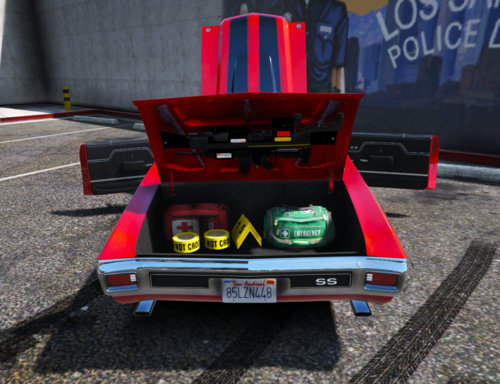 VERY VERY nice car..loved the nice items in the trunk to give it some legitimacy..wouldn't mind seein a little lighter windows. (also the car disappears after a radius of about 15 feet) but, overall, just a beast. thanks to everyone responsible
- 20 comments
- 1 review
-
hi everybody 😄 tonight's patrol was down in Davis..well we tried to stay in Davis..and we had our k9 Pickles with us. It started off with gunshots and that's kinda how it went the rest of the night..hope you enjoy and please consider subscribing if you haven't already 😄
-
hey 🙂 now you have to install this first. you install this one manually. https://www.lcpdfr.com/downloads/gta5mods/scripts/13245-eup-menu/ once you have that installed then you install this with automatic installation https://www.lcpdfr.com/downloads/gta5mods/character/8151-emergency-uniforms-pack-law-order/ good luck and if you need anything else just send me a message cuz this part of the forum isnt for request help 🙂 **now from your log files it looks like a file is missing or it cant be reached. so before you do those steps up there verify your game files to make sure your game has all the necessary files. if you have steam just look up a video HOW TO VERIFY GAME FILES ON STEAM.
-
DUN DUN DUH 😄 i did a late night patrol tonight so wanted to come over and share with ya!! We used some cars by Tactical Donut and they were great. We used a crown vic, slicktop charger, taurus, and an umarked crown vic that was frickin amazing! This was more of a traffic patrol, but it ended up with a few shootouts. Hope you like it 🙂
-
HELLO 🙃 I am back with another LSPDFR patrol..this time using a 2020 Chevy Silverado by Draft Ragnarok. It has it all..cage in the back, bad ass lights, nice handling, and a great interior. I had a blast on this stream..we had several shootouts, many foot chases, and a couple explosions 😮 So come hang out with me guys. hopefully ya like my content.
-
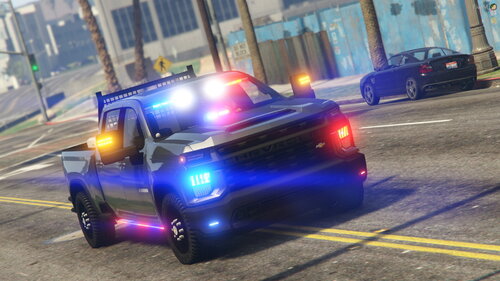 very nice truck logan 😄 it handled great during those chases and i appreciate that chrome grill. also loved that cage in the back. thanks for all the hard work!!
- 49 comments
- 9 reviews
-
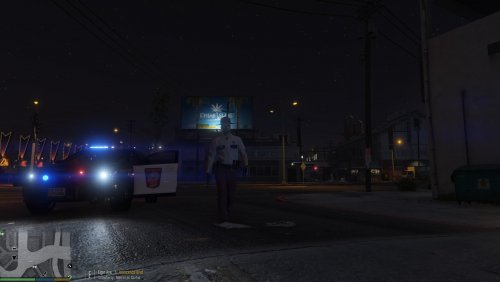 oh no need to update this buddy. i really liked it alot and i hope more people use it. one of my fave uniforms i've ever seen :)
- 14 comments
- 1 review
-
hi 😄 how you all doing? tonight i did some Minnesota state patrol by request so here we go. I had a great time with the uniform. i loved the colors so i might keep that sucker in my game for a while..the skins were nice..all the links are in my video description..its a process to get this one together. but, i hope you enjoy the patrol and, as always, thank you so much for supporting me 😉
-
whats up Felska!! I used your uniform today and i thought it was quite nice 😄 definitely appreciate all the work that went into it. i just love it 😄
- 14 comments
- 1 review


