


play4fun28
Members
-
Joined
-
Last visited
-
-
-
For me it is definitely Simple Trainer for GTA V (named trainerV.asi/.ini in the game directory). I installed version 17.9 and the issue appeared. Going back to version 17.7 or 17.8 fixed the bug.
-
GTA VI takes place in Vice City (Miami), Leonida (Florida) is the state, not the city. So the name should be VCPDFR.
-
Thanks for your help! Your advice fixed my location spawning issue, but the character spawning issues are still there. It is really weird. I pressed M and sat the character spawning to last one used. Then I selected my created character, went on duty, went off duty, after that I did your RPH console command but nothing seemed to help. Whenever I start the game, I always spawn with Michaels character, but actually I am not Michael. Pressing ESC shows me some random name and off duty in the top right corner. The name changes with every start of the game. The weirdness continues: although I did everything you mentioned, selecting the character via LSPDFR Menu (pressing ESC) spawns my character with different hair, a pig mask, no arms and no pants. Going on duty after spawning my broken character has the issue of some weird outfits, because their arms are messed up, but in the same time going off duty seems to spawn my correct character without any issues. The RPH console command ReloadAllPlugins spawns my desired character without broken outftis as well. I think that seems to be the fix, starting the game and using this command immediately. Do you know if there is any fix for this issue? I even tried creating new character, but nothing seems to work.
-
-
Hello, I updated ScriptHookV, LSPDFR and RagePlugin to the latest version. Everything works fine, my mods and custom configs work, but I got one issue when launching the game. Sometimes I spawn as Michael, it seems to be like single player (when his kid rides a bike and says something to him) and sometimes I spawn with Michaels skin having a different name in the menu off duty and sometimes I spawn with my LSPDFR character, sometimes at the station, sometimes in some random appartment showering. Whenever I switch through the menu to my LSPDFR character, I got a really weird outfit with a pig mask and no arms or no shirt without pants. I already deleted all of my characters, created a new one, but the problem still appears. Even saving the game through the smartphone does not help. Going on duty and off duty does not help either. Before the update I always spawned off duty with my LSPDFR character near a police station. Is it possible to set it up like this with the new version? I don't know the spawning system works and how it behaves when creating a new character but it seems to me that at least my conifg is broke.
-
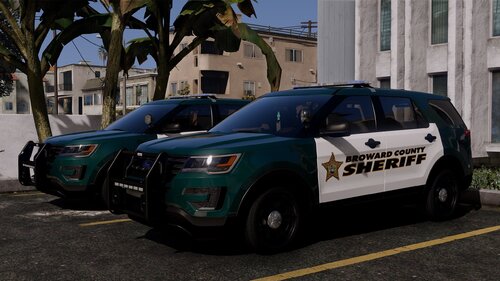 Insane pack, I really like it. All cars are top quality. Is there any chance to get Los Santos County liveries or do you know anyone who could create these liveries? Would it be muc effort? I think Los Santos County liveries would line up perfectly with your BCSO pack.
 -
 play4fun28 reacted to a comment on a file:
[ELS][Addon/Replace] Blaine County Sheriff's Office Mega Pack
play4fun28 reacted to a comment on a file:
[ELS][Addon/Replace] Blaine County Sheriff's Office Mega Pack
-
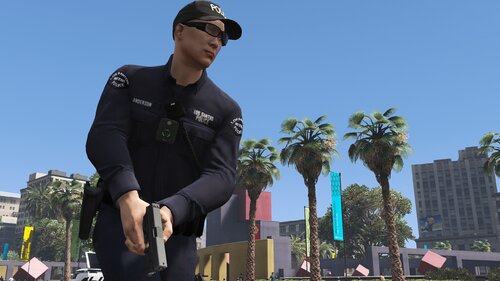 Very nice conifg, I customized it a bit by myself and it works perfectly fine, but I found one visual bug. Some of the SAHP peds got bugged LODs, I think. Whenever they are far away sitting in a car, their legs stick out of the bottom to the road. If they come closer everything seems to be okay, so it should be an LOD issue. Is this fixable with your config or do I have to update my EUP to a newer version?
- 954 comments
- 24 reviews
-
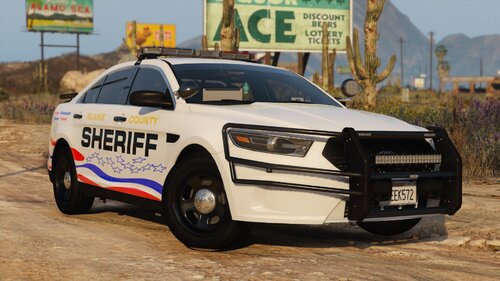 Very nice pack, I really love it and always use it. The vehicles fit perfect with BCSO, but I found one issue. The 11 CVPI and 23 Charger (both, marked and unmarked) got some bugs with their headlights and taillights. There is no reflection on the ground, it seems like the lights are turned off because there is no cone of light in front of the car but the lights are actually turned on. I thought it was my els config, but every other car in this pack has working lights. Is it possible to fix the issue with a quick fix in some config file or is it model related?
 -
Hello, I got the disc version of GTA. When I try to mod something it says my files are corrupt and starts download the original files. Is there any way to stop this and mod my game?
-
-
You can change the walkstyle in peds.ide located in GTA IV/common/data...
-
Yeah, but I want to use the Amublance as Ambulance and the Firetruck as Firetruck...
- 19 comments
- 2 reviews
-
-
Come on, I can only use 3 DROT cars in my game but there are far more than 3 good and accurate DROT cars...
- 19 comments
- 2 reviews
-
-
- 1
-
-
-
-
-
-
-
-
-
-
Thanks, it worked and it looks really good!
-
I don't know what you mean, I looked in Bxbugs files but I could not see how he changed the colour. In Kinksta's there is only one file who colours the lightbar.



