


strikerq12
Members
-
Joined
-
Last visited
Everything posted by strikerq12
-
-
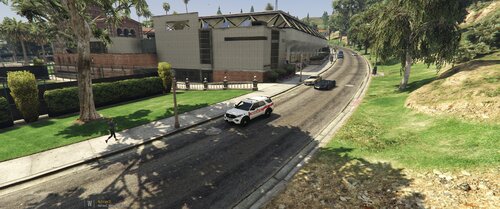 JurisdictionPatrol works with and without LSPDFR. It will work with any plugin/script. That being said, it does not directly work with Policing Redefined as this script is just for ambient spawn patrols that just drive around in the jurisdiction's that you setup. This version is currently for look's more than anything. I am working on adding more to it, I have an entire list of things to still implement. This is only the beginning stages. Create Jurisdiction, ambient police now patrol. It's eye candy at this time with more to come interaction to come in the future developments. Understood, I just wrote this down and will look at it for further development. Thanks for your interest and ideas!
 -
Hello, thanks for your suggestion, I currently have something similar in my list and will certainly add your suggestion to see where I could fit it in at. Currently my idea was to have an officer of your setup jurisdiction drive to random location's and get out and walk around entire perimeters for security checks and then re-enter their patrol vehicle, go back on patrol until it's next random check. I have many ambient ideas for this script currently and for future releases. I am currently testing added ambient backup from the same ambient patrol units that you currently see driving around with your setup jurisdictions, full details are not worked out as of yet on what they will do during backup, but they will not be your standard backup that other plugins provide. Thanks for taking your time to comment and asks questions. Have a lovely day! -Strikerq12
-
 Sorry I have not responded to you since I made my initial comment. It was on my end, I got it to work, thanks for your patience waiting on me to respond, My sincere apologies!
 -
ATTENTION: This script will no longer be actively updated. I had a planned development path for Jurisdiction Patrol, but unfortunately, I no longer have the time needed to finish everything I had planned. I will post my original development roadmap below so everyone can see what I had hoped to accomplish with the script. If I eventually find the time to return to the project and finish it, I absolutely will. However, I do not expect that to happen anytime soon. Thank you to everyone who has downloaded, supported, tested, and followed the development of Jurisdiction Patrol! VERSION 1.0.0 — Ambient Jurisdictions, Uniforms & Mapping Current foundation of Jurisdiction Patrol. Provides ambient jurisdiction-based patrols, customizable agency uniforms, and jurisdiction mapping. VERSION 1.1.0 — Ambient Backup & Traffic Stops Begin development of an ambient backup system tied directly into normal patrol activity. When the player initiates a traffic stop, nearby Jurisdiction Patrol units can respond as backup or perform a drive-by patrol of the scene. Nearby ambient units can also automatically respond when a stop escalates, such as shots fired or a fleeing suspect. Add ambient traffic stops for additional realism. Ambient officers conduct stops lasting approximately 90–180 seconds, giving the player time to observe or interact using other plugins such as Stop The Ped. If the player takes control of an ambient traffic stop, Jurisdiction Patrol detects the interaction, releases control of the stop, and converts the ambient officer into a backup role so the player can handle the incident normally. VERSION 1.2.0 — Ambient Foot Patrols & Station Officers Add ambient foot-patrol behavior. Patrol officers can randomly pull into businesses, buildings, and appropriate outdoor locations, exit their vehicle, patrol the area on foot for approximately 75–150 seconds, return to their cruiser, and resume normal jurisdiction patrol. Add ambient officers at police stations, sheriff's stations, and secured law-enforcement facilities. Officer uniforms remain customizable through EUP and the Jurisdiction Patrol Uniform Converter, allowing each agency or location to use its appropriate uniforms. VERSION 1.3.0 — Random Patrol Pull-Offs Add idle/pull-off behavior to make ambient patrol units feel less repetitive. Officers can select an appropriate roadside location, pull over, and remain there for approximately 90–300 seconds before resuming patrol. This can simulate officers running radar, completing paperwork, observing traffic, or simply sitting stationary between calls. Create unlimited agencies. Any region. Total immersion. Jurisdiction Patrol is a customizable ambient patrol script that puts you in control. Create your own law enforcement agencies, define where they patrol, choose their vehicles, configure their uniforms, and bring jurisdiction-based ambient policing to GTA V. • Unlimited Agencies – Create as many agencies as you want • Any Region – Define custom patrol areas anywhere on the map • Custom Uniforms – Configure freemode uniforms using the included uniform system • EUPToUB Converter – Included utility converts EUPToUB output directly into Jurisdiction Patrol uniform profiles • Custom Vehicles – Assign your own vehicle models to each agency • Realistic Spawns – Officers patrol naturally within their assigned jurisdictions • Custom Boundaries – Use the included in-game Jurisdiction Mapper to create your own patrol regions • Easy to Configure – Simple .ini-based configuration • Works With or Without LSPDFR – Jurisdiction Patrol operates independently and does not require LSPDFR MAKE YOUR JURISDICTIONS THE WAY YOU WANT Create city police departments, county sheriff agencies, highway patrols, park rangers, airport police, university police, or virtually any other agency you want. Each agency can have its own jurisdiction, vehicles, uniforms, patrol count, and configuration. Jurisdiction Patrol was designed to give players control over ambient law enforcement instead of relying on one police agency spawning everywhere. INCLUDED TOOLS Jurisdiction Mapper An in-game boundary creation tool that allows you to travel around the map, record boundary points, and create custom jurisdiction regions. EUPToUB Uniform Converter Paste EUPToUB <Ped ...> output into the included converter and automatically generate a JurisdictionPatrol_Uniforms.ini compatible uniform block. IMPORTANT Jurisdiction Patrol does NOT include the police vehicles, vehicle liveries, EUP clothing, or other visual modifications shown in the screenshots. These are from my personal GTA V installation and are shown only to demonstrate what can be configured using the script. Works with or without LSPDFR. Built for customization. Built for immersion. Built for realism.
-
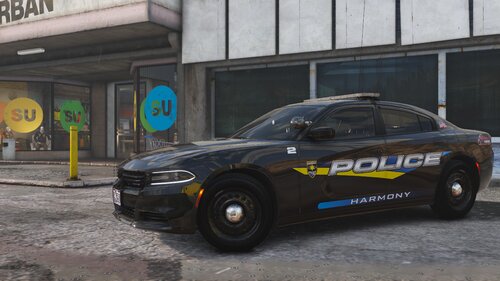 SSLA is broken with new update so this car pack is not working as it should.
 -
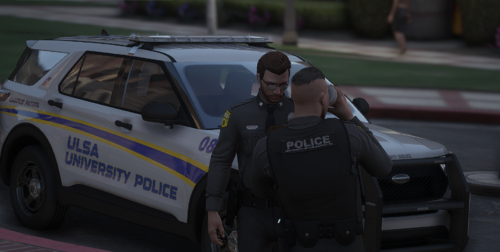 Does this not work in singleplayer? Installation file say's install in EUP-Stream folder. I do not have a that folder.
 -
Installation is failing to install in OpenIV, FYI!
-
I am having this same problem where the fire department show's up and does not leave after call is ended. Did you figure this out? I have disabled the gas station fire in enable all interiors, I disabled the "never wanted" in trainer, I have completely reinstalled all mods related to UB,LSPDFR,Call outs etc and still same problem. I use to never use the fire department for anything until recently when I downloaded the fire callouts plugin, I have removed it and called the fire department without that plugin and it does the same exact thing. It's really annoying, you can drive to one side of map and come back, they still standing there or spraying lol.
-
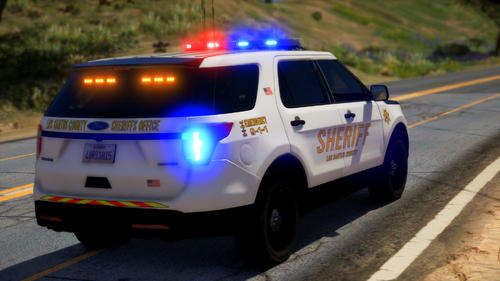 Hello, I love your vehicle pack, however for some reason the Dodge Charger keep's crashing my game, I have uninstalled and reinstalled on multiple occasion's, different slot's including "Sheriff" and did everything that I normally do when installing a mod and it just crashes whether I use it or just come across it in game when AI is driving it around, soon as it loads into my screen within seconds the game freezes and crashes. Do you have any solution's to this problem by chance? I will continue to find the reason in the mean time. Thank's for a lovely pack and hope to hear back from you. -Kind Regards
- 29 comments
- 6 reviews
-
After hours of playing with LSPDFR, I reinstalled it all from scratch and now I am good.
-
Posted, Thank's RagePluginHook.log
-
Hello, I am trying to figure out what is causing LSPDFR to crash when I load it from the console. Everything seem's to be loading and then it just crashes. Here is my log. Any help would be greatly appreciated. Thank's in advance.
-
 Hello, Great job on the new EUP! My question is how do we add the ranks to uniforms? I see in the screenshots on the file page that there are ranks on the sleeves.
- 2,349 comments
- 238 reviews
-
 if you live near Raleigh, Durham, Greensboro or Charlotte, they all have motorcycle traffic units. I trained with some of those agencies when I did armored transport from 2010-2018 I remember when Raleigh added their motorcycles, they had new glider harley davidsons.
- 17 comments
- 1 review
-
I live in Indian River County, FL we have 2 traffic motorcycle units. A lot of agencies in Florida still use them. I drive an 18 wheeler for a living and I see them all over the country, Not sure where you live but motorcycle units are still hot and heavy in certain parts of the country. Just to name a few states, Florida - Most of the agencies have motor units. Georgia - Atlanta, and surrounding cities typically have them out and about. California - CHP is always running hot with motor units, mostly near major cities such as LA, SD, SAC, etc. Colorado - Denver, Aurora, Lone Tree, Colorado Springs, Commerce City, plenty of agencies in Colorado use them during warmer days. Texas - Dallas, Houston, El Paso, San Antonio, Lubbock, Tyler, Austin, Amarillio, McKinney and more. Washington - Have only seen Seattle, Bellview and Tacoma PD using them. I think I may have seen a trooper but can't recall if it was or not. Ohio - Columbus all the time on I-270, Cincinatti, Cleveland, Toledo, Springfield Michigan - State troopers, Detroit, Battle Creek, Ann Arbor, Lansing, Grand Rapids, The list goes on and I'll stop there. They are everywhere especially during the summer months and early fall.
- 17 comments
- 1 review
-
-

- 1
-
-
 Very awesome pack, would be sweet if you kept adding and updating to this pack with different variations of models and jurisdictions. This would be by far the sweetest pack out of all I have used. Thank's a million and keep up the great work!
- 95 comments
- 32 reviews
-
Very awesome pack, would be sweet if you kept adding and updating to this pack with different variations of models and jurisdictions. This would be by far the sweetest pack out of all I have used. Thank's a million and keep up the great work!
- 95 comments
- 32 reviews
-
 No Sir, Just installed them the way they came. Since the release of LSPDFR 4.0 I am going to turn over a fresh folder in the next few days and reinstall everything from ground zero. I will let you know if I find the issue or fix. Thank's for your time and keep up the good work.
- 131 comments
- 45 reviews
-
I added on all 4 of the vehicles. Not sure why the Tahoe keeps crashing, It's the only one out of the 4. I did a test a few minutes ago before replying, I replaced Sheriff2 and it still crashes the game when I try and spawn it from the trainer, So I restarted the game, went into the police station, on duty, selected vehicle as I switched over to it, it crashed as it was loading the vehicle. I'm at a loss with it. strange
- 131 comments
- 45 reviews
-
did not see an older conversation, disregard and have a great day.
-
LSPDFR is for GTA 5, LCPDFR is for GTA 4.
-
I installed the pack, absolutely love it, However when I load the 2013 Tahoe the game crashes. I have removed it, reinstalled it, did everything I know to do and it keeps crashing when trying to load it through trainer. The other 3 vehicles work fine. Not sure what's going on. I have re-checked everything from spelling to install itself. I'm at a loss. any advice?
- 131 comments
- 45 reviews
-
Yes Sir, It is, Thank you!
-
Oh man, This help's a bunch, Game is now working, Thank you, Thank you, Thank you. I appreciate the help very much.




