


B. McDonald
Members
-
Joined
-
Last visited
Everything posted by B. McDonald
-
I already have both of them. Still have the same problem
-
I just did a fresh install of GTA IV and when I put lcpdfr in and run it, it doesn't do anything. I go to the diagnostics tool and it says it cant find the x86 version of MSVCR. I downloaded the things In the "installer" folder for GTA and I have Driectx 11.1 and Microsoft C++ 2005,2010, and 2012. I am not using a cracked version of anything. , I bought off steam. I have the newest versions of everything. The only other mods I have in there is ELS 8.5 and the trainer. I will post pictures of everything down below. Also I'm running windows 10 but it has worked before for me on windows 10 and I do run the game as administrator. When I go to uncheck the "read only" box i hit apply and when i go back into it, its back to read only. Scripthook log lcpdfr diagnostics
.thumb.png.d03d1cb7ac6e515f579aed67e7594089.png)
.thumb.png.9b6ceaad543305d9ad4cf0aedae52fc5.png)
.thumb.png.d02562f21f2a751f7463492c7e86df91.png)
.thumb.png.d327d1e37416937edc74f14cc6aa06d2.png)
-
Yes, i got my mods to work but as i said above, LCPDFR crashes my multiplayer. Any idea why?
-
I installed LCPDFR 1.1 about a month ago. Finally a couple weeks ago I actually got it to work but it crashes my multiplayer or tells me my computers running too slowly. I know it LCPDFR because when I take it out, I can stay in multiplayer but as soon as I put it back in I can't stay in multiplayer.
-
Well I got LCPDFR working but now it crashes my multiplayer and that's the main reason I wanted it.
-
On my old computer, everything worked just fine. But ever since i switched to my brand new computer i cant get ANY mod working. Not even SNT which is the easiest to work. The mods i am trying to use as of right now is LCPDFR, SNT, ELS, and a couple callout scripts. and a car pack
-
The folders are set to read only but when i uncheck that, it goes right back to read only. How do i fix that?
-
Yep
-
yes i have.
-
I just got a gaming comouter and went to download this off of steam. When it was done i logged into rockstar social club and hit play. The window went away but my game never started. I dont get an error message either.
-
They are
-
Sorry about that, I completely forgot. I will keep that in mind for the future!
-
1. no need to put all the caps. You need to calm down. 2. PM me and id be glad to help
-
There arent really any screenshots i can take because it kicks me out of the game right as i join. Ill go into a little more detail maybe thatll help you. So my friend will create a game, start it, then invite me. Ill join, stay in the game for literally a second and then it brings me to a loading screen and where the multiplayer chat is, it tells my friend i tabbed out when i didnt. Then it just brings me to single player.
-
Ill try that and let you know what happens.
-
I have installed LCPDFR 1.1. I followed all the steps and everything but when i go in game, It wont start when i hit Alt P. I evenn re installed my game to make sure all older versions were out. Any help would be great!
-
When i play online with a friend, I hit enter to start the game. It will put us in a game but for only a few seconds then it brings me "sometimes both of us" to a loading screen that lasts a long time and tells my friend i tabbed out when i didnt then just brings us into single player. He'll try to invite me if hes in game but itll do the same thing.
-
I click the LCPDFR uninstall in the directory.
-
If i don't have LCPDFR installed then my ELS lights dont work. I know a lot of people are gonna say "then just keep LCPDFR installed" but it slows my multiplayer down and i think that's whats causing it to say "your computer is running too slowly" is there any way to fix this ELS problem? or both problems for that matter.
-
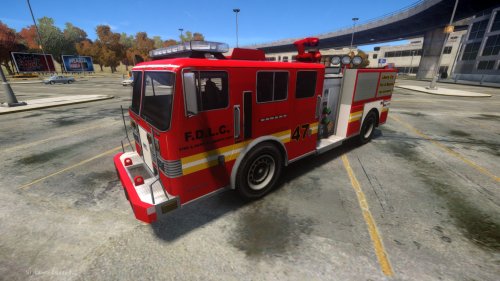 Well true but still i really like this truck. Could he have picked a different light bar yes but it still looks really good.
- 7 comments
- 1 review
-
Not to argue but this is realistic. i cant stand the rotators on the defult ones. I say he did a GREAT job
- 7 comments
- 1 review
-
I have ELS 8.5. Is there any way to make a custom pattern? or even just change one of the other patterns?
-
On some of my cars the ELS lights look white. When in the file of the car it shows red and blue. I have ELS 8.5 I can try to get screenshots if you need them just let me know.
-
Ahhh i was looking at the user guide thats why. Thank you very much! But i do have a question. If i change all this stuff will i still have the els 8 patterns just the els 7 cars will work correctly?
-
I looked and dont see anything on how to do this? Could you tell me what section this is in?
.png.03b9337317a84ecf0884dd9adb6805c8.png)
.png.08bc23d4f21e625bb63dd98d9f48e299.png)
.png.9a9dc44bc9ed3b978b03f67420653eac.png)
.png.ad7e68e3b58606a852747fe2613610bd.png)
