
TopCop72
Members
-
Joined
-
Last visited
Files posted by TopCop72
-
Hello All,
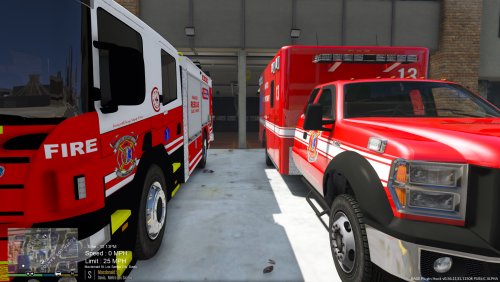
Here in the folder you will find all that you need should you want to use BULLDOG Designs [ELS] NSW Scania Fire Truck, Patrol 31 [ELS] Vapid Ambulance and t0y's [ELS] ESU Truck (as a Rescue Squad) in a Los Santos setting. All I did was revamp the original textures to work better with Los Santos setting.
I am digging the RED & BLUE lights and you can also change the ESU wheel colors (included).
I have included some simple instructions on how to install the ESU as a Rescue Squad as an ADDON to be use with a CUSTOM BACKUP Mod
*** I recommed using a MOD FOLDER when installing any NON-GTA V vehicle *** especially if you aren't very experienced with doing this.
Vehicles Used for the Pack
Download fire truck:
Download ambulance:
Download ESU Truck within Pack:
I hope you all enjoy...
Showcase Video 4.1.0
Please leave any Review, Comments, or insight as I truly am NOT a modder at the bottom. I'm just throwing stuff together I think looks good.
.....
- 225 Downloads
Updated -
Hello All,
Here in the folder you will find all that you need should you want to use BULLDOG Designs NSW Scania Fire Truck and Patrol 31 [ELS] Vapid Ambulance in a Los Santos setting. All I did was revamp the original textures to work better with Los Santos setting.
Also I am digging the RED & BLUE lights.
*** I recommed using a MOD FOLDER when installing any NON-GTA V vehicle *** especially if you aren't very experienced with doing this.
First you need to download and install BULLDOG Designs NSW Scania Fire Rescue Pumper, All credit for the model go to them. (Using Internet)
Download fire truck:
Second you to download and install Patrol 31 [ELS] Vapid Ambulance 1.0.1
Download ambulance:
Third, once everything is downloaded install all the vehicle files in the latest Patchday Update folder. (Using OpenIV)
Forth, Once they are installed, simply replace all of the ******.ytd files in whatever location you have installed the vehicles you downloaded. (Using OPENIV)
Fifth, is to place/replace both of the VCF file for the ELS lighting setup. This folder can typically be found in your GTA V folder (Grand Theft Auto V\ELS\pack_default). Simply copy from the folder and paste in the correct folder. (Using your Windows Explorer)
Sixth thing, which I highly recommend, is changing the handling line of the FIRETRUCK in the HANDLING.META that contains FIRETRUK. The standard handling does not work for this truck. I have found the proper handling line for it and have included it in this folder. (update\update.rpf\common\data\handling.meta) (using OPENIV).
Once you have done 1 thru 5, you are all set to play your game. But again I recommend step 6.
I hope you all enjoy...
Showcase Video
- 748 Downloads
- 5 Comments
Updated -
Hello All,
Here in the folder you will find all that you need should you want to use BULLDOG Designs in a Los Santos setting. All I did was revamp the original textures to work better with Los Santos versus a foreign city fire department.
*** I recommed using a MOD FOLDER when installing any NON-GTA V vehicle *** especially if you aren't very experienced with doing this.
First you need to install BULLDOG Designs NSW Scania Fire Rescue Pumper, All credit for the model go to them. See below for downloading. (Using OPEN IV)
Download the fire truck:
Second is to download this file and replace both of the ******.ytd files in what ever location you have the latest firetruck installed. (Using OPENIV)
Third thing is to place the VCF file for the lighting. This folder can typically be found in your GTA V folder (Grand Theft Auto V\ELS\pack_default). Simply copy from the folder and paste in the correct folder. (Using your desktop)
Forth thing, which I highly recommend, is changing the handling line of the FIRETRUCK in the HANDLING.META that contains FIRETRUK. The standard handling does not work for this truck. I have found the proper handling line for it and have included it in this folder. (using OPENIV).
Once you have done 1 thru 3, you are all set to play your game. But again I recommend step 4.
Hope you enjoy....
Version 2.0.1
ORIGINAL
Version 2.0.1
- 104 Downloads
- 4 Comments
Updated -
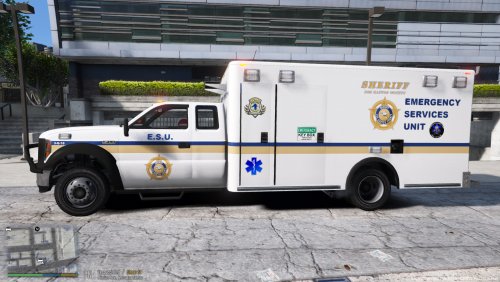
Here is a Sheriff E. S. U. skin, fictional of course, for @Patrol 31 ELS Vapid Ambulance. I used the base idea from @Chirpy Bomb Squad skin and revamped it. And now I'm loading on here with his permission.
I replaced my POLICET with the Vapid Ambulance but how you do it is your business. I also changed the vehicles.meta file to spawn with a deputies instead of a LSPD officer when used in the POLICET slot. Now the reason I did this is because the county I live in, the sheriff is involved with the smaller departments for SWAT, HazMat, and High Angle Rescues in our county and I thought that would be a cool, different element for LSPDFR.
Side Note: I also changed the backup.xml in the LSPDFR folder for Local SWAT backup to POLICET as the SWAT unit to be called in.
Included is the skin and a simple readme file.
You will need this
For red/blue lightbar
and this of course
I hope you enjoy.
- 148 Downloads
- 4 Comments
Updated -
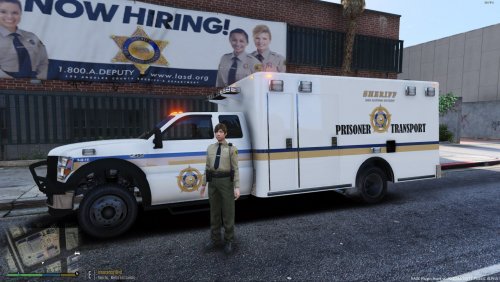
Here is a sheriff prisoner transport skin for @Patrol 31 ELS Vapid Ambulance. I used the base idea from @Chirpy Bomb Squad skin and revamped it. And now I'm loading on here with his permission.
I replaced my POLICET with the Vapid Ambulance but how you do it is your business. I also changed the vehicles.meta file to spawn with a deputies instead of a LSPD officer when used in the POLICET slot. Now the reason I did this is because county I live in, the sheriff does prisoner pickups from the scene no matter which agency within our county needs it.
Included is the skin and a simple readme file.
You will need this
and this of course
I hope you enjoy.
- 161 Downloads
Submitted -
First and foremost GREAT thanks to @Lt.Caine for his hard work on getting ELS back in the GTA world.
The texture is an adaptation @Patrol 31 [ELS] Vapid Ambulance. The original template created by @Candice was revamped by me @TopCop72 and uploaded with permission.
You can use it, play around with it, but please give credit to those that performed the basic HARD work.
PS: I am not a modder, so any negative commenters, please keep that in mind. Thank You.
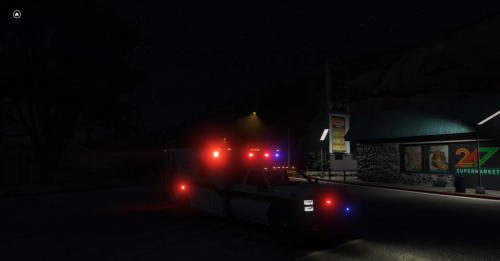
This texture will give you both red and blue lights for the lightbar and various lights around the vehicle. I've include both a simple YTD file replacement or you can manually change the textures out yourself.
A ambulance.xml file VCF is also included for proper coronas and environmental lighting. I also changed out LEDS for STROBES, It's just my thing and you can change it back to LEDS if you choose in the xml file.
VIDEO of the works
Items used:
The root of it all
The vehicle
Original Template
The NON-ELS Ambulance
Additional SWAT Skins
That is all, now carry on...
- 634 Downloads
Submitted