


tomcat8492
Members
-
Joined
-
Last visited
Everything posted by tomcat8492
-
.thumb.png.46e58dd3c89b8cb7fd1952928665ce22.png) You're welcome.
You're welcome. -
I'm quite busy nowadays. Hopefully this will satisfy your angry lust for creative imagination until the next thing. Feel free to convert to GTA 5 BUT DO NOT RE-UPLOAD TO ANY SITE.
-
.thumb.png.e24be739e2a72f3e30772d380fd897f3.png) Thanks
Thanks -
Haha. You're very welcome.
-
If it looks really messed up in zmodeler it's probably because I don't know what I'm doing. Don't worry, it will look fine in-game. Feel free to convert to GTA V BUT DO NOT RE-UPLOAD TO ANY SITE.
-
 ...I'm single...
 -
.thumb.png.cb5993a9873b5a7501e72cac20d3780b.png) Thank you very much, Mr. Gump. Will do. The glass is clear with different colored tint.
Thank you very much, Mr. Gump. Will do. The glass is clear with different colored tint. -
This train has no brakes. Thanks for the comment.
-
File includes a horizontal split red, blue, white, amber and green lights for all of your ambulance and apparatus needs. It also includes a signal light that federal signal makes. Feel free to convert to GTA V BUT DO NOT RE-UPLOAD TO ANY SITE.
-
It's a possibility. I'm working on some other stuff at the moment.
-
I release all this stuff so all of you can express your creativity and imaginations easier. Thank you for the comment.
-
Thank you. I appreciate your support.
-
You're welcome! Oh, stop it you. You're making me blush. Thanks for the support.
-
You're very welcome. Thanks for the comment.
-
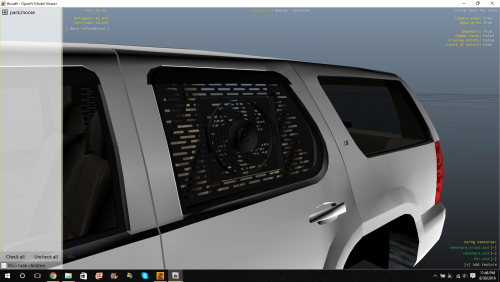
This file includes two types of window bars for the Tahoe; a window bar with a fan and one without for a vehicle with a K9 set-up. Who's to say it's specifically for the Tahoe though... Big thanks to: Maurice97 for suggesting this part, iRagingNinja for helping troubleshoot and testing in GTA IV, OfficerWalters for the screenshots and testing in GTA V. GTA IV NOTE: Due to the design and the way I assigned the materials, if you attach the window bar to the door, certain sections will disappear behind the window. The only way to fix it with this version is to either remove the window so it can be attached to the door or leave the window bars at the top of the vehicle's hierarchy leaving it separate from the door. I don't plan on fixing it because...I have this...thing...I have to go to...and I'm...busy...ya, that's it.
-
-
-
-
-
-
-
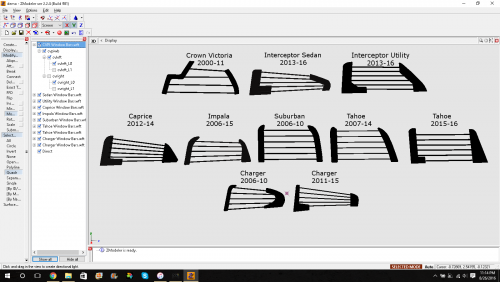
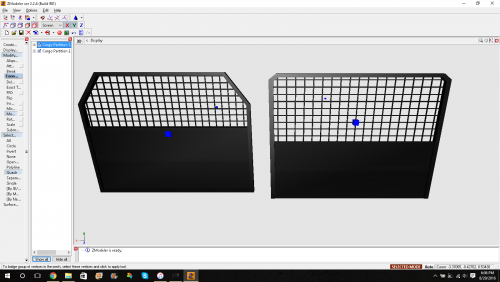 I think we can all agree we can't be letting the suspects go through all the gear in the back. The designs are primarily for the Tahoe and Interceptor Utility. Since the scaling and design of the cars themselves aren't exactly accurate, you can use either partition for any SUV. A bit of resizing may be needed. Some assembly required. Batteries not included. Feel free to convert to GTA V BUT DO NOT RE-UPLOAD TO ANY SITE.
 -
 I downloaded it myself with no problems. Might be on your end.
 -
Thanks. It is a consideration. There's some kinks I need to find a solution to in terms of attaching a "glass" window guard to a glass window.
-
Thanks!

.thumb.png.46e58dd3c89b8cb7fd1952928665ce22.png)

.thumb.png.e24be739e2a72f3e30772d380fd897f3.png)
.thumb.png.cb5993a9873b5a7501e72cac20d3780b.png)
