


lawenforcementjoker
Members
-
Joined
-
Last visited
Everything posted by lawenforcementjoker
-
I miss spoke it’s EUP menu that has it. But you need to use EUP as well. Here is the link to EUP menu which also has the links to EUP.
-
Police smart radio does. And I haven’t used lspdfr+ in quite some time so I am not sure about that one.
-
I use traffic policer but not arrest manager and it works. I am getting it from EUP 8.1. And it is up to date from there.
-
That's what my issue was, and we were having the same issue. so I would try that make sure especially if you use EUP you add it from there to your GTA V directory and see if it works.
-
It would appear I have found my problem... While I was reinstalling things I forgot to put in RAGENativeUI. Once I put that back in I was good to go. I just played for about an hour with no crashing. The only problem I have is with one of the vests in EUP not spawning correctly.
-
Yeah I hope I can get it figured out tomorrow and figure out which plugin was causing my issue.
-
That’s what I started doing today. I got it to work after first then I put two more plugins in and it stopped. I haven’t checked the rest yet. I do know that police smart radio is one of the issues. I have the newest one and it says “it is out of date and is meant for LSPDFR0.439” i also have the the laziest LSPDFR
-
That’s what mine is doing. Hopefully someone can provide us with a fix soon.
-
That worked for the loading but no matter how I attempt to play LSPDFR it always crashes when it loads up.. No matter what I do, being have it load at the start, going to the station, orr trying to force duty. It loads everything then LSPDFR crashes.
-
Hello, So I was having the issue where I would attempt to go on duty either at the PD or via 'force duty' and it would crash. I reinstalled LSPDFR and now I load into the game and it gives me a black screen with 'loading lspdfr' and the circle and it stays in this screen and never changes... I will attach my RPH logs and see if that helps. RagePluginHook_25082019_205008.log RagePluginHook_25082019_205816.log
-
Thank you, Now my newest road block is in OPENIV. None of the patch days are showing up. Therefore I cannot mod my cars... Any idea on this?
-
I can try yes. It just says game edition not supported. It says my game is version 1604 and the RPH is for 1737. I was using 1737 before I had to do the install.
-
Hello, I had to do a fresh install and RPH is saying the game is an old verizon, However when I open steam and OPENIV it says my game is up to date... any ideas how to fix this or do I need to do another complete install?
-
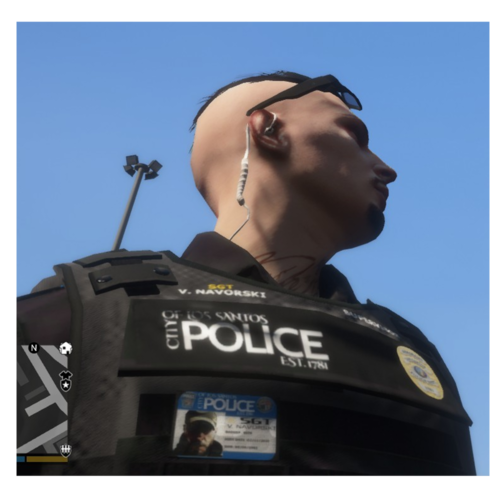 Maybe I am doing something wrong. I installed these and when I attempt to use the uniforms through EUP menu I cannot get any of them to load. Any one able to explain the correct way for me to load these?
- 95 comments
- 16 reviews
-
No, I just use EUP law and order and the Search and rescue one.
-
Hello, I like many others are using EUP, however since the last GTA update when I load in my player is wearing a search and rescue shirt with a sheriff vest. When I go into wardrobe to change I cannot get any of the vests to spawn correctly. Does anyone have any experience with this and a fix? I have tried a fresh install of EUP and it still did not fix it.
-
OpenIV is a program you use if you put modded cars in your car. If you just use the basic cars, uniforms, equipment. Then you more than likely haven’t downloaded or used openIV
-
For me all my files are in game still, my vehicles are there, same with uniforms. The only things I had to reinstall was radiance V, and Visual V. Try opening up your trainer (F3) and spawning your vehicles that way and see if they are there. I do know after every title update you have to reinstall any visual mods you use. I was wrong I had to reinstall my uniforms as well.
-
I would like to extend this solution hopefully it works for you. I forgot to go into OPENIV and update the update.rpf file. Once I did that I was able to load into the game and play again.
-
Hello, I updated to 0.43, and updated RPH and Scripthook. Now I get to the "loaded plugin "lspd first response" and it just sits here with the loading circle spinning... Any ideas? I have it set to auto load LSPDFR and EUP. I have tried disabling those and it did not work and I also tried windowed mode which also did not work.
-
Hello, I have downloaded a few cars and the authors released them with LOD issues. What I mean by that is when you get too far from the vehicle they have red and blue or white circles that appear above the light bar. Is there anyway I can manually fix this issues on these cars?
-
 Oh okay cool. I still use this car every time I patrol so no worries. Keep up the great work. I’ll be downloading everything you release.
- 253 comments
- 53 reviews
-
-

- 1
-
-
Still wondering if anyone else has the front visor lights and all lights in the back a very light blue and then a few are darker? How can I make them all darker the light blue is too light.
- 253 comments
- 53 reviews
-
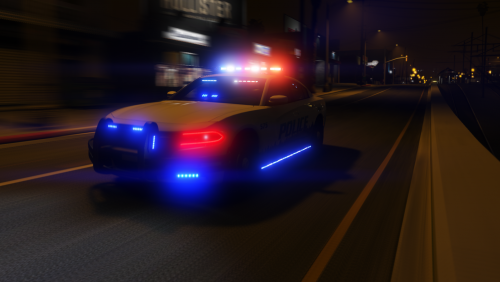 The only thing I have noticed is when you have the lights on and are a bit away from it there is a white light and blue light way above the car in the sky.
- 28 comments
- 8 reviews
-
-
- 1
-
-
I don't know if it just my game, but I noticed with the new updated verison the visor lights are not as bright as they used to be... Any one else notice this?
- 253 comments
- 53 reviews

