


Nutt
Members
-
Joined
-
Last visited
Everything posted by Nutt
-
What was the last thing you installed (script, vehicle add-ons, etc...)?
-
Believe or not, I have over 300 vehicle mods, with the same original default gameconfig. The problem is that the image (img) files between all the updates and user add-on's, causes rpf-image bloat. If you're adding huge add-on packs, versus replacing vehicles, the simplest thing to do is check the dlc.rpf image configuration "setup2.xml" file. Each add-on package or DLC update has this file when you first click the dlc.rpf image (assuming you're using Open IV). Within the "setup2.xml" file you should see a "name hash" and "order value" line. These particular lines are the biggest causes of vehicles not showing up and game crashes. Lots of the add-on packages are created using the same method from a previous package build. So, you'll have several add-on's with the same "name hash" and "order value". This will cause problems with add-on vehicles not spawning and game crashes. GTA V recognizes the multiple dlc.rpf as one image, because they are using the same name hash and order value (hence a bloated rpf-image). To resolve this, simply correct those lines. Example: <namehash>stealth</namehash> to <namehash>blahblahblah</namehash> and change the order value number to something like 50 or higher. Once the corrections are made, you should be good. If not, just check all other user created add-on dlc.rpfs for the same issue. You do not have to check Rockstar's download contents, just the ones gamers created. Hope that helps...
-
Hello Everyone, Does anyone know how to bypass the default license plate system within GTA V? There are some emergency vehicle mods that allow for custom plates, however once in the game, the default exempt plate shows up. And before anyone ask, yes I can see the plate on the vehicle within the Open IV vehicle file viewer. Literally it's mapped on the vehicle within Open IV, however once in the game, the exempt plate rears it's ugly head. Thanks... FYI: To all the car modelers, it would be nice and easier if you would take the time to map (template map) the license plate for custom designs, rather than leaving the default system on handling this. Many livery designs outside of the California based designs, don't use the "exempt" tag design, but there own state, county or city design layout.
-
 As of now, any officers/vehicles spawned by LEJS will not assist the game AI officers when responding to emergency calls. They will only assist in emergencies if they are already spawned, or going to be spawned soon. In other words, they will only assist in emergencies if they are patrolling or on watch. Albo is working on a solution towards integrating (hooking) LEJS into the game's AI system, plus some other goodies coming soon.
- 270 comments
- 19 reviews
-
-

- 2
-
-
File updated... 0.8.0.0: Updated for GTAV 1.0.944.2 and RPH 0.49. Still works with RPH 0.41 and higher. Various adjustments made to improve performance and stability on the new RPH & GTA. Some slight changes in how the plugin is loaded/unloaded. Fixed a problem that prevented the console command from working.
- 270 comments
- 19 reviews
-
-
- 1
-
-
-
Hello everyone, I've been away for a minute, but I have returned. Hopefully before the New Year, Albo1225 and I, can get an updated file out with some improvements.
- 270 comments
- 19 reviews
-
-
- 1
-
-
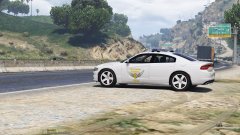 OSHP and MSP are more open to being visible, than finding the most clandestine spots. Being more visible on highways and roadsides actually helps reduce traffic incidents (speeding, reckless driving habits, etc…) yearly, than other policing traffic tactics/methods. Being planted (hiding) is more towards catching those “particulars” who habitually disobey traffic ordinances/rules/laws…
 -
An eye for an eye isn't good for anything in life. God bless all those souls lost within the recent hours, days, weeks, months and years. That's all I have to say....
-
Glad to hear. You can create (assign multiple vehicles to a zone) more than one vehicle per zone. Example below... [Armada Police: Patrol v1] Zone Name=Great Chaparral Vehicle Invincible=True Keep Vehicle Clean=True Vehicle Livery Number= Shift Start Time=00:00 Shift Stop Time=00:00 Spawn Chance=25 Emergency Vehicle=chargerarmada Ped Model 1=S_M_Y_Cop_01 Sirens Active=False Vehicle Blip=True Ambient Event Chance=5 Ambient Event=Pursuit [Armada Police: Patrol v2] Zone Name=Great Chaparral Vehicle Invincible=True Keep Vehicle Clean=True Vehicle Livery Number= Shift Start Time=00:00 Shift Stop Time=00:00 Spawn Chance=25 Emergency Vehicle=chargerarmada Ped Model 1=S_M_Y_Cop_01 Sirens Active=False Vehicle Blip=True Ambient Event Chance=5 Ambient Event=Pursuit [Armada Police: Patrol v3] Zone Name=Great Chaparral Vehicle Invincible=True Keep Vehicle Clean=True Vehicle Livery Number= Shift Start Time=00:00 Shift Stop Time=00:00 Spawn Chance=25 Emergency Vehicle=chargerarmada Ped Model 1=S_M_Y_Cop_01 Sirens Active=False Vehicle Blip=True Ambient Event Chance=5 Ambient Event=Pursuit As long as the jurisdiction title (name) is slightly different from the last... you'll be able to add/spawn as many vehicles within a given zone.
- 270 comments
- 19 reviews
-
-
- 1
-
-
You're not going to see that vehicle depending on the "spawn chance ratio" and/or "shift time" it should appear. The dot is only representative of where it should appear. If you set spawn chance for 100 and shift time 00:00 for both start and end, you should see the vehicle patrolling. If not, paste your .INI file here.
- 270 comments
- 19 reviews
-
What do you mean missing something? If you’re in master-view mod (F3) the green dots represent the custom created jurisdiction patrols (patrolling), while red dots represents stationary patrols. Yellow dots represents Zone spawned created jurisdictions. So, master-viewing mod (F3) is only a overview of where these vehicles (green dots / red dots) are located, based on Spawn Chance and Shift Times. This also applies to Zone Spawned vehicles (yellow dots), however Zone Spawned vehicles aren't locked into custom spots as they are dynamic spawning in nature.
- 270 comments
- 19 reviews
-
-
Glad you got the file working. But yes, a simple rename of the main folder or just dragging the contents to the proper GTA V folders will resolve this.
- 270 comments
- 19 reviews
-
per Albo the great... 0.7.0.0: -Added 'Random' to ambient events. -Added 'Ambient Event Chance' field. -Tweaked pursuit ambient event slightly. 0.6.0.0: -Reworked the processor architecture target to x64 only. -Removed various debugging symbols. -Reworked the pullover ambient event. -Fixed an issue where the suspect entities were not appearing/disappearing properly. 0.5.1.0: -Fixed issues with the pursuit ambient event. -Pullover ambient event implemented into custom jurisdiction setups. (Zoned setups won't work with pullovers.) -Improved suspect entity cleanup. -Fixed errors thrown when setting zoned jurisdictions to pursuit. -If SirenActive is true, siren is now also no longer silent during pursuits. 0.5.0.0 -Multiple zone names per zoned jurisdiction. -Added 'writing' ambient action. -Option of just spawning a parked vehicle without the need for an officer. -Added the 'ambient event' field for both zoned & custom jurisdictions. -Added 'Pursuit', 'Pullover' and 'None' to the ambient event options. -Officers responding to other crimes is still WIP. -Various code & performance optimizations. -INI EDITOR 1.5.0.0: Redone Zone Names Added field for ambient event. Added writing option. Altered some of the layout behind the scenes code. Hello Everyone, Quite a few new features were added to the latest LEJS file, since the 0.4.0.0 version. As you can see from the change log a few versions (0.5, 0.5.1 and 0.6) were not released do to quality testing and making sure the release candidate is in good working order. • The newest release contains options for selecting multiple zones at the same time, when creating patrol points… without the need for creating repeated layouts on covering particular area(s). • There are two new vehicle ambient features for patrolling cars. Patrol and Pursuit for Zoned created patrols and Patrol and Pullover for Custom created patrols. Both ambient events have options for Random and Chance on allowing a more realistic approach. More vehicle ambient features coming soon… • New writing ambient action for law enforcement peds. You guys will love the pullover ambient feature... looks awesome watching the officer interaction animation and what follows. Albo, nailed it here... :) Please remember, pullover only works with custom created patrol points, not zoned spawns.
- 270 comments
- 19 reviews
-
-
- 1
-
-
Yes. The current script should be compatible with the latest RagePluginHook. The new LEJS should be coming this weekend or sooner....
- 270 comments
- 19 reviews
-
-
- 2
-
-
-
Hello everyone, I was wondering is anyone else having issues with the latest GTA V patch giving customed add-on police vehicles normal civilian horns, instead of the emergency sirens? Usually I'm pretty good at figuring out mods/add-on issues, but this one has me stomped. All my custom named police vehicles (example: cvpimcso, cvpidpd, cvpihpd, chargermsp, etc...) lighting will not function without the emergency siren (or not be recognized as an emergency vehicle). Believe me, I checked everything (vehicles.meta, handling, carvariations, etc...), making sure the audiohash settings in vehicles.meta didn't change and so on... A little help would be great! Thanks!
-
-
.jpg.47584f7e1d1479ea668a1364cb2966a2.jpg)
From the album: Federal Package: Border Patrol, U.S. Park Police & Ranger
Federal Package: Border Patrol, U.S. Park Police and Ranger Liveries. -
Federal Package: Border Patrol, U.S. Park Police & Ranger:
-
.jpg.711109dc3d3d20eadae528187be96530.jpg)
From the album: Federal Package: Border Patrol, U.S. Park Police & Ranger
Federal Package: Border Patrol, U.S. Park Police and Ranger Liveries. -
.jpg.c1f296a0c353d53b012c4ad66e65a633.jpg)
From the album: Federal Package: Border Patrol, U.S. Park Police & Ranger
Federal Package: Border Patrol, U.S. Park Police and Ranger Liveries -
.thumb.jpg.3da3e1cebe379e8bd8a56e65a1b6a4d3.jpg) Package Contents: - Multiple Border Patrol fleet numbers. - Multiple U.S. Park Police fleet numbers and two variations. - Two variations of the U.S. Park Ranger. About: U.S. Border Patrol: https://en.wikipedia.org/wiki/United_States_Border_Patrol U.S. Park Police: https://en.wikipedia.org/wiki/United_States_Park_Police U.S. Park Ranger (NPSR): https://en.wikipedia.org/wiki/National_Park_Service_Ranger Vehicles fitted for:
Package Contents: - Multiple Border Patrol fleet numbers. - Multiple U.S. Park Police fleet numbers and two variations. - Two variations of the U.S. Park Ranger. About: U.S. Border Patrol: https://en.wikipedia.org/wiki/United_States_Border_Patrol U.S. Park Police: https://en.wikipedia.org/wiki/United_States_Park_Police U.S. Park Ranger (NPSR): https://en.wikipedia.org/wiki/National_Park_Service_Ranger Vehicles fitted for:- 4 comments
- 3 reviews
-
-
- 6
-
-
Glad to hear. Yes, a large activation boundary and patrol area size will start their patrol before your get there. :)
- 270 comments
- 19 reviews


.thumb.jpg.3da3e1cebe379e8bd8a56e65a1b6a4d3.jpg)
.jpg.47584f7e1d1479ea668a1364cb2966a2.jpg)
.jpg.711109dc3d3d20eadae528187be96530.jpg)
.jpg.c1f296a0c353d53b012c4ad66e65a633.jpg)