


ChrJahnsen
Members
-
Joined
-
Last visited
Everything posted by ChrJahnsen
-
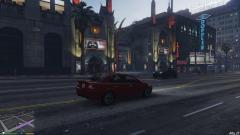 Enjoying is too mild a word for how I feel about GTA 5 for PC. I enjoy it WAY more than on my PS3!
 -
Nice, the spawning bug which created about a billion ambulances is gone. However, I still have problems with the ambulance. I have set both lcpdfr.ini and callouts+.ini to spawn an ambulance with Control+M. Sure enough, an ambulance is spawned but it doesn't stop where I am. It just drives on. :(
-
Please try this step-by-step guide. I wrote it after several hours of trying to get the taser to work. I finally succeeded. :)
-
Phew! I just spent several hours trying to work out why the hell I couldn't draw my taser inside the game. No matter what I tried, I kept hitting the key and nothing happened. I kept checking everything and trying new ways around this and in the end I located the final problem. I then thought I might as well make a little check-list for other people who can't get the taser to work. So, if you also have problems getting the taser to work, please go through this check-list carefully. In the following checklist, [GTA4] refers to the root game folder. Example: I run the game through Steam, so my root folder is E:GamesSteamsteamappscommonGrand Theft Auto IVGTAIV. You can recognise your game's root folder by Install LCPDFR using the automatic installer. Select everything inside [GTA4] and right-click it. Make sure the "Read only" is unchecked and click "OK". In the next window, make sure it applies to all subfolders and files. This ensures that you can overwrite any files you want. Download the manual installer and install LCPDFR again - overwriting all files. This is to make sure you have all the latest data files. Run the game diagnostic tool: [GTA4]LCPDFRLCPDFR Diagnostics Tool.exe. Inside the tool, run the "Check your installation" (I usually have to check the checkbox at the bottom before running this in order to point out where the game folder is). If the diagnostic tool doesn't fill up entirely with green bars, something is missing. Clicking an empty bar will provide a solution to your problem. By the way: I run a 64-bit Windows 7, but I still had to use the 32-bit C++ package, so if you need to install this required bit, don't download the file named "x64" but use the file named "x86" instead. If you are using the native trainer (if you have no idea what this is, ignore this bit :-)), enter the [GTA4]trainer.ini file and set the KeyBindingsDisabled=1. This is to ensure that the trainer doesn't "steal" the function of your taser key. Download the attached ZIP file. The two folders inside this archive have to be extracted into [GTA4]. Make sure you extract the two folders to this exact location, otherwise it won't work. Also make sure that you overwrite all existing files (you will want to back these files up first, so look below for a list of the files that will be replaced). This ensures that all the correct weapon files necessary for the taser to work are in place. The files that are replaced by the last step are listed below and these should be backed up before you overwrite them: Inside [GTA4]commondata: default.dat gta.dat images.txt Inside [GTA4]pclcpdfr: models.img definitions.ide WeaponInfo.xml Inside [GTA4]pcmodelscdimages: weapons.img That is a total of 7 files. The first three files are the files that make sure that the game starts linking weapon information to the files in [GTA4]pclcpdfr (the next three files) rather than the default weapon files. The three files in [GTA4]pclcpdfr are the files that adds the taser to the game and determines its behaviour. The last file is the binary file containing the weapon library. It is the game's original weapons.img with the two taser files (lcpdfr_taser.wdr and lcpdfr_taser.wtd) added to it by using the OpenIV editor. If your taser still doesn't work after all this, I am out of ideas. Sorry, mate. Anyway, I hope this solves taser problems for everyone. :-) DISCLAIMER: I am not liable for any damage to your GTA IV game or to your PC by performing the things described in this post.
-
Dear ineseri / staff. I'm sorry if they appeared similar. I realise they were posted within an hour of each other, but they were in fact two different posts reporting two different bugs, and therefore included two different sets of the same log files. Anyway, I just wanted to point that out, also for the sake of LukeD and his debugging of the fabulous Callouts+. Regards, Christian
-
Okay, I got another one. I hope I'm not too annoying with all those bug reports. :) I just pressed E next to the officer down. I examined the cop for like 10 seconds and at the exact time the text "Suspect is in a black DUKES ..." appearted on screen, the standard LCPD error appeared on my screen and began to beep like crazy - like once every 1/10 of a second. I am attaching the log files, buddy. :) Guess who! It's the Danish terror again. This time I had two pedestrians who were killed by a gas tank detonation. I called for an ambulance. The driver drove up, stopped pretty close to the two injured people and then kept getting in and out of his vehicle. This repeated itself ad nauseum. Log files are attached. Posts merged. Please do not double post. - Staff
-
Hey LukeD. I just saw this for the third time. Tow truck driver steps out and the car teleports onto the back of the truck. Then the truck sounds its horn for like 0.2 of a second and the car is "re-teleported" to the back of the truck. You could say that the car on the back of the trunk "blinks" att the exact same time the short honking of the truck horn sounds. This repeats itself about 15-30 times and then I get the standard shutdown error in LCPDFR. I am attaching the log files. Thanks again for all your hard work, buddy.
-
-
Excellent, buddy. Can't wait to try it! I just had an idea. In the vdh tow truck script, you could actually configure how the tow truck spawned. I loved that feature. There were three "speeds", and if you set it to the quickest one, the truck just spawned right in front of you, magically teleported the stranded vehicle onto its back and then disappeared again. No driving to and from. Would you be able to make something similar for the paramedics and tow truck? I don't mind at all that it isn't ultra-super-realistic and it just spawns right in front of me. The way the ambulance spawns in the vdhPoliceHelper is also really appropriate, I think. It appears just slightly down the road and drives up rather slowly thus not plowing into cars and bystanders. :) Would you be able to make a similar "spawn configuration" for the ambulance - like with the tow truck? Thanks again for your work, buddy.
-
Hey bud. You're doing a fabulous job with Callouts+. I absolutely adore it!! Please don't change anything about what you're doing. :-) And THANK you for adding the tow truck. Phenomenal improvement. There are two bugs I wish to report. With the two 0.5 releases, I've had a lot of problems with the tow trucks and ambulances. First of all they seem to get stuck rather easily, and they also seem to be able to spawn in alleys, parking lots and the like, and then they are completely unable to get out. :) Second of all I seem to get an awful lot of bugs when the drivers exit the vehicles, both the paramedics and the tow truck driver. I haven't established a complete pattern yet, but I just had the paramedic exit his ambulance and run to some other spot than to where the injured person actually lay on the sidewalk. Then I get about a thousand "beeps" and the well known error message about LCPDFR has encountered an error. I have attached the log files, mate. Thanks again for your hard work. You make a lot of people very happy.
-
Hey buddy. "44 minutes" is a great watch, but it's very specific. It's about the North Hollywood Shootout. http://en.wikipedia.org/wiki/North_Hollywood_shootout Darn good for excitement, and Michael Madsen is always cool. :) I enjoyed End of Watch with Jake Gyllenhaal. Good cop movie, methinks, although they often don't follow proper police procedure. :)
-
-
-
-
Update: Wouters Callouts now works with 1.0c even while running Callouts+ and vdHPolicehelper at the same time.
-
Wouters got updated today, apparently re-compiled for 1.0c. Can't wait to try it! :-D
-
OH BOY!!! I've been waiting so IMpatiently :-) for this to be updated to 1.0c. I can't wait to get going. You're a hero, man! I will also report back with any problems, promise.
- 74 comments
- 36 reviews
-
Update: I have now re-installed everything once more, but this time I went for version 1.0b. Wouters callouts now work again without errors.
-
I second that. Immediately upon upgrading to 1.0c, Wouters started to make errors. I then completely re-installed GTA IV and LCPDFR 1.0c but the errors persist.
-
Yep, I have had this happen to me as well. There doesn't seem to be anything specific provoking this bug.
-
-
 Have you tried uninstalling .NET Framework and then re-installing it? I did get some crashes pertaining to those certain DLL-files, and it helped re-installing it completely. You might also try to see if you have the latest version of DirectX.
- 534 comments
- 206 reviews
-
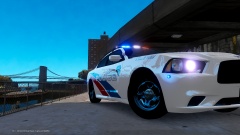 Grizly, I know it's a cliché, but ... "Me too!" :-) That charger is gorgeous! Do you have a link or something?
 -
I LOVE the script! Thank you SO much! Beforehand, all that seemed to spawn were taxis!! It was like a bad dream: taxis at every intersection. :-)
- 97 comments
- 67 reviews
-
-

- 1
-

