gamepro552
Members
-
Joined
-
Last visited
Everything posted by gamepro552
-
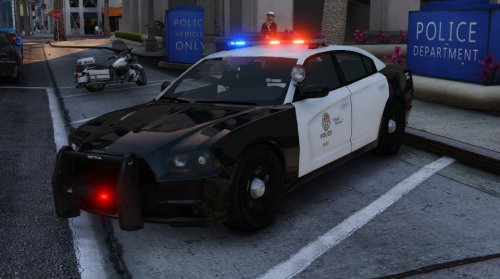 I was going to come on here and say something about the rear seat bug, I noticed it as well. It was very popular with GTA IV and some of the chargers, just seems like there isn't enough space back there, lol. Anyways, the car is freaking fantastic, I don't know if it just my graphics mods/settings, but it looks beautiful. I thank you very much for your work on this. A standard rambar would be nice, maybe some work on the interior, and the backseat bug, but I am sure you already know this. Thanks again, 10/10.
- 25 comments
- 10 reviews
-
-

- 1
-
-
-
.thumb.png.e88f1892e13ddb98db35e668d465c34b.png) Amazing car, and I love the Ohio Sheriff themed skins, blew my mind when I saw it. I just really wish we had a Dodge Charger with this type of quality. I've been trying to learn how to convert models just because I am dying for a quality Dodge Charger. I was thinking maybe the older body style, like 2006-2009 or something, but a 2010+ one would be great too. If anybody knows if there is one being worked on or created, please let me know.
Amazing car, and I love the Ohio Sheriff themed skins, blew my mind when I saw it. I just really wish we had a Dodge Charger with this type of quality. I've been trying to learn how to convert models just because I am dying for a quality Dodge Charger. I was thinking maybe the older body style, like 2006-2009 or something, but a 2010+ one would be great too. If anybody knows if there is one being worked on or created, please let me know.- 182 comments
- 44 reviews
-
I would really love something like this, please don't give up!
-
-
Hey guys, I need to change the siren setting for one of my police vehicles so the lightbar works correctly, but I can't seem to find the right carvariatons.meta file for it, I search in OpenIV but I get like 15 different carvariations.meta search results. Does anyone know the locations of these files for the police vehicles? Like police, police2, police3, police4, and so on?
-
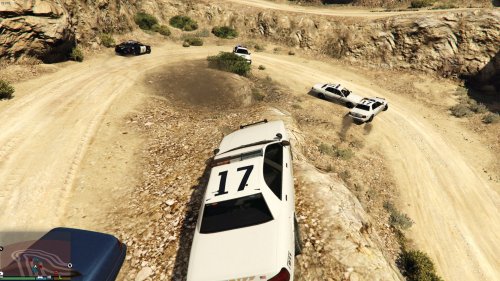 LMAO, I know what you mean.....
 -
You know, I was just thinking about something like this a few days ago. I haven't tested it yet, but I installed it. Does this also make the ambulance invincible? By the time they get to the scene for me, the ambulance is trashed.
-
 Not really sure, the textures I downloaded worked with his other CVPI's, just not this version. The textures are in a folder that labeled LSPD 4096px if that means anything.
- 146 comments
- 24 reviews
-
I found out it had something to do with the LSPD textures I was installing on the car. I just extracted the textures from the current CVPI I had and put them on this model. All fixed now.
- 146 comments
- 24 reviews
-
-
- 1
-
-
Great car, I have it in the Sheriff slot. For some reason though, when I try and replace the Police slot with this car, my game won't get past the loading plugins screen. I've tried installing it on two PC's with the same result. Will this model only work with the Sheriff slot?
- 146 comments
- 24 reviews
-
-
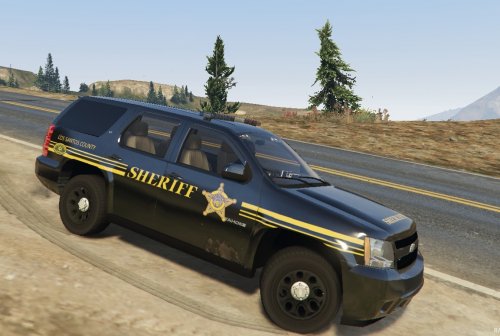 Sneak peak for you, I expect I will be able to release this skin tomorrow. I'm probably going to compile all my skins into an Ohio based package so people can just easily download them all at once.
- 8 comments
- 4 reviews
-
-
- 1
-
-
-
-
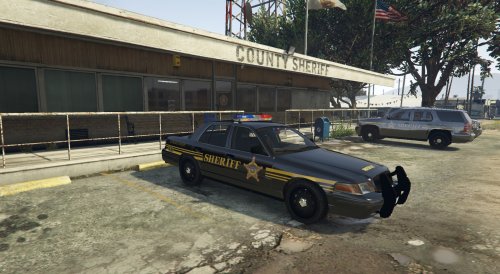 I present to you the CVPI version of my Ohio Based LSSD Skin. The skin will work on any CVPI based off of F5544's template. Check out the Tahoe version of this skin by me: http://www.lcpdfr.com/files/file/8912-ohio-based-sheriff-skin-for-tahoe/ TYPE: Vehicle Skin MODEL: Any CVPI based off of F5544's template. Original model: http://www.lcpdfr.com/files/file/8765-ford-cvpi-dev/ Model in the screenshots: http://www.lcpdfr.com/files/file/8870-ford-cvpi-lspd-mx7000/ I assume you have OpenIV and know how to install custom vehicles and skins. Install Instructions: 1. Navigate to the location of the CVPI that you have installed. I personally have it replacing sheriff located at (GTA V > update > x64 > dlcpacks > patchday3ng > dlc.rpf > x64 > levels > gta5 > vehicles.rpf) 2. Make sure you have "Editing Mode" enabled in OpenIV, and then open the sheriff.ytd file. 3. Locate the CVPI's several skins inside of the CVPI's .ytd file, click the one you want to replace, and then click on "Replace" near the top right of OpenIV. 4. Locate the skin inside the "Texture Folder" and click Open. 5. Make sure the skin has replaced what was there before inside the .ytd file, if it is there, you are all done, and may close OpenIV. 6. If not, try these steps again. This skin was created by gamepro552 on lspdfr.com. Anybody and their mother is free to edit this skin as they please.
- 5 comments
- 3 reviews
-
-
Hello everyone, I present to you an Ohio Based Sheriff Skin for the newly released Tahoe here on lspdfr.com. As you may notice in one of the screenshots, I have a skin for F5544's CVPI also. In my opinion, that skin is not ready to be released yet, and I will continue to work on it. I will create a pack including this skin and the skin for the CVPI in due time. This is my VERY FIRST RELEASE, so if I am missing any information that I may need in the installation instructions, or something is wrong with the file, pease feel free to let me know. Check out the CVPI version of this skin by me: http://www.lcpdfr.com/files/file/8916-ohio-based-sheriff-skin-for-cvpi/ TYPE: Vehicle Skin MODEL: 2008 Tahoe PPV by CollaboProductions http://www.lcpdfr.com/files/file/8890-2008-tahoe-ppv/ I assume you have OpenIV and know how to install custom vehicles and skins. Install Instructions: 1. Navigate to the location of the Tahoe that you have installed. I personally have it replacing sheriff2 located at (GTA V > update > x64 > dlcpacks > patchday3ng > dlc.rpf > x64 > levels > gta5 > vehicles.rpf) 2. Make sure you have "Editing Mode" enabled in OpenIV, and then open the sheriff2.ytd file. 3. Locate the tahoe_skin inside of the Tahoe's .ytd file, click it, and then click on "Replace" near the top right of OpenIV. 4. Locate the skin inside the "Texture Folder" and click Open. 5. Make sure the skin has replaced what was there before inside the .ytd file, if it is there, you are all done, and may close OpenIV. 6. If not, try these steps again. This skin was created by gamepro552 on lspdfr.com. Anybody and their mother is free to edit this skin as they please.
- 8 comments
- 4 reviews
-
Iv'e made a matching sheriff skin for the newly released Tahoe. The vehicle model itself still needs some work, but it still looks amazing. Going to do a little more work to both of these skins and then I will probably release them as a pack in the correct place on the Downloads page. Just give me a few more days ;) I also won't be able to resist making one of these in due time:
-
-
-
-
-
-


.thumb.png.e88f1892e13ddb98db35e668d465c34b.png)