



Down Under Mods
Members
-
Joined
-
Last visited
Everything posted by Down Under Mods
-
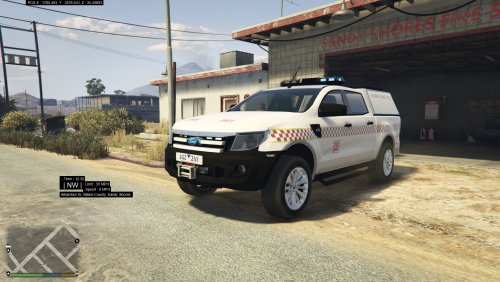 I'd love pictures of the front, the lockers and the interior mainly. And some of the lightbar just so I can see what they're using
 -
Actually yeah man that'd be pretty good if you could
-
2015 but I don't think anything has been changed on it since https://youtu.be/w_rTTWSTUoU
-
Damn man beat me to it. I'm in the middle of modelling one exactly like the ones In those pictures
-
.thumb.png.f2cf22c7113a99a590d937c0ab1ac6dd.png) I already told you. you most likely put it in a different car slot that has a different sirensetting
I already told you. you most likely put it in a different car slot that has a different sirensetting- 45 comments
- 5 reviews
-
yes I am sure. https://www.youtube.com/watch?v=wjAK6A45D60 or https://www.youtube.com/watch?v=weoh-APGoSY or https://www.youtube.com/watch?v=yPQvQIRgk4Y
- 45 comments
- 5 reviews
-
You either put it in a car slot with a different sirensetting or are using some other modification. it's nothing to do with my model. and for further reference don't say something like "when are you fixing the lightbar mate" because it makes you sound like a prick
- 45 comments
- 5 reviews
-
-
.thumb.png.23b56a0ef426095045adcc2870493be1.png) Already done it i just haven't released it yet Probably the same thing it did to IV Yes just rename everything and put it in a different slot
Already done it i just haven't released it yet Probably the same thing it did to IV Yes just rename everything and put it in a different slot- 27 comments
- 8 reviews
-
-

- 1
-
-
It's for when ELS V comes out I don't have to change the name of all my models, and because I might release ELS versions of them too
- 27 comments
- 8 reviews
-
Sounds good just remember to get permission to convert if they weren't originally your models
- 27 comments
- 8 reviews
-
Nah I keep the models as close to their real life counterparts as possible I'm gonna rape victoria first then move on to other states
- 27 comments
- 8 reviews
-
-
- 1
-
-
~~~~~~~~~~~~~~~~~~~~~~~~~~~~~~~~~~~~~~~~~~~~~~~~~~~~~~~~ Victoria Police Marked FG-X XR6 Turbo 2.0 [AUSSIE FLASH PATTERNS] BY MACGREGOR FOR GRAND THEFT AUTO V ~~~~~~~~~~~~~~~~~~~~~~~~~~~~~~~~~~~~~~~~~~~~~~~~~~~~~~~~ ABOUT: This is a fully marked Ford FG-X XR6 Turbo, used by Victoria Police, Australia It uses lighting equiptment produced by Code 3 Lighting TERMS OF USE: The user of this vehicle has permission to edit the liveries on this vehicle or create their own with the provided template. IF the user modifies my liveries, they do not have permission to re-upload it to any website, if they make their own they have permission to, although they cannot upload the vehicle with it. The user has permission to use this vehicle for a clan, provided the clan pack is not uploaded to the public. If any user wishes to create a public vehicle pack with this vehicle, they must ask permission from me, Macgregor, prior to using it. NOBODY has permission to use unlocking or ripping software to gain access to the model for dev use. If you wish to use anything seen in this model you must contact me. ~~IF ANYBODY IS FOUND TO HAVE BREACHED THESE TERMS I WILL ASK FOR YOU TO TAKE THE MODEL OFF THE INTERNET. FAILURE TO COMPLY MAY RESULT IN LEGAL ACTION~~ SPECIFICATIONS: LIGHTING SYSTEM: Ausse Flash Patterns 1.2 EXTRAS: no VEHICLE SLOT: sheriff DISCLAIMER: I, Macgregor, do not take responsibility for any damage to your game, or any punishments as a result to using this mod in GTA Online. It is the user's responsibility to know how to operate OpenIV correctly. Readme file created by Macgregor, 3/5/16
- 27 comments
- 8 reviews
-
-
- 5
-
-
-Copy.png.45db63ca6b17640eddd03968fbc50181.png)
From the album: Macgregor's GTA V photos
© Macgregor 2016
-
-
.thumb.png.fdcadb68f7f1450bfc1fbdd76248ac10.png) I realised you can just add a new police4 line in, but its not the handling that matters it's the vehicle lines, if you didn't add it to the vehicles.meta the liveries wont change
I realised you can just add a new police4 line in, but its not the handling that matters it's the vehicle lines, if you didn't add it to the vehicles.meta the liveries wont change- 33 comments
- 4 reviews
-
-
-Copy.png.08a3fe5440c521d6e7cdf82245b7a283.png)
-
-Copy.png.1b7ea0fbaed627e153dc1db2efeea8a8.png)
From the album: Macgregor's GTA V photos
© Macgregor 2016
-
I'll chuck some photos up soon, but you might not see much more from me just yet, I'm waiting for something
- 45 comments
- 5 reviews
-
Maybe you didn't have the mod folder installed correctly, or something simple like you just booted the wrong copy of the game
- 45 comments
- 5 reviews
-
It's most likely an error on your end. You probably installed it to the wrong area or the launcher detects the modification and re-downloads the default files.
- 45 comments
- 5 reviews
-
-Copy.png.31d5ab1f0432bf183c874fd5674e8017.png)
From the album: Macgregor's GTA V photos
Old picture, but I figured I'd upload it anyway© Macgregor 2016
-
-Copy.png.0e68b3c92e1f5afaba503ca81bd4ca03.png)
From the album: Macgregor's GTA V photos
© Macgregor 2016
-
-Copy.png.f18deb1944f8f5c5b98e70110050f3e5.png)
From the album: Macgregor's GTA V photos
Officers from Albury assisted Gundagai highway patrol in taking down a suspect with a warrant for arrest© Macgregor 2016

.thumb.png.f2cf22c7113a99a590d937c0ab1ac6dd.png)
.thumb.png.23b56a0ef426095045adcc2870493be1.png)
-Copy.png.45db63ca6b17640eddd03968fbc50181.png)
.thumb.png.fdcadb68f7f1450bfc1fbdd76248ac10.png)
-Copy.png.08a3fe5440c521d6e7cdf82245b7a283.png)
-Copy.png.1b7ea0fbaed627e153dc1db2efeea8a8.png)
-Copy.png.31d5ab1f0432bf183c874fd5674e8017.png)
-Copy.png.0e68b3c92e1f5afaba503ca81bd4ca03.png)
-Copy.png.f18deb1944f8f5c5b98e70110050f3e5.png)