Element
Members
-
Joined
-
Last visited
Everything posted by Element
-
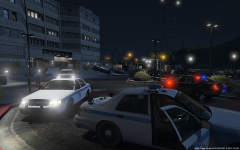 Baltimore County Police respond to suspicious activity near a government facility
 -
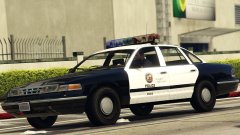 Damn.. This thing is gonna be epic.
 -
Saw this one a year ago. Nice model. Not about to make any guarantees on a project less then 48 hours old, but progress is being made.Cosmo just started to work on converting it. And will be doing a Dev version in the near future. Still very early on though and nothing is for sure at this time.That is exactly what i`m looking for! Maybe marked and unmarked. Sorry been waiting for one since 2009 and ready to buy out of this wait. Ill re read the forums Rules and guidelines.This would be one hell of a feat for someone to make this for GTA V. It was never really in GTA IV or V. Someone did make a 1994 Vic for IV but it was left in Beta stage and was really to buggy to use. To see it in V would be a service to the modding community as it has been extensively requested since LCPDFR/LSPDFR was a thing.I would love to see the 7th gen Impala`s in V. That was the first personal vehicle i owned that i fell in love with. 2002 Impala LS with the sweet 3.8L V6 , 205BHP and hella torque. Loved that car so much when i blew out the motor in it racing i went out and bought the 305 BHP 2013 Impala LT. Such nice domestic sedans for a daily driver. And they look mean as patrol cars.This looks great and is gonna be epic with my Baltimore Skins. Thanks for making this. I did on IV and it was a pain in the ass. Nice work. I do think that the MSP emblem on the back of the Explorer should be just a little bit smaller.