


antiboy6
Members
-
Joined
-
Last visited
Everything posted by antiboy6
-
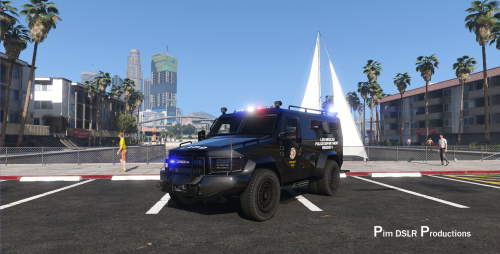 Mehh it's OK... I wish we could change the rims for something real like in the picture. I'm using this one thanks. Change the rims, I hate the generic GTA 5 truck rims.
- 66 comments
- 11 reviews
-
 Cause you have to activate Light Stage 3 before then siren. use my ELS control lines in order to use Q for Light stages and E for siren and R for Siren 2 (WOWOWOWOWOWOW) for intersections IT WORKS! [ CONTROL ] AllowController = true Toggle_LSTG = 81 Toggle_SECL = 75 Toggle_WRNL = 76 Toggle_CRSL = 219 Toggle_TKDL = 221 Toggle_BLKT = 220 Toggle_SIRN = 71 ChgPat_PRML = 85 ChgPat_SECL = 73 ChgPat_WRNL = 79 Sound_Ahorn = 89 Sound_Manul = 84 Snd_SrnTon1 = 69 Snd_SrnTon2 = 82 Snd_SrnTon3 = 51 Snd_SrnTon4 = 52 Snd_SrnScan = 53 Snd_SrnTonX = 54 Snd_SrnPnic = 71 TogInfoPanl = 80 TogKeysLock = 145
- 2,655 comments
- 234 reviews
-
-
-
-
-
-
-
-
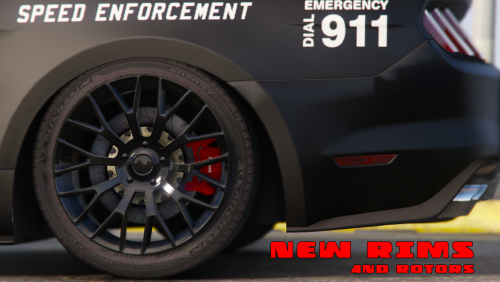 There us no steel rim option for the GT and the police buy them as is. The send them to be stickered and equipped. The GT uses 8" rims steelies are 5" I think, this would jeopardize handling big time.
- 106 comments
- 9 reviews
-
Told ya... maybe you can post your method, so we always have more roads leading to Rome.
- 2,655 comments
- 234 reviews
-
-
-
Hi remember me? Me and my deputies are running a all blue setup. What about that other spoiler?
- 106 comments
- 9 reviews
-
Remove VisualV and or RadianceV and use only MAKE VISUALS GREAT AGAIN 2.0... and like I ALWAYS say. It has two work. I'll have a donut next time I see you.
- 2,655 comments
- 234 reviews
-
-

- 1
-
-
No ELS don't have anything to do with that, if not for the Lightbar color or reflections. It's all in the order of things, whenever you apply graphic mods or any mod that touches graphic settings... make sure you install or reinstall MAKE VISUAL GREAT AGIAN 2.0 last! Just remember to apply your taxi light fix and no motion blur again. Adding VisualV and or RadianceV last, will cause that problem. Same here: Thank me later.
- 2,655 comments
- 234 reviews
-
-
Thanks man I doubt GPU it a GTX 1050ti ram is 8Gb but pc is XPS 630i 2.83GHz Quad Core... but HD space now that you say it is a merely 9Gb.
-
 How can LSPDFR be loaded twice... so I can look out for this too. I see double menus flash when I press B for backup. Default LSPDFR backup menu is disabled and I'm using Backup+.
- 1,178 comments
- 137 reviews
-
How did you guys solve these? I tried so many things on the internet. Even upgraded to From Windows 8.1 to Windows 10 because of this, still the same. It happens on high speed chases or after playing for a while.
-
Your trouble shooter still works great WONDERS, don't know why they don't use it MORE!!!!!!
- 124 comments
- 25 reviews
-
-
- 1
-
-
I know I know I'm not using it anymore I miss it but..., it uses a ton of resources as the developer states himself. Won't happen again.
- 1,178 comments
- 137 reviews
-
-
-
American Ambulances needed with carvariations lines. E-350 and E-450, there are enough Mercs around. We need something for our American patrols too. ATM I'm using this one https://www.gta5-mods.com/vehicles/ford-e450-led-version-ambulance-4k-by-pimdslr with a renamed firetruk carvariations lines cause I have all blue light on my patrol cars. So I need to make the ambulance blue too. It worked but at certain distance the side leds hang outside the model. And some side leds don't work.

.thumb.jpg.53e6566fc11617e23f7fb13f2792cbbe.jpg)
