


MooHamOinkBeef21
Members
-
Joined
-
Last visited
Everything posted by MooHamOinkBeef21
-
 Replacing textures isn't too bad, just open up the sheriff2.ytd file in OpenIV after putting your new vehicle in and then drag and drop the appropriate skins in. I'm sure you can find some tutorials online.
- 221 comments
- 34 reviews
-
I mean you can go under vehicle textures and find a ton of skins for the explorer covering a wide range of agencies, sheriff included I use this texture pack personally as it covers all the major agencies I like and a wide array of the popular vehicle models.
- 221 comments
- 34 reviews
-
All you have to do is change the file names to sheriff2 and replace sheriff2 in Patchday3, and in the carvariations you change the police3 to sheriff2. You will also want to change the HandlingID of Sheriff2 in your vehicles meta to police3 or it will flip very very easily. Screenshots from an older post (as the screens seem to have disappeared) to show what I mean the vehicle on the left is what the last 2 updates have made the dashlights do, and the one on the right is the original release of the model.
- 221 comments
- 34 reviews
-
Nice to see this model on the top of the update list, I'm still having the issue where the front dash lights are dim and more like the pushbar lights than the back LEDs which I thought they were the same as, is this intended?
- 221 comments
- 34 reviews
-
To go along with this it seems some of the new animations with .3 are making some interesting errors, currently I've seen if I draw my sidearm it will remove any baliistic vest I have on and then when I draw the stun gun it will throw a random grey ballistic vest on.
-
-
 Hey I saw you deleted this comment so did you find the fix for that issue, I'm having the same problem when drawing the tazer out now with the new animation is spawns a grey bulletproof vest.
- 2,349 comments
- 237 reviews
-
Ohhh Yes please even though it's being designed as FBI the lightbar and everything is pretty much the same setup as my local PD. Maybe the spotlight as an extra so it can be off for those who chose to use it as FBI but also allowing it to be installed in another slots as a conventional car. Either way I'm pumped for this whenever it is ready.
-
Yea I just did a fresh check and a reinstall of radiance V as I have edited my visualsettings to tone down Radiance a bit as it's still a little too bright for me. But yea it just appears to be something that was changed with the last update it doesn't look too bad with radiance V full on but for me with a toned down edit or for someone without Radiance it looks kinda bleh. Like it's a single light blinky in a big LED block vs the back ones which look like the full on LEDs. I suppose I don't mind too much either way the bigger issue is that the back ones are different from the front ones even though they are the same style of light.
- 221 comments
- 34 reviews
-
Really? And that's with the newest update as well? It's so weird because I currently have both the old version with the invis problem and the newest one with the fix one as Sheriff2 and the other as one of my highway cars the only difference is the actual vehicle files and yet I get that weird dash light glitch, guess it's time to go dig through the carvariations yet again...and probably facepalm when I notice some tiny typo I missed before lol.
- 221 comments
- 34 reviews
-
You have to adjust the vehicle meta for whatever model you're using under FLAGs here is the one I use for the explorer. <flags>FLAG_HAS_LIVERY FLAG_EXTRAS_REQUIRE FLAG_EXTRAS_STRONG FLAG_LAW_ENFORCEMENT FLAG_IS_OFFROAD_VEHICLE FLAG_EMERGENCY_SERVICE FLAG_NO_RESPRAY FLAG_DONT_SPAWN_IN_CARGEN FLAG_REPORT_CRIME_IF_STANDING_ON</flags> If I'm wrong please someone correct me but I believe the key one for making sure the pushbar doesn't just launch off is FLAG_EXTRAS_STRONG so if you just add that it should stop that issue.
- 221 comments
- 34 reviews
-
So after this most recent update it seems the front dash LEDs are sorta blinking like bleh instead of the bright LEDs i have at the back which is usually a sign of the Carvariations being messed up but I copied the carvariations right out of the one in the downloads and just changed the name for the model I'm using it for as I do for all my other cars. Is anyone else having this issue with the update or is it just me? Edit: Screenshot with what I mean, the one on the left is with the most recent update checked over the Carvariations and it doesn't seem like anything was changed in the downloads for the new one but it appears that something was changed on the model.
- 221 comments
- 34 reviews
-
-

- 1
-
-
 Don't know if I'm too late to the party for this, but if I could get the .awc file as well that would be awesome. Tried to import a seperate siren in and with the new Open IV update I screwed all my sirens up lol.
- 316 comments
- 31 reviews
-
 Ooooo Can't wait too see the results of that cooperation it's gonna be sick.
- 159 comments
- 53 reviews
-
-
- 2
-
-
Well I tried the trainer, no dice though I have narrowed down the problem...and made it like 10x more confusing. So I noticed when I first load in, in Los Santos there's no issues and I teleported out to the countryside (grapeseed specifically) and boom the flickering was back. Thinking it was maybe from teleporting I tried going back to Los Santos and it was gone again, I teleported all over Los Santos and it was working fine but anywhere up north (sandy shores, Paleto, grapeseed, Etc.) and the advisory lights would start the flicker. I even tried driving from LS instead of using teleport and right around the North South halfway point of the map the lights started flickering. I truly have no idea what could cause this I'm gonna try to go back to 1.3 and see if the issue is still there as I don't remember noticing it before. Edit: Still not sure with the whole North South thing it appears driving around long enough the flickering will eventually appear it just seems to take longer down in LS. Edit2: Gahhh I give up I can't seem to consistently narrow down a cause, it seems to happen more up north and more with the 1.4 update than the 1.3 though it still happens with 1.3. I mean not a huge deal on an already great car model. I've been waiting for a non-valor version anyways as I have no idea how to mod so I'll just run it slicktop for now =)
- 159 comments
- 53 reviews
-
What did you do with the trainer to fix it? And yea it's like a buggy ELS on only the advisory lights.
- 159 comments
- 53 reviews
-
I'm getting an interesting issue with I think it's with the new 1.4 update as I didn't notice it before, the traffic advisory lights seem to start flickering when the vehicle is in motion but not like a strobe pattern or anything it almost looks as if the lights are being blocked for a split second over and over again. I also had the middle 2 traffic advisory lights were just not flashing at all during a traffic stop and as soon as I started moving they re-appeared though I haven't been able to replicate that issue again. I'm assuming this is on my end somehow screwing up the update as I've had no issues with this amazing vehicle model until now. Anyone else experiencing anything like this?
- 159 comments
- 53 reviews
-
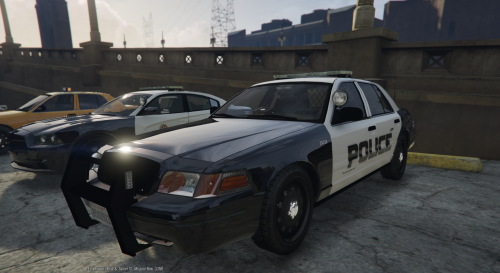 I would like to just join the multiple livery crowd, I'm able to add multiple liveries and switch through them all with the trainer. But no matter what I do it never changes the cvpi_sign_1 in game even though it's changed in the .ytd file. I'm not sure if there is just an option to tick somewhere for multiple liveries but it would make this the best CVPI model imo. Edit: I was able to fix the multiple livery issue by also adding the cvpi_sign files into the sheriff_hi.ytd file, hope this helps some people as this is a great cvpi model
- 29 comments
- 12 reviews
-
 Hey first of all love this mod, I have found a strange interaction while using Emergency Uniforms Pack, if you use Skin control to use any of the skins from that pack it will give you a strange interaction with human partners, you can recruit and control them just fine but as soon as you get in a vehicle they will just continuously get in and out of the vehicle over and over again. The K-9 partners still work fine even when using the custom skins, not sure if this is just a weird bug between the mods or if there's maybe a workaround because I would really like to have a human partner and still be able to use the nice skins from the EUP mod.
- 542 comments
- 98 reviews
