PTRJason
Members
-
Joined
-
Last visited
Everything posted by PTRJason
-
 HAHA Funny my Sgt only buys the Vanilla trees, but he doesn't use leather.
 -
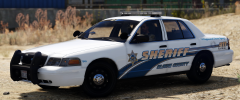 Looks awesome, its a neighboring county to me.
 -
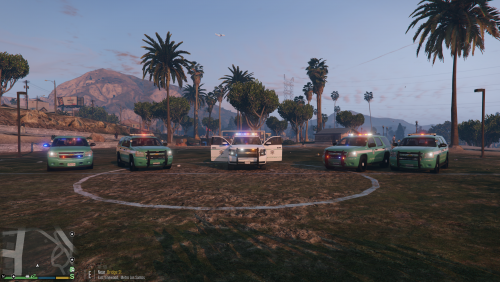 Windows Store had it for 6.99. I saw the free versions after googling it, but I figured it was safer to get it from Windows and not risk a virus or accidentally click on an ad "download" button.
- 8 comments
- 2 reviews
-
Your awesome, Thank you! I like paint better because I don't have to deselect something each time, but it had it downside. I bought the Windows version of Paint.net and I am able to rotate images some with it. So since I can do that now, and follow the vehicles line a little, I made another version for the Tahoe. Thank you again!
- 8 comments
- 2 reviews
-
98% of departments nationwide use amber to the rear. I HATE all red and blue to the back. Amber is a very visible color day and night. Some states require amber to the rear (like CA). In California ALL emergency vehicles must have a solid steady red (non-flashing) light to the front, and an amber flashing light to the rear. Some stated like South Dakota even have one amber flashing light to the front of their vehicles. It all boils down to state laws and what is required. With LEDs being dual and tri color now days and a lot cheaper then they used to be, I am starting to see more and more with all red and blue to the rear with amber only being shown when the bar or arrow stick is in traffic mode. Like Nevada Highway Patrol ( their Valor bars are all red/blue/white to the front and red/blue/amber to the rear, but you only see the amber if the trooper physically pressed the Left-Right-Center Out on the SmartSiren to turn on the SignalMaster. That is the only amber to the rear. I am lucky enough to have a Code-3 bar on my unit that is dual color and it alternated between Red/Amber and Blue/Amber on the patterns. If you spend ANY amount of time on a roadway, look at lights. I guarantee you will see the amber lights on a construction vehicle or wide load, well before you will see red and blues.
-
 I have never installed a modded map before, how do I install it? The readme has no instructions and I know I am not the only person that has never installed a map. Thank you for any help.
 -
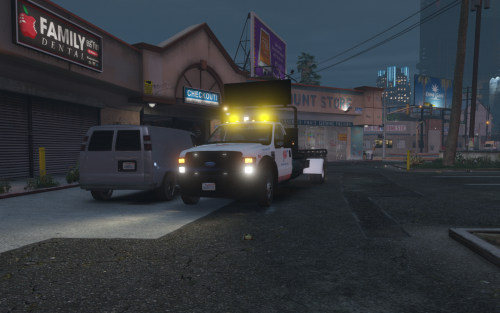 I entered these with the Mod as I downloaded it after it was already updated with the new position and cars still float about 5 feet behind the truck.
- 45 comments
- 12 reviews
-
SmartSirens, new ones are probably SmartSiren Platinums. In the first video with the Whelen light bar, most of those bars were test bars that they were trying out when Fed Sig stopped making the Arjent, so it may have been a CenCom in that unit BUT the rear flash pattern on the TA was not a CenCom flash pattern. So unless they used a WeCan bar and programmed the bar to flash a certain way in the computer software, then it may be a SmartSiren, however the yelp sounded different. Keep in the mind, a lot of the CenCom Sapphires and 295 Sirens from Whelen have Alternate Wail and Alternate Yelp. In my patrol vehicle I have the Wail and Yelp set to alternate as it gives more of the Federal Signal Unitrol sound then the long drawn out wail and yelp of Whelen. And yes I know this is a very old post.
-
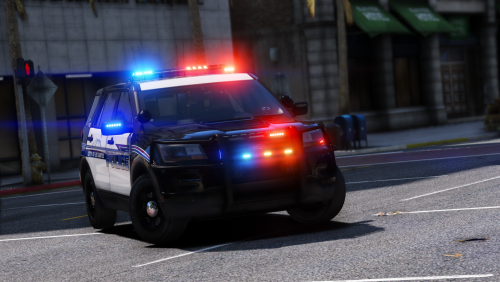 How do you make the "hot feet" steady burn. I would love to have a valor bar or two with no light no lights to the front on 1 or 2 except for the steady burn red and blue, then in three every thing is on with the steady burn still staying steady for CA compliant? I have no clue how to make lighting files, just tinker with ELS and I can not figure out how to add steady burn to a light bar that did nto already have it.
- 60 comments
- 32 reviews
-
Ok, will do, but it does have an ELS file with it in the download that I modded with it as well.
- 8 comments
- 2 reviews
-
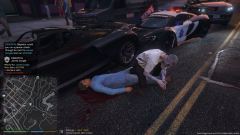 That just happened to me today. I was by the pier. I was laughing so hard. They showed up in some mad max type vehicle for fire and in a hearse for medics. They rubbed the blood on their faces. I have NO clue what mod was doing it because I did not install a Halloween mod, or the vehicles. But it was cool to see. Is it something built into GTA5? I handeled a call on the other side of the pier a few min later and everything that responded was normal.
 -
This is my FIRST EVER attempt at uploading, modifying, and changing anything. I also DO NOT have any fancy editing software, only Paint, so sorry for that. It looks okay to me in my game, a few blemishes but oh well. I used the EUP and like the SASP Rangers, but the uniforms are CA State Parks. I Love the US Park Ranger file made by Narobic, but it did not fit with the CA Parks uniforms of EUP, so I modified it a little. I also changed up the ELS light settings to a few different patterns, but keeping the CA Steady burn red. (I even have it on my RL cop car, but I am not even in CA) This is a somewhat hybrid between the CA State Parks and the US Dept. of the Interior (National Park Service / BLM) green stripe graphics. I kept the green stripe, added the CA Parks badge, CA exempt plates. I added my RL call sign of ES-6, but made it 1-E-6 as that is what I have the game call sign set when I get a dispatch. I removed the park and just left ranger. I know these are not real graphics, but I like the look. **In the newest version I added the call signs, roof text, removed the boating and waterways sign, added California State Parks to the doors of the Tahoe, and removed Ranger in the back and put Law Enforcement. In 2.0.2 I made a 2013-2014 version in all green with a silver stripe. It is meant to be an older graphics package, with the 2015 being a newer package they went to. I plan on making a white one at some point. The SeaShark2 is not included, I just made it for fun instead of the Los Santos Lifeguard one (see the screenshots). I added a 2015+ Tahoe from Pricefield . To install it follows the same instructions. This may also work with TheHurk's but the license plates will not show. You can use the same ELS file that is included with the EXPEDITION if I remember right, or just use the CHP one with the original file, just rename it pranger. Again this is just the Texture and the ELS file. You will need the EXPEDITION from Thehurk. ****INSTALL**** What I did was install this as the ' PRanger ' vehicle. The game vehicle file moves more like a Ford Expedition or Tahoe, and using Computer+ will also bring up the State Parks wallpaper when in the vehicle. 1- Take the Expedition from Thehurk or the 2015 Tahoe from Pricefield and rename it to PRanger (Or install the 2013-2014 Tahoes as Police through Police4) And install as it is instructed. I have used PatchDay14. It should be GTAV > mods (if used) > update > x64 > dlcpacks > patchday14ng > DLC.RPF > x64 > levels > gta5 > vehicles.rpf and place the PRanger there. ---EXPEDITION--- Once there, edit the PRanger.ytd and replace the exp_sign_1.png with my texture. ---2015 TAHOE--- Once there, edit the PRanger.ytd and replace the tahoe_sign_1.png, and also Rambar texture with the included ones. 2 - Place the ELS XML file into your GTAV > ELS > pack_default ---2013 - 2014 Tahoes--- I installed as Police through Police4 and just replaced the texture in each one. I also included an ELS file for each police version. And you should be good to go. This is how I installed it, and edited it. PLEASE PLEASE PLEASE backup your files, I am not responsible for anything. Use this at your own risk, remember this is my first attempt at this. If something does not work, just delete the files as you installed them, and the default PRanger should restore.
- 8 comments
- 2 reviews
-
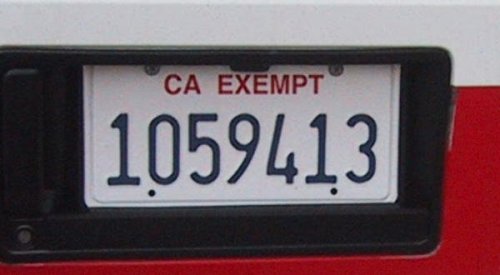 Calif only has 7 digits, not 8. GTA has 8 ;)
 -
There are still some in the NHP Northern Command, like Elko and Reno. Just one or two, the article is about the NHP South Command. Neither have I. I have a 2017, and prior to that I had a 2016, ours are issued. If I let it idle for very extended times, I can smell it, but that is normal with any vehicle. We have about 6 in our fleet, and no one has complained about it.