


Figgis302
Members
-
Joined
-
Last visited
Everything posted by Figgis302
-
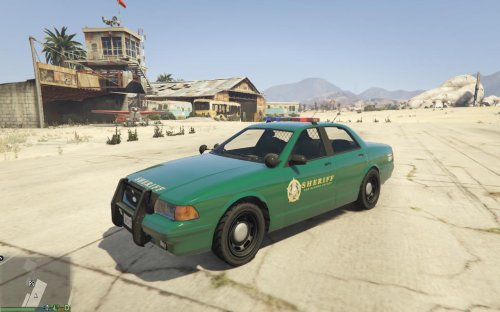 10/10. Brings a fresh new look to the sheriff's department. Maybe make a black-and-white LA Sheriff's Dept-styled skin?
- 5 comments
- 3 reviews
-
11/10 best mod Will write review after I've had more time to screw around with it in-game.
- 5 comments
- 3 reviews
-
-

- 1
-
-
#1 thing I want in future versions is more god-damn jails. Two for the entire map!? Just two!? Jokes aside, more jails really are necessary. It's obscenely obnoxious when you detain someone in the middle of Los Santos and you have to drive across the city to arrest them, or if you detain someone in Sandy Shores and have to drive all the way to Paleto Bay.
-
I've noticed a distinct lack of the "pull over" voice lines compared to LCPDFR. Sure, they exist and are usable within LSPDFR, but you need to lean on your horn during a traffic stop to proc them, and in a pursuit, you need to be right behind the suspect. Is it possible we could get these lines to work from any distance during pursuits as long as the suspect is in sight, like in LCPDFR? Furthermore, could these lines simply replace the horn sound during traffic stops? ie, instead of playing the horn while holding your horn key, it just plays a randomized stop line. Additionally, traffic stops are still able to be conducted during pursuits. Again, as with LCPDFR, could traffic stops be disabled during pursuits/only allowed on suspect vehicles? This way Shift can be used to proc the stop lines and we can press it safely during pursuits, without fear of bugging out because we accidentally left an already-initiated traffic stop behind.
-
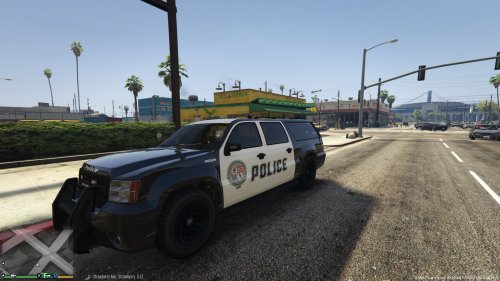 It'd be cool if the door was in the style of the Stanier/Buffalo, I personally dislike the Interceptor skin. You could probably rip the textures for the door straight from the .ytd for the Stanier/Buffalo, if you ever do this in that style.
- 4 comments
- 1 review
-
-
- 1
-
-
-
Quoting posts twice is really unnecessary. Quoting posts twice is really unnecessary.
-
Is this the issue where peds randomly attack each other in the street? Because that's annoying as hell.
-
I've always found the walk animation for the sheriff's deputies to be a bit weird. Like, the way they take really small steps and hold their arms almost exactly at their sides as they move them has always looked off, especially compared to the animated, brutal swagger the LSPD officers have. The LSSD deputies always seem like they literally have a stick up their ass. Is it possible for this to be changed at all, or made permanent with LSPDFR 0.3?
-
 Eight-second video, four of which are occupied by a channel intro. But for real, nice work.
 -
As title; it's always bugged me that the NOOSE tactical officers randomly switch between the unmarked FIB car and the NOOSE truck. I want to make it so that they only use the ARV, but I don't see a setting for it anywhere. If it doesn't exist as a setting, it's a decent idea to be added in the next LCPDFR patch.
-
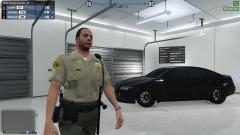 How do you get the police uniforms on your characters in Online?
 -
-
I'm not a developer, but from what I can glean from LCPDFR.log, it seems that the game called (set a value to, referenced, etc) an object (ped, car, etc) that the game had removed, but the object's signature was still in memory thus allowing LCPDFR to call it. Logic dictates that this is caused by the game not having enough memory to run properly. Try uninstalling any high-poly cars (pretty much all ELS models and some newer non-ELS ones) and running again to see if it fixes anything.
-
Yeah, it seems to be an issue with Avast not liking the .zip for whatever reason. I had the same issue and downloading the alternate auto-installer worked just fine.
-
Weirdly, every time I download the LCPDFR .zip file containing the automatic installer for version 1.0d using WinRAR's 64-bit application, I get an error stating "unexpected end of archive" and cannot perform further options such as executing the .exe or anything else of the sort. This has happened consistently across four new .zip files, and I cannot determine the cause - WinRAR successfully opens other .zip files just fine; it is only this one it encounters issue with. I've tried re-downloading the .zip four (soon to be five) times now with no success - is anybody else having this issue? Edit: Downloading the alternate auto-installer works fine - sorry to waste people's time, should've tried this before looking for support. Can somebody lock this?
-
They're scripted shut after Three-Leaf Clover and Museum Piece, respectively - the interiors are still there, all that'd need to happen is the doors would need to be opened again with a G17 script.
-
While I do agree with being able to change their model as well, the thing that bugs me is that you can't change their voice - it's weird seeing a hispanic man's voice on a white man. Perhaps an option for this as well?
-
You just made references to both Payday and Heat. I love you. Unfortunately, I don't think there will be masks. Anyways, thanks for the feedback everyone - hopefully some will be added. I also like the idea of a Museum and/or Armored Car robbery. EDIT: Taser manual installation worked. Thanks!
-
Replies in red.
-
Small list of ideas I had to improve the current callouts, as well as to add more or bring back ones that were present in older versions of LCPDFR but removed in 1.0. Domestic Disputes In LCPDFR 0.95 RC2, there were Domestic Violence callouts that were fairly common in Bohan and Broker. I haven't seen a single one in any of the 1.0 updates, so I'm assuming they were removed. Some of the older players will remember how they worked, but for those that don't I'll give a basic explanation. The call would go out and the location would be at a random location somewhere in the map - typically indoors or just outside a building. When the responding officer arrived, there would be an argument in progress. As soon as said officer got close, it would turn violent - the suspect would either be unarmed or possessive of a melee weapon. What I'm suggesting here is, as the title implies, bring them back. They were realistic and they added a bit of variety to the usually-standard resisting arrest or drug dealing callouts. Drunk Driving Redux The current DUI/DWI callouts are rather half-baked at best - the suspect makes no attempt to flee from you (they just kinda weave and flop around the road) and you can't start a pursuit, leaving your only option at conducting a traffic stop. However, when you get the suspect out of their vehicles, they're drunk (the weird, half0ragdolled walking you get when the player gets drunk at a bar), so you can't cuff them easily and when you try to calla prisoner transport unit on them, they keep falling over into traffic and getting run over before they get anywhere near the prisoner transport car. Solution: Have the drivers themselves not be drunk, but keep their driving while they're in a vehicle the way it is. That way, the DUI/DWI callouts aren't nearly uncompletable. New Callout: Bank Robbery We all remember the mission Three Leaf Clover, where you rob a bank with Packie and his brother Derrick. What if that bank kept getting hit again and again, and each time it went down the player was on the other end of the gun - as a cop trying to stop the robbers? Introducing Bank Robbery callouts as a suggestion. The interior of the bank exists, it's just scripted to be closed after Three Leaf Clover is completed. Have a script with LCPDFR that re-opens the bank's interior during specific callouts and spawns several armed enemies inside, using AK-47s, Micro Uzi's and Shotguns to fire at responding officers from inside. If they aren't taken down in time, they start heading towards an escape car of a random selection parked in a nearby alleyway, at which point it goes from a shootout to a high-speed pursuit. Taser System Overhaul The taser - for me, at least - doesn't work AT ALL. I don't know what's wrong with it, but every time I press Alt+T, nothing happens. I'm fairly sure it's a problem with my current hardware because it worked on my old computer, but still - the taser system could use a bit of streamlining. If someone could tell me if there's a specific option I need to enable in LCPDFR.ini or a model I'm missing or something, that would be great. Thoughts?
-
Traffic Flow solves this issue with relatively little side effects. Definitely worth it - the Police Buffalo will almost always outperform the Stanier or Merit cruisers.
-
I think the crashes may have been caused by two conflicting LCPDFR.ini files from a filepath error on my behalf. However, I don't see the PreloadAllModels option listed.1 Anyways, I can list every single mod I have installed. They're all certified to work with the latest patch and LCPDFR, so I'm not sure if they'd be the cause. Regarding my tone; apologies. Something had happened away-from-keyboard and I was rather upset. EDIT: PreloadAllModels did not fix the issue, nor did correcting the filepath error on my end. 1: Misread it. Ignore that.
-
Hooray, hours of ridiculously shitty PC performance while GTA downloads only to have it crash again, every fucking time I launch it. I've tried fresh installations before when this has happened, and it's solved nothing. This isn't the first time this has been an issue, only the first time it's gotten to the point where GTA is unplayable. I ask again, did the log files say anything?
-
Alright, I googled which one Dsound uses and I was correct the first time, which means this isn't a corrupted savegame. Did the included log files say anything?


