




CrossFire
Members
-
Joined
-
Last visited
Everything posted by CrossFire
-
I have ChinaGreenElvis 5.03 and a custom car pack made by a friend, but all those worked before I changed the settings
-
No the screen is blank, just black, nothing other than black, switching through full and half screen
-
As I forgot to put this in the post, there is only a blank screen. Now in the post: there is only a blank screen
-
Okay let's get started, I read on a website that if you set your resolution to 800x600, you get good FPS, and I did that, and now whenever I try to start gta and I clicked online and then it goes full screen and just a black screen appears , then it goes to a corner screen thing, and I replaced every file in the gta folder and deleted the save games, but it still does that. Can somebody please help me? All help is appreciated.
-
You need proper credits, like who made the car, who made the lightbar, and stuff like that.
- 6 comments
- 4 reviews
-
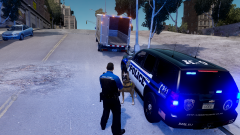 I can tell your using push-to-talk but I wouldn't, sometime when I record Its hard to be in a chase and use push-to-talk, just some friendly advice.
 -
What I've never gotten about the NYSP is that one yellow light in the back.
-
-
-
Any programs specifically
-
Its okay ill try to uninstall some other programs and see if that fixes it.
-
Well looks like I'm going to be playing clockwork mountain for awhile
-
Oh I re-installed it after it started doing that (I forgot to tell you) And still had the same probs
-
Well I uninstalled it A few months ago and re-installed it a few days later because of backup issues, then it started, oh and I installed it on the Gamestop App if that makes a difference
-
I have AVG PC tuneup 2013 and AVG 2013 virus protection, but I know that's not it because I had it uninstalled for a few days and it didn't boost FPS at all
-
Dell XPS 8300 8 GB RAM AMD Radeon HD 6700 series Video card Windows 7 64-bit Home Premium Tried it.
-
Well even if I uninstalled all my mods (I tried) It still gives me low fps I have a AMD Radeon HD 6700 series
-
I'm not running a laptop, i'm running a desktop A Dell XPS 8300 Desktop
-
Okay two problems here, first unless i'm on the clockwork mountain map mod I only get under 20 FPS (On it I get the normal gta FPS), even with everything uninstalled I still get low FPS, why??? Second issue, I have to use xlive for the game to work and you're probably thinking "re-install the game and/or re-install GFWL" iv'e tried both and still it does not work. I'm running 1.0.7.0. on a Dell XPS 8300 with windows 7 home premium, 8.00 GB of ram and a intel core i7 processor. Iv'e tried a commandline, Iv'e tried the thing where you disable those to microsoft things, Iv'e tried about everything.
-
Can you even do this?
-
-
-
Where did you install it to? The scripts or main directory?
-
Would you be nice enough to send me the link to that Tahoe?
-
To figure out if you have a X32 or X64, go to start menu, right click Computer, click properties, look under system, look for system type, there you go!

