


Tom S.
Members
-
Joined
-
Last visited
Everything posted by Tom S.
-
Hi all, I've only just started learning how to model for the past couple of days and I've got the basics down. I'm practicing by using the base CVPI converted from Driver San Francisco and even though I've managed to get the model working in game, the textures for the lightbar aren't showing even though I have imported the necessary files in zmodeler via materials editor and into the appropriate texture file of the car. In this case, the emerglights, vehicleenvmap128 and black image files. The vehicle textures work fine. I was quite surprised that I got my first model edit to work but the only thing that's in my way is getting the textures to work on the lightbar in zmodeler. The lightbar I have downloaded on this site is the non els arjent, I've tried importing the necessary textures files that came with the lightbar but what I don't understand is why it won't apply the textures to it. I'm probably missing something that's so obvious but if anyone can help me out, it would be greatly appreciated :) I'm hoping that I've explained everything as clear as possible.
-
-
Hello all, you may or may not have seen pictures of my latest WiP floating around here on LCPDFR.com, well now is the time that I will show you my latest work in progress. My Alderney County Sheriff pack is on hold for the moment but will be continued soon. Now I understand that there have been a load of LAPD textures released but since I haven't found any that closely resemble LAPD for the default GTA vehicles I took the liberty of making them but with some different ideas. Liberty City/Los Angeles police textures for the default GTA vehicles These textures are mainly for the following vehicles: *2nd gen Vapid Police Cruiser with MX7000. *2nd gen Vapid Police Cruiser with default V lightbar. *2nd gen Bravado Buffalo Police Cruiser with default V lightbar. *Declasse Granger with arjent. These vehicles of course can be downloaded already on LCPDFR.com but since this is a WiP I will provide beautifully looking pics of what you can expect :) I'm aiming to blend in both GTA V and LAPD styles when making these. Comments and feedback appreciated! :) The following liveries are being made: LCPD based off LAPD with some minor changes. Sheriff based off LASD with some minor changes. Airport Police based off Los Angeles World Airports Police. Logos/decals: Vehicle screenshots:
-
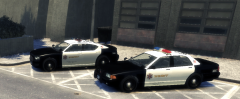
From the album: Stodd94's Gallery
Based off LASD, the LCSD's new vehicles. -
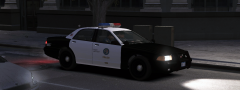
From the album: Stodd94's Gallery
A texture pack will be released later today, this is just a preview :) Stay tuned. -
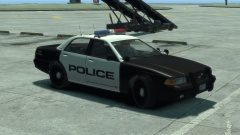
From the album: Stodd94's Gallery
Another skin I've recently developed, feedback is appreciated :) -
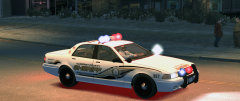
From the album: Stodd94's Gallery
Another preview shot of the texture for the Vapid Cruiser. -
From the album: Stodd94's Gallery
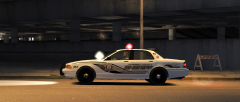
First vehicle of the pack is done, I'll post the topic when I've done all of the other vehicles, stay tuned. -
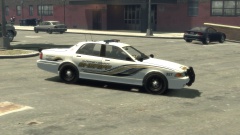 Thanks for the positive feedback! :)
 -
Sounds like a brilliant addition to the mod, I think it would make it more realistic.
-
From the album: Stodd94's Gallery
My next project: Alderney County Sheriff's Office texture pack for the default GTA vehicles. -
I really like these ENB settings, except the only problem is I get a CTD if i Install the red sky fix files and the red sky glitch bugs me, am I the only one getting this? If I don't install the fix, it works fine nonetheless.
- 59 comments
- 19 reviews
-
-

- 2
-
-
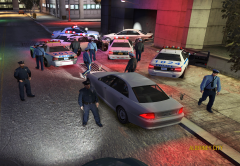
From the album: Stodd94's Pursuits
Two LCPD traffic officers detected a stolen vehicle on the highway in Alderney, the suspect refused to pull over as requested by police. The suspect was quickly taken into custody after a long pursuit which ended in Alderney City when the LCPD boxed the suspect in. -
-
Here's some textures I have created for the Vapid Stanier Police Cruiser and Vapid Police Interceptor models; both City of London/Liberty and MET Police skins. Multi livery is recommended for these vehicles in order for the player to see a mixture of these textures appear in the game. The 1.0 release only features textures for two models although I plan to add more for other vehicles in future versions. A readme file is provided in this modification to ensure proper installation of these textures. The correct vehicle models are also required in order to install these skins.
- 4 comments
- 2 reviews
-
Hi all, firstly I would just like to say that I used to make skins a while back a couple of years ago, I decided to come back and do this again as its something I love doing with photoshop. I thought I'd share with you some stuff I've been working on for the past couple of days for the recently released GTA V's modified ELS police car models. I appreciate constructive feedback and any suggestions, ideas or improvements are welcome. The following skins are for the Vapid Stanier Police Cruiser and Police Interceptor models, featuring City of London/Liberty and Metropolitan Police livery. I still need to do the Met skins for the Interceptor before I can release these all in one pack. The first version will only contain skins for the two main cop cars but I do plan to release more for other modified default GTA vehicles as well in future updates. Apologies if the images are too big and cause bandwidth issues, I will rescale them if need be. 26/01/14 - 1.0 has been released. Download here: '?do=embed' frameborder='0' data-embedContent>> Vapid Stanier Police Cruiser: Vapid Police Interceptor:
-
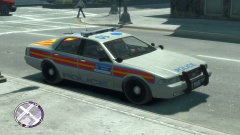
From the album: Stodd94's Gallery
Testing my Metropolitan police skin on the Vapid Stanier, let me know what you guys think :) I'll provide more pics as time goes on. I'm currently making a texture pack which I hope to release fairly soon. -
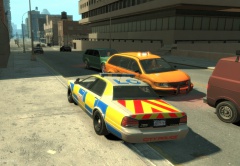
From the album: Stodd94's Gallery
Testing my City of London/Liberty skin on the Vapid Stanier, let me know what you guys think :) I'll provide more pics as time goes on. I'm currently making a texture pack which I hope to release fairly soon. -
Oh my god, I've been waiting for something like this for a while now, thank you! It fits in really well with IV :)
- 34 comments
- 10 reviews
-
-
Since I have been a long time Driver fan, this is amazing, I will definitely be downloading this. 5 stars :)
- 7 comments
- 8 reviews
-
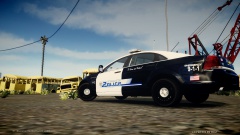
From the album: Stodd94's Gallery
LCPD testing and rolling out their new cruisers, textures made by myself. Credits go to the original author of the vehicle. -
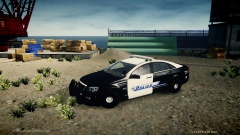
From the album: Stodd94's Gallery
LCPD testing and rolling out their new cruisers, textures made by myself. Credits go to the original author of the vehicle. -
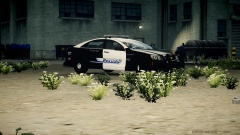
From the album: Stodd94's Gallery
LCPD testing and rolling out their new cruisers, textures made by myself. Credits go to the original author of the vehicle.

