


midnight900
Members
-
Joined
-
Last visited
Everything posted by midnight900
-
Nice video yet again. You are getting better and better that is really good to see. I also love the subtitles you use. One thing I hate about ELS, I don't know if you guys have this problem but sometimes when you have more then one ELS police car most of their sirens freeze or stop working fully. Overall good video!
-
Not sure if you found out how to do it yet, but make sure you're gun is out and then you need to press the H key
-
Well here is the difference for you to know F11 Key: Air support for when you are in a vehicle chasing a suspect F12 Key: Call Police Back up when you are in the vehicle chasing a suspect ALT + B: Is to call for back up when you aren't in a car (For Example you are in a gun fight and you need back up you use these two keys) ALT + N: Is to call for Noose back up when you aren't in a car (For Example you are under Heavy Fire and you need Noose back up, you would use these two keys)
-
-
The taser works fine for me to. I am having no problems with it, I did press ALT + T and it didn't work then pressed it again and came out no problem. The only thing is, is there a way to get you're pistol back after putting the taser away because my pistol always goes away after (Sorry if I am hijacking this thread, I just don't want to open a useless thread)
-
If I seen a convertible cop car I think all I would do is just stare and be like wtf LOL And you can't burn a Dodge Charger those cars are beast :P On the news a while ago a Dodge Charger (Suspect) was outrunning a Crown Vic. I was amazed to see that especially knowing Ford does give them better engines than Civilian cars.
-
Great can't wait, I'll be on youtube now to see when you post new videos ;D
-
I know a lot of people use a trainer and there is a option for "Clean Car" Below is the link of that trainer that everyone uses to clean the car http://grandtheftauto.filefront.com/file/GTA_IV_Simple_Native_Trainer_v39;102457
-
For my desktop tower I use the below: Processor: Intel Core i7-2600 (8MB Cache) Overclocked Turbo Boost to 3.9GHz (Liquid Cooled) Ram: 12GB Dual Channel DDR3 at 1333MHz Graphics Card: 2GB GDDR5 AMD Radeon HD 6950 Hard Disk Drive: 2TB ( 2x 1TB) SATA II (3Gb/s) 7,200RPM (2 x 32MB Cache) Matte Stealth Black Alienware Aurora w/ 875W Multi-GPU Approved PSU That's what my computer is and running GTA 4 and LCPDFR
-
Looking really good. I love the new system they put in there where you can give cars tickets now.
-
Ok sounds good cannot wait ;)
-
So this is not released in the GTApolicemods website? I like this car and the way it looks.
- 9 comments
- 5 reviews
-
I just subscribed to you, it's from DodgeCharger300
-
Yeah I know what you mean. I'll subscribe. I remember my first video man it was slow I didn't know the controls well and getting the sirens down for me was a pain lol.
-
In real life those boxes would count as police scanners. Those scanners scan you're license plates and then display on the Officers computer so he can see if you are valid or not, car reported stolen etc, it also detects registration, inspection stickers, etc. Some police cruisers have them on the trunk others have them on the roofs of their car. They scan many licesne plates and within seconds.
-
Great videos. Of course the whole getting a few callouts in one video is a great idea. I know when I watch videos I like them to be a little long. Make it like you are making a actual cop show. Now if you find yourself getting no calls you can use these two keys ALT + F11 and that will force a call for you. Just a tip and nice job!
-
Hi Everyone, I am trying to download the .NET Framework 4 but seem to have no luck at all. I mean it is installed and everything, then I try to run the LCPDFR: 0.95 RC2-R2.exe but for some reason it keeps having a exclamation point everytime on me. To confirm I am running Window 7 64 bit system and am using the link below to get this. I am not sure if I am doing something wrong. I tried searching for a hour now and seem to have no results anywere. http://www.microsoft.com/download/en/details.aspx?id=24872 EDIT: I just got it to work now. Sorry for posting this thread
-
The link to the 2011 Un Marked Dodge Charger is below. This link is not mine it is the developer of this mod. I take no credit for this at all. Also for the sirens I cannot seem to find it on my computer sorry for that. But hey you got the best thing the car ;D http://www.4shared.com/file/OPytpVrL/BETA_UNMARKED2011CHGR_V11.html
-
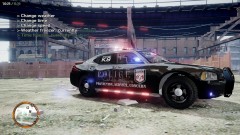 Dude very nice job on this cop car. It's really nice and I like it. Now we need a 2011/2012 Dodge Charger of this version lol ;D
 -
Hi Everyone, Haven't been on in a while but made a new video about a week ago that i'd like to share with some of you guys. Tell me what you guys think. I haven't played GTA 4 in a while so I am slow at acting in the game again ;D
-
Yeah there was a time I got that call and was trapped by a whole bunch of enemies. I called for Noose asap and man they sure whooped the enemies. LOL :D
-
-
Ok, I found the Charger on my Desktop, I got 2 of them total, not including the 2011 Dodge Charger which I sent you. I think you might want both, but you can test them both and see what you like better. http://www.4shared.com/file/Mkl9RHXl/Dodge_Charger_Mod.html Also here is another video I have made, Enjoy!!
-
You got it. This is a direct link to download it from the developers it's self. Here is the link: http://www.4shared.com/file/OPytpVrL/BETA_UNMARKED2011CHGR_V11.html As for the other Dodge Charger, I do no remember where I got it from, but I do have the 2 files needed to get the model. I'll go though my computer after work and upload it for you.
-
It's been a while since I made a video but just made 2 new ones today and uploaded them to YouTube a while ago. It has been a while so I was a little rusty, but hey to Desktop was happy because it got a break. Well here are the videos, I'll post both below. Thanks for watching guys!


