


midnight900
Members
-
Joined
-
Last visited
Everything posted by midnight900
-
Hopefully it helps you. If not post back here maybe someone else could have a possible suggestion for you.
-
If your trying to turn ELS on then the keys for that are: J - Turn Primary Lights on k - Turn Secondary Lights on If you're talking about LCPDFR's flashing patterns, then use the / key on the numpad to make it work
-
That car has been around for a while now actually. I recorded a video back in December 2011 of it ;)
-
The best I can tell you is to try and reinstall the LCPDFR mod, and see if that works, unless someone else has a idea on it. I would already assume you are running the game as a Administrator?
-
We need to see your Diagnostic test before we can help you.
-
I also have this same problem. Like when I get a vehicle fire call, and I get to the scene, I halt cars from both ways to avoid running over any bodies (In case they can be saved) and running into the vehicle, then I call the fire truck he gets caught behind a few others cars, Also they don't even spray the fire when they sometimes do pass by it. So I then take the truck and do it myself.
-
Ok I will try my best to help you. Now if you have any mods at all, delete all of them first. Originally stated by the G17 Team is that LCPDFR is suppose to be run on a Vanilla copy of Grand Theft Auto 4. So if you have mods get rid of them first (For now) Now try to reinstall LCPDFR mod. After that when you start the game always make sure you run the game as a Administrator. This avoids most "Hiccups" on the LCPDFR with Grand Theft Auto 4. Now if you get in game messages of things crashing etc, You can try and press the ` key next to the 1 key on the keyboard, then type in 'reloadscripts'. After you type in that command press ALT - P to activate the LCPDFR mod, when the mod is activated, then press CTRL - P and that will force you on duty again. Hopefully this helps, sometimes crashes of scrips do occur so you need to use the command console to reload all of them again. Report back here is the problem still persist, or if it is fixed. Check list below: Try and reinstall the LCPDFR mod: Run the Game as Administrator. If scripts do crash press the ` key next to the 1 key on the keyboard, that will bring up the LCPDFR command console Once you have the command console up, type 'reloadscripts', the press ALT - P to activate the LCPDFR mod, the press CTRL - P to force duty. (See if that resolves the issue at all)
-
Wow you have a lot of errors on this. Let me ask you this, your Grand Theft Auto 4, is it a clean install?
-
Use the Diagnostics Tool found here: Then post the status here so I can see it ;)
-
Wow very nice deal indeed. I'll take that offer when it comes. Very good find on this one. +rep
-
As far as I know those two command lines you have put in the file don't work when you are on the latest version of Grand Theft Auto IV. (Version 1.0.7.0) Also very good write up you did. You put a lot of effort into that post and that's what I like seeing. I'm 100% sure the development team will love to see the feedback put into this post!
-
It might help if your graphics card is due for one. But it could most likely be the scripts you have that are causing this, as most of the time it is.
-
Don't forget about Keypad 5 to select the action ;)
-
We are ruining the site and spamming it? I think you simply are the one ruining it and spamming it. Me and Yard1 have been here longer than you have. You just registered today at 6:30 pm (My time) and are already spamming the forums with umbrellas. Really? People such as me and Yard1 have been helping people all over LCPDFR for a while now.
-
All I can say is what the hell?
-
As far as a mod goes for that the only thing I can think of is a mod for weather. I don't think a weather freezing was was ever made.
-
What do you mean Rockstar Game File? As where is GTA IV installed?
-
I've also heard that to. I think if I remember correctly Grand Theft Auto San Andreas, always had a Nvidia logo pop up every time the game started. I know Nvidia came out with a new Graphics Card which is the GTX 690, which is suppose to be the most powerful graphics card alive. Although the thing is heavy on price. Now Grand Theft Auto 4 is the only game I know that seems to always have FPS issues. I know on like Crysis 2 for example my FPS was always a steady 60FPS on max setting and never a problem. But good to hear your FPS rised up more.
-
Well what I am getting at is it seems the graphics card cannot handle the game at all, that's what it seems like. Even though he's on lowest settings, and it still lags that seems like a graphics card to me. That's the only thing I can think of because all of his other system requirements definitely meet the game, even on max.
-
Really the only thing I can tell you is did you update your graphics card. My system is some what similar to yours. I have a Intel Core i7 2600 at 3.4 overclocked to 4.0. Ram is 12GB and Graphics card is a AMD Radeon HD 6970, which mine is the same with Yard1 worse case is at least 40 FPS. So it's either you need to update your graphics card, or the graphics card just can't handle it. I tried searching your graphics card on AMD website, and found this page: http://shop.amd.com/.../900485?tabid=2 (Not sure if this one is right), but from what I see this graphics card only has 1GB of memory?
-
Can you post your computers specs, by looking at you having 2 cores, it seems your computer is not up to date at all. Also if you have mods that can also be another problem you have, as your computer can't handle it. Also your ram is kind of low to.
-
No problem, glad to be able to help. Enjoy the mod!
-
So all you have to do it one of 2 things. 1.) You can restart the game 2.) Press the ` key next to the '1' key and that brings up a command console. Then type 'reloadscripts' after press ALT - P to start the mod again, and then press CTRL - P to force yourself on duty. You should then be able to pull cars over after fowling one of these steps. Sometimes the scripts crash in LCPDFR, so all you have to do is one of the following steps. I recommend step 2 as it always works.
-
For #1 sometimes you have to keep pressing the keys for the Taser to come out. Also when installing LCPDFR mod did you make sure the taser was checked for it to install? That could be your problem also. Hunter is right on number 2 the police were always slow at catching people from running so I wouldn't rely on them that much at all.
-
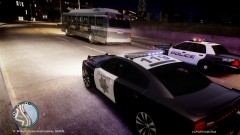 Love that new Charger


