


Exo 401
Members
-
Joined
-
Last visited
Everything posted by Exo 401
-
-
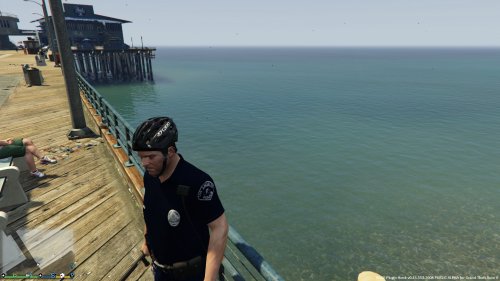 I will do that eventually. I already just edited the patches for myself on the arms to Los Santos, but they kinda look like crap. Then all I'd have to do is edit the ID card to LSPD. I will upload a video shortly.
- 15 comments
- 5 reviews
-
-
Since ped modeling isn't possible right now and none of the cops wear shorts, I decided to edit Michael's clothes to make him part of LAPD's Bicycle Coordination Unit. I recommend using a trainer for this to get the correct textures. These instructions are for Simple Trainer by Sjaak: After activating LSPDFR - Switch back to Michael Go to Clothes Menu Upper Slot > Model 17 > Texture 1 Lower Slot > Model 14 > Texture 4 Shoes Slot > 2 Accessory 1 Slot > 9 (Gruppe 6 utility belt) Hats Slot > 8 Installation Instructions I highly recommend using the mods folder or at least make back ups! If you have a mods folder already set up do this: Copy x64v.rpf to your mods folder In OpenIV go to Grand Theft Auto V\mods\x64v.rpf\models\cdimages\streamedpeds_players.rpf\player_zero and replace these files: accs_diff_008_a_uni.ytd lowr_diff_013_d_whi.ytd uppr_diff_016_a_whi.ytd Next go to Grand Theft Auto V\mods\x64v.rpf\models\cdimages\streamedpedprops.rpf\player_zero_p and replace this file: p_head_diff_007_a.ytd If you do not have a mods folder do this: In OpenIV go to Grand Theft Auto V\x64v.rpf\models\cdimages\streamedpeds_players.rpf\player_zero and replace the files like above Go to Grand Theft Auto V\x64v.rpf\models\cdimages\streamedpedprops.rpf\player_zero_p and replace the file like above And that's it! Have fun bicycle patrolling at the beaches! Just wanted to point out that when you use Michael while playing LSPDFR, random events will happen such as purse snatcher, bike thefts and more.
- 15 comments
- 5 reviews
-
-

- 4
-
-
I have no idea what you're talking about!
-
Thanks! You also
-
What I meant to say in my second post is that this section of the board doesn't have to be just about GTA / Games / LSPDFR / Police news, it's general topic discussion, so it's not off-topic. However I should have scrolled down a little so I could have seen the current events section, which this might have fit better. Cheers
-
I posted a topic in the general / miscellaneous section which goes for anything, not just GTA / LSPDFR / Game related. However I probably should have posted this in the current events section. Didn't see it earlier.
-
It's been over 20 years since the first time! I was just standing on the back deck minding my business and then felt this burning sensation on my arm and whaddaya know! A hornet stinging me
-
Went through some of the topics and there's a lot of great ideas I've seen so far such as taking weapon from holster to dragging injured people on safety. I'm not sure if this was suggested yet but cops always arrest a suspect after they gunned them down and it would be cool to see this happen, if possible to arrest them as they lay on the ground dead or injured.
-
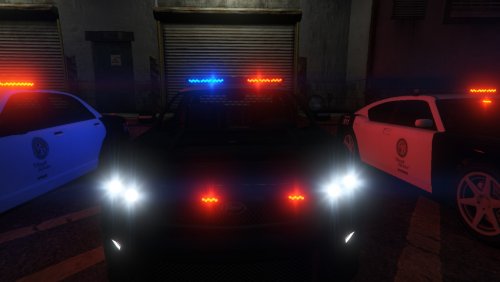 How come the emissive light texture doesn't work for the Interceptor? When the lights are off I can see it, but when they're on, it's the default lights texture.
- 35 comments
- 4 reviews
-
Wow what a piece of shit. I had the Angry Planes and sure enough I found all those files the same day I downloaded it.
-
Just saw this on Facebook. Awesome!
-
Yeah I noticed this before as well. Rockstar employees must be fans of the show/comic :D
-
Where did you find that link?
-
Here's a bike cop ped. I haven't used it. http://www.gtaiv-vmods.com/index.php?/files/file/17-bike-patrol-pack/
-
I liked the damage the cars got in GTA IV. That's about it. I was hoping in GTA V it would be the same or even better. I don't think it's even possible to edit the handling to be the same as in IV.
-
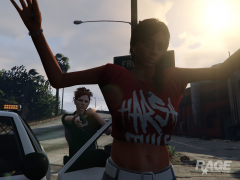 Her hair blends in with the tree in the background.
 -
I was playing with Alexander's SNT and finally realized what button to press to make the car boost work. Anyway, I got in a plane and held the button down and noticed that you can just keep going and going and going. Look behind you, and Los Santos is no longer in sight. I kept going straight for at least 4 mins and then finally decided to shoot straight up. Look at these images I took http://imgur.com/a/hV8Ob#0 This map is huge... You could definitely fit Liberty City in here (Would be awesome if this was possible to fly back and forth.) Try it out for yourselves!
-
It's a variation of the prison guard.
-
The first thing I wanna do is increase the amount of random ped's being robbed happen more frequently. I hope it's an easy edit in a .dat file. It would keep me preoccupied until we see a playable LSPDFR mod. Since Alexander Blade released his SNT, I've been having a blast! The prison guard outfit is pretty bad ass. A few little edits and you'll have a K9 officer ped pretty soon! Pic below. Link to SNT - http://gtaforums.com/topic/788343-gtavrel-script-hook-v/
-
Awesome!!!
-
This is awesome! Can't wait to try this.
-
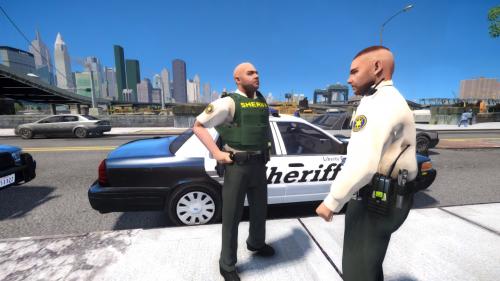 Holy shit - These look really nice. I like the detective and the shorts model! Good job BJ! 1000/10 The only thing or two I would suggest is, to use a badge and patch similar to the model's so that you don't see the outline of old textures and to make a new bumpmap or take it off another model for the detective because the outline of the patch is showing. (I might do that for my own personal use)
- 9 comments
- 1 review

