


Creators: Due to background reprocessing of files, approvals and file security checks may be delayed. Thanks for your patience.

shadowhunter388
Members
-
Joined
-
Last visited
Everything posted by shadowhunter388
-
I will be soon, I've been quite busy but that is my plan is to make a OCSD pack.
- 7 comments
- 2 reviews
-
Thank you so much. :D Take your time, looking forward to seeing it.
-
-
Is the model going to be ELS? I love ELS :D
-
Orange County Sheriff Department skin for any Crown Victoria. .Rar comes with two skins, one real skin and one fictional skin. (with orange field in logo) Any questions feel free to contact me through email.
- 7 comments
- 2 reviews
-
Yes that's perfect! :D
-
Just curious but what does REL mean? I live in the county too, Also how is the skin?
-
Here's V2. I even included a "Orange Field" version of the logo even though it's not real and the regular one. http://www.mediafire.com/?s9h433u1wmz54xx
-
I did some checking and I can't find a OCSD car that has a orange on it. I think you're mistaking their patch which has the orange field on it and even the images you posted has the Indian it so I kinda don't understand. Police cars: http://farm7.staticf...4a4d5160e_b.jpg http://csiclass.com/...es/img_0211.jpg Patch: http://pennybailbond.../OC-Sheriff.jpg
-
Thanks but I need one with the Push bar though. :/ But Thank you for trying I appreciate it. Yes, they had one with the light bar but the push bumper wasn't go rhino and it had these weird Huge flood lights in the front. I am just looking or requesting if anyone could make or find one with just a Go Rhino and a X2100 :)
-
Yeah, I can do skins. :) Here is the first skin of the OCSD CVPI ------ Finished Skin here is the DL link: :D You can also get it here as well: http://www.mediafire...ydjslggfd630k8s Credit goes to maker of the Sheriff Logo I had to do some repixeling of it.
-
Yes, but with a GoRhino pushbar as well. (like the image I posted above.) Plus it would definitely be something new instead of another Whelen Liberty.
-
O_O a Police car with a MX-7000 and a Go Rhino Pushbar! Please share with me where you got this awesome car? Also not bad for a first time skin. :)
-
Hi, I was wondering if anybody could make a CVPI with a Code 3 X-1200 Lightbar and a Go Rhino Pushbar like in this picture? I know Bxbugs made one but the problem is, the push bar is something else and it has huge fog lights on the front. If anyone is willing to do this I'd really appreciate it and it would add something fresh to GTA 4 instead off having every police car with a Whelen Liberty :)
-
I too would love to see some O.C. Sheriff. I can make the skin probably but idk about the model.
-
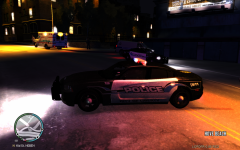 Just curious, where'd you get teh car from? I've been lookin all over for a Charger '12 with pushbar and lightbar.
 -
Okay nvm, so it works using the bug but right now my only problem is the light reflection off the ground (It's all red) and I want it to be R/B did anyone figure it out yet? Also what is it about vehicles that determines if they are police or not? (Like if they have a siren or not) because my vehicle is like a civilian one, (Just horn and radio) Thanks for reading :)
-
To disable the default is usually (Depending on the trainer version, Mine: Simple Native Trainer Desktop Edition) Right CTRL+ALT+ D
-
Okay, I'll just leave it. Thanks. :)
-
Just a bunch of mods I have installed in my game.
-
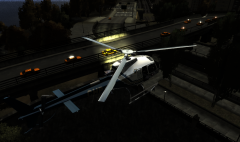
From the album: Shadowhunter388's pics.
Just a pic the new helicopter I got off of GTA4-mods.com from SkylineGTRFreak's AS350 Ecureuil and Jorge's Spotlight mod.© shadowhunter388
-
-
-
Love the MX7000 and the car is great :D is there a possible way to add a pushbar onto it?
- 12 comments
- 9 reviews
-
The light bar is awesome, It would look awesome to see one of those on a CVPI with a GoRhino Pushbumper. >:D
- 18 comments
- 7 reviews

