


shadowhunter388
Members
-
Joined
-
Last visited
Everything posted by shadowhunter388
-
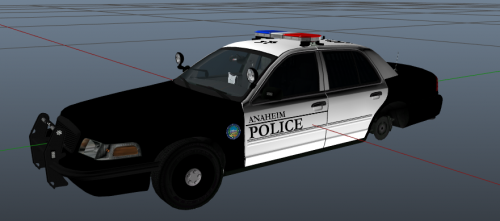 Very Nice, here's mine. You're welcome to use or I can make for you. Also have Cypress's new style of badges and such.
- 11 comments
- 3 reviews
-
 I used this to replace "Police4" and for some reason I keep getting rolling at speed. Anyone have any idea of a good handling for this vehicle. Also I know this doesn't belong here but if I add a "Police4" entity in the handling.meta, will it actually affect that said vehicle?
- 964 comments
- 158 reviews
-
Anywhere specific that I should look? Say it's for Police 3. Do I go into the YTD model or?
-
Is there a way for AI or just when you spawn in general to have say a Police Dodge Charger always spawn with a Pushbar. I got some great vehicle mods I am using but I hate how sometimes the vehicles spawn in the world or on AI without the pushbumper.
-
shadowhunter388 replied to LCSO Sergeant Jester's topic in Law Enforcement, Current Events & SocietyExplorers is fun. Best thing to do if you're in your 16's - 20's. Very valuable knowledge and insight. I found explorers to be very eye opening. You see more then what the average person sees thus opening your eyes a lot more. lol Story from me: I remember the time when I used to be an explorer when I was younger. We were performing "Tubular Assaults" (Bus insertions) and part of our training was to turn off the bus before moving up to the main entry doors. So here comes Gung-Ho Shadow rollin up, past the shut off button, to the door, and then pinning the bus driver against his seat and making everyone put their hands up. I then completely go out of character, stop in the middle of everything and go "Sorry, I messed up, can we redo the scenario again?" That day become known as the "Tactical Do-Over"
-
It does, by any chance do you know off hand if the "Sheriff" model is multi livery? (White stock CVPI in game?)
-
Whats up guys, I need some help here. I am trying to add a second livery for a specific location. So basically I want two have a B&W Sheriff Charger for Blaine County and a second livery W&W charger for areas near Paleto Bay. One more question. I notice that there are San-Andreas Highway Patrol units in the game and sometimes can be seen sitting alongside "Sheriff" model car one. Is it possible to make a 3rd Livery as a CHP vehicle that only spawns with the CHP officers (So I don't run into CHP in front of a sheriffs station or pursing after a vehicle on a county road.) Is there a specific file that I can edit to change these things?
-
-
-
Haha Thanks, It's okay, In fact it's what drives my motivation to give you guys perfection in my textures. :)
-
-
Thanks guys.
-
FINALLY!! Someone puts up a CVPI with a Code 3 X2100 with a pushbar. Thank you so much! :D
- 12 comments
- 3 reviews
-
LOL I did a OCSD too but I don't think I did a Tahoe version.
-
Cypress is a city in Orange County, Southern California. This texture is accurately made to look like the Cypress Police Department's CVPI graphics design on their cars. At the moment I have only the CVPI Texture. Later I might do a Tahoe one. This texture looks best on BxBugs123's "MX2100 CVPI" w/ pushbar (As this is the light bar our department uses.)If you have any questions feel free to PM me. Also don't forget to change the file name to what ever texture your car uses. Usually, it's police_sign_1 or something like that. Thanks for Downloading :) Enjoy! IMPORTANT: 1. DO NOT MODIFY OR UPLOAD THIS TO ANOTHER SITE WITHOUT CREATORS PERMISSION 2. WHEN GIVEN PERMISSION. PLEASE GIVE CREDIT TO CREATOR. *CHANGELOG* v0.2 - Added a border around the vehicle number like the real car. - Straightened out the door logos.
-
-
I remember my ride alongs... Good times, if you're American then it's a great program and I recommend it. You do and learn so much, It really prepares you.
-
Unfortunately, I don't know how to fix that. I hate it too. :/ It was part of the model pack that I downloaded it from, All I did was reskin it and get permissions to release it. I am not sure how to fix the issue, i'll look into it though.
- 7 comments
- 6 reviews
-
In game it should be black, The reason it's white in the screenshot is because the picture was taken in the OpenIV modding tool. So it doesn't apply the textures to the duty belt but in game they should be there. Thanks and Enjoy :D
- 7 comments
- 6 reviews
-
I see you have the light problem because of EFLC (No Glow), there is a way to fix it, if you want help tell me.
- 21 comments
- 9 reviews
-
A Los Angeles County Sheriff's Department skin for the State Trooper model. It still needs some work but I will eventually get to that later. Right now it comes with a Campaign hat and a jacket, rain jacket, and long/short sleeve uniform shirt. *Install* the files inside Component ped go into: Grand Theft Auto IV Episodes from Liberty City\EFLC\pc\models\cdimages\componentpeds.img The files inside the hat folder go into: Grand Theft Auto IV Episodes from Liberty City\EFLC\pc\models\cdimages\pedprops.img *Remember* Do no reupload or modify without my permisson. Don't forget to make BACK UPS. All Credits go to: LASD Skin by shadowhunter388 Skin Base by OfficerBaboso Model by Policeman456 Enjoy :)
- 7 comments
- 6 reviews
-
I am not sure about the first but I think the second (Can't really see it that good) might be a Code 3 2100 but I could be wrong.
-
Whelen Liberty I believe, there are tons of car on here with libertys lol XD
-
The biggest thing I am looking forward to in this mod is the way the AI's chase after the suspects in pursuit and how they don't try to ram them off the road. It looks awesome :D
-
That is on my list is to do a pack but at the moment I need to figure out what Tahoe everyone is using but I will be doing a Charger for sure. :)
- 7 comments
- 2 reviews

