



SoCal Thero
Members
-
Joined
-
Last visited
Everything posted by SoCal Thero
-
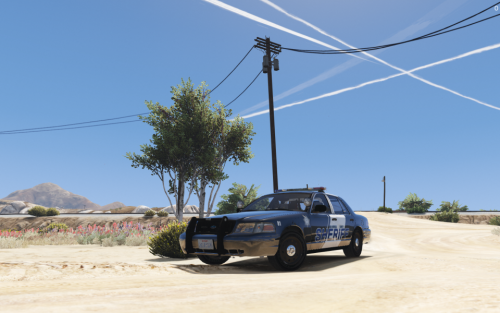 Just need to update the els xmf file from red blue to red only Ill apply it for an update in the future but to save from having to redownload
- 24 comments
- 9 reviews
-
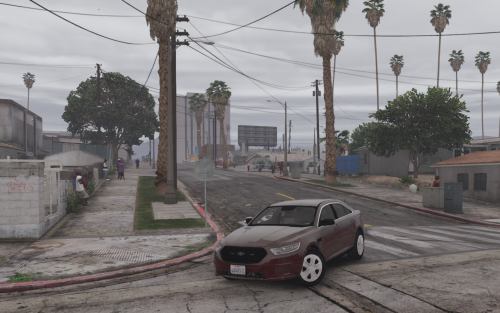 Just noticed the file is not the correct one. I've updated with version 1.0.1 with the correct file.
- 39 comments
- 11 reviews
-
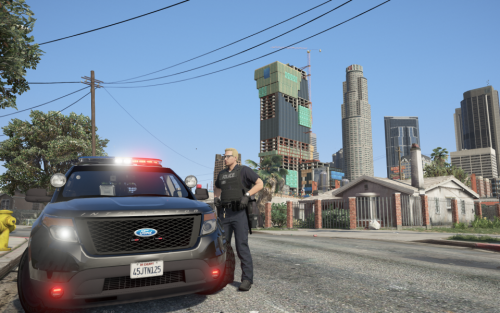 I've went through and tried everything from the downloads into my game to see if I can get it to mess up and it doesn't mess up for me. You can see it in the video below I am spawning every single car in game: https://www.twitch.tv/videos/180732220 Problem troubleshooting: Are you trying to go in game again after the crash? I went in game and crashed the first time but when I reloaded it again, it works fine with my scripts installed as well *You can see all this in the video as well* I noticed the car variation and Vehicle Meta's were corrupted from the initial release. I've replaced those to see if that does the trick and have updated all 3 downloads for it. The Install instructions before stated to install the carvariations in the same spot as the vehicle meta file (This is incorrect) I've updated the instructions to be correct that the carvaritations is to be installed in the data file and not within the levels one that leads to the vehicle meta file.
- 78 comments
- 12 reviews
-
Gonna pm you so the comments don't get flooded with trying to troubleshoot if thats ok I'm gonna troubleshoot it now. If you have suggestions I can't see the chat as much but you can watch and see here: https://www.twitch.tv/socalthero2002
- 78 comments
- 12 reviews
-
-
*Edit* I've uploaded the changes to all 3 off my uploads however you only need the files from 1 of them to see if it fixes it. I believe the folder path was so long that it would corrupt the carvariations file so I've shorten it in hopes that it fixes the issue. The file before wouldn't open on my desktop and now it does so I'm hoping that was what the problem was. I think the file may have been corrupted because of the lenght to the folder. See if you can open the car variation up on your desktop. I'm uploading a new version for all 3 right now hopefully fixing the problem. *Edit* I've uploaded the changes to all 3 off my uploads however you only need the files from 1 of them to see if it fixes it. I believe the folder path was so long that it would corrupt the carvariations file so I've shorten it in hopes that it fixes the issue. The file before wouldn't open on my desktop and now it does so I'm hoping that was what the problem was.
- 78 comments
- 12 reviews
-
Are you using All 3 packs? Do you have the "Only if you have All 3 Packs" version of the Metas installed?
- 78 comments
- 12 reviews
-
Updated everything to include both a "Los Santos County" and a Blaine County Version.
- 24 comments
- 9 reviews
-
-
@Mr.JonnhyCZG Took the majority of the pictures. In the Video its Visual V and Radiance V
- 78 comments
- 12 reviews
-
-

- 1
-
-
Ill try and update here this weekend or the following weekend to at least get the trim version to work i agree door trim should be added to give a more undercover look.
- 39 comments
- 11 reviews
-
-
- 1
-
-
Understandable but it should be looking at how to incorperate els into its systems. For a vehicle modeling perspective els makes creating light setups easier, you dont have to search through files of code to change light patterns to mimic els, you dont have to resize light meshs and rotate dummys a certain direction because rockstar set it up this way or position them through the ground so the coronas dont look right. I think those are some of the main reasons you dont see as much non els anymore. I have a non els version not of this pack but from the past i never released because it contained a car i couldnt get permission to use. Its more lapd and lasd theme you can see a video of it on my YouTube
- 78 comments
- 12 reviews
-
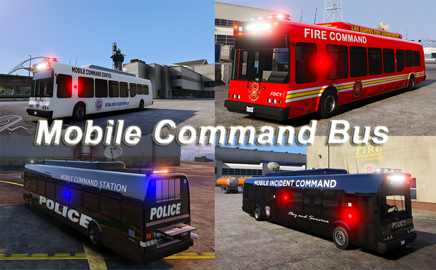 Love the uniqueness had no idea my party bus could turn into this! haha. Love it!
- 51 comments
- 6 reviews
-
-
- 3
-
-
-
I can never remember which one of @Albo1125 scripts has it (i love em all and have all of them lol) but one of them in the ini says something along the lines of "default corner vehicle = SPEEDO" change the speedo to CORVAN and it should show up as your corner van
- 78 comments
- 12 reviews
-
I think in the instructions i may have incorrectly written the location for the car variations, they i forgot to add "common" in the mpchristmas2 pathway (I am at work for another 6 hours before i can go home and verify). Also are you using all 3 packs I released? If so you will need to use those files in place of the other two.
- 78 comments
- 12 reviews
-
*Edit* Yea I was right Sorry about that. I've uploaded a new version but its just instructions with that added to it. Sorry i may need to update that, is common in there then data? I think i forgot the common part in the instructions
- 24 comments
- 9 reviews
-
Very true and I noticed that with my Sheriff Pack as well, Was already done with the last vehicle before I realized it and was already tired of painting to fix it Template is included feel free to change it out
- 78 comments
- 12 reviews
-
*NOTE* 2.0 Update The Install Instructions have Changed Adding an additional Vehicle Meta file to install. THIS IS REQUIRED TO GET ALL THE VEHICLES THAT ARE NON ADD ON VEHICLES DIALS WORKING!!! *Updates* Version 2.0.1 Changes: *Note* No Update to vehicles as of 12/22/17 update. Just updated the download with a tutorial video for others having problems installing car packs. ALL VEHICLES: -Added Interior Lighting to mimic headlights so vehicles interior lighting turns off when vehicle is turned off and/or headlights FBI: CVPI -Fixed Reverse lights so the little outline of lights doesn't show FBI2: Suburban: -Fixed Headlights as they should properly illuminate -Fixed Taillights as they should properly illuminate -Fixed Brakelights as they should properly illuminate --------------------------------------------------------------------------------------------------------------------------------- Version 2.0.0 Changes: (To Big Not to skip to a full 2.0 Version lol) -Fixed lighting Textures so they were not so dim for All Vehicles (FBI,FBI2,FBI3,FBI4,FBI5,FBI6) FBI2: Suburban: -HQ Mirrors added -Working Dials Now FBI3: Impala: -HQ Mirrors added FBI5: 13 Tahoe: -HQ Mirrors added -Working Dials Now --------------------------------------------------------------------------------------------------------------------------------- Version 1.0.3 Changes: Updated Install Instructions again (Hopefully correctly this time let me know in the COMMENTS SECTION if I missed something). Version 1.0.2 Changes: Updated Install Instructions for newly discovered CD/Box version of the game need. Suburban (FBI2) Templated Window so that you Can Tint Windows (Cannot get the Window Tint Mod in game to work properly so this will have to be the fix until I figure it out or someone can help me with it). Template is located with the Body Template in the Credits Folder. Version 1.0.1 Changes: CVPI (FBI) added door trims on the doors to look more "civilian" like. Impala (FBI3) Replaced YTD file with corrected one with textures. Hello Everyone, After 8 Long on and off Months of working on this Pack it is finally being released for everyone to use: Thero's Lore Friendly, Fictional, ELS Vehicle Pack (23 Total Vehicles). This is a Lore Friendly pack and not based on any real emergency services department. Special Thanks: -To everyone who released the DEV models to make these possible. Sharing with the community really helps showcase multiple talents and ideas and wouldn't be possible without all your help and support of the community!!! -Special Thanks to @Sinnisa and @shadowdiver710 of LSPDFR. They went and Created the Liveries for Almost all of the vehicles as well as help me with creating the liveries that I made in the pack, as well as Beta Testing the Pack to help me find any bugs and/or issues that I may have overlooked. -Also Want to Thank @Mr.JonnhyCZG of LSPDFR. He offered his services to Beta Test the Pack as well as take amazing pictures and create a video for the Pack to showcase the great work that All 3 of these LSPDFR members were apart of. *NOTE* These 3 packs obviously have a lot of time and energy in them when I worked on them. If you find issues other than in the known issues that I may have overlooked please let me know and I'll try and provide a fix and update the file What Comes in the Pack: -3 "Add On" Vehicle Files with CarVariation and Vehicle.meta files modified for them (Simply type in the file name in your trainer to spawn the vehicle). -2 "Replacement" Vehicle Files. -All ELS Files for Lightning Setup -Credit to @shadowdiver710 for doing these. -Multiple Liveries Enabled for All of the Vehicle Models (Additional CarVariation & Vehicle.meta edits maybe needed for some vehicles already not enabled). -Templates to Create Your Own Liveries for the models (I'm sorry I had to create new ones for every vehicle. I wanted to use already created templates however I am not very good in regards to painting Black and White Units). -Extras- -FBI5 Tahoe has ALPR Cameras that are extras. Vehicle Files Included: -FBI CVPI -FBI2 Suburban -FBI3 Impala (Add On Vehicle) -FBI4 Charger (Add On Vehicle) -FBI5 Tahoe (Add On Vehicle) -FBI6 Taurus (Add On Vehicle)
- 39 comments
- 11 reviews
-
-
- 9
-
-
*NOTE* 2.0 Update The Install Instructions have Changed Adding an additional Vehicle Meta file to install. THIS IS REQUIRED TO GET ALL THE VEHICLES THAT ARE NON ADD ON VEHICLES DIALS WORKING!!! *Updates* Version 2.0.1 Changes: *Note* No Update to vehicles as of 12/22/17 update. Just updated the download with a tutorial video for others having problems installing car packs. ALL VEHICLES: -Added Interior Lighting to mimic headlights so vehicles interior lighting turns off when vehicle is turned off and/or headlights SHERIFF: CVPI -Fixed Reverse Lights so the little white outline around them doesn't show when not in reverse --------------------------------------------------------------------------------------------------------------------------------- Version 2.0.0 Changes: (To Big Not to skip to a full 2.0 Version lol) -Fixed lighting Textures so they were not so dim for All Vehicles (AMBULANCE, FIRETRUCK, CORNER VAN, SHERIFF, SHERIFF2, SHERIFF3) -SHERIFF, SHERIFF2, SHERIFF3 All use Extra 11 Take Down ELS Lights CORVAN: 3500 Express Van -Fixed Missing Textures in vehicle -HQ Mirrors added -Working Dials Now Sheriff2: F-150 -HQ Mirrors added --------------------------------------------------------------------------------------------------------------------------------- Version 1.0.3 Changes: -Added Engine Texture to Corner Van -Fixed Issue with Corner Van Livery missing a paint spot in the back -Fixed Ambulance Collision so Now the Ambulance should collide with objects correctly and not go through them. Version 1.0.2 Changes: Updated Install Instructions for newly discovered CD/Box version of the game need. Updated Firetruck ELS File so that the environment flashes only red lights and not red and blue lights. Version 1.0.1 Changes: CVPI (SHERIFF) Added "LOS SANTOS COUNTY" and "BLAINE COUNTY" Textures F-150 (SHERIFF2) Added "LOS SANTOS COUNTY" and "BLAINE COUNTY" Textures Charger (SHERIFF3) Added "LOS SANTOS COUNTY" and "BLAINE COUNTY" Textures Hello Everyone, After 8 Long on and off Months of working on this Pack it is finally being released for everyone to use: Thero's Lore Friendly, Fictional, ELS Vehicle Pack (23 Total Vehicles). This is a Lore Friendly pack and not based on any real emergency services department. HOWEVER Fire Liveries are based on the Murrieta, Ca Fire vehicle Liveries but in Lore Form. The Sheriff Vehicles are based on the Eagle County, Colorado Sheriff Department Liveries but in Lore Form. *NOTE* I know EMS/Fire/Tow/Taxi/ and Stanier are not part of a Sheriff's department, I just didn't want to create a 4th pack download for just those vehicles (And the Sheriff Vehicles are only 3 vehicles so it made more sense here then in the police or undercover one.) *NOTE* These 3 packs obviously have a lot of time and energy in them when I worked on them. If you find issues other than in the known issues that I may have overlooked please let me know and I'll try and provide a fix and update the file Special Thanks: -To everyone who released the DEV models to make these possible. Sharing with the community really helps showcase multiple talents and ideas and wouldn't be possible without all your help and support of the community!!! -Special Thanks to @Sinnisa and @shadowdiver710 of LSPDFR. They went and Created the Liveries for Almost all of the vehicles as well as help me with creating the liveries that I made in the pack, as well as Beta Testing the Pack to help me find any bugs and/or issues that I may have overlooked. -Also Want to Thank @Mr.JonnhyCZG of LSPDFR. He offered his services to Beta Test the Pack as well as take amazing pictures and create a video for the Pack to showcase the great work that All 3 of these LSPDFR members were apart of. What Comes in the Pack: -2 "Add On" Vehicle Files with CarVariation and Vehicle.meta files modified for them (Simply type in the file name in your trainer to spawn the vehicle). -7 "Replacement" Vehicle Files. -All ELS Files for Lightning Setup -Credit to @shadowdiver710 for doing these. -Multiple Liveries Enabled for All of the Vehicle Models (Additional CarVariation & Vehicle.meta edits maybe needed for some vehicles already not enabled). -Templates to Create Your Own Liveries for the models (I'm sorry I had to create new ones for every vehicle. I wanted to use already created templates however I am not very good in regards to painting Black and White Units). Vehicle Files Included: -Ambulance -CorVan Express Van(Add On Vehicle) -Fire Truck Rockstar FireTruck -Sheriff CVPI -Sheriff2 F-150 -Sheriff3 Charger (Add On Vehicle) Known Issues: None at this Time.
- 24 comments
- 9 reviews
-
-
-

- 13
-
-
*NOTE* 2.0 Update The Install Instructions have Changed Adding an additional Vehicle Meta file to install. THIS IS REQUIRED TO GET ALL THE VEHICLES THAT ARE NON ADD ON VEHICLES DIALS WORKING!!! *Updates* Version 2.0.1 Changes: *Note* No Update to vehicles as of 12/22/17 update. Just updated the download with a tutorial video for others having problems installing car packs. ALL VEHICLES: -Added Interior Lighting to mimic headlights so vehicles interior lighting turns off when vehicle is turned off and/or headlights Police: CVPI -Fixed Reverse Lights so the little white outline around them doesn't show when not in reverse Police5: 2015 Tahoe -Optimized Vehicles more for better game Performance -Fixed Headlights as they should properly illuminate -Fixed Taillights as they should properly illuminate -Fixed Brakelights as they should properly illuminate --------------------------------------------------------------------------------------------------------------------------------- Version 2.0.0 Changes: (To Big Not to skip to a full 2.0 Version lol) -Fixed lighting Textures so they were not so dim for All Vehicles (POLICE, POLICE2,POLICE3,POLICE4,POLICE5,POLICEB,POLICET,RIOT) -POLICE, POLICE2, POLICE3, POLICE4, POLICE5 All use Extra 11 Take Down ELS Lights PoliceT: 3500 Express Van -Fixed Missing Textures in vehicle -HQ Mirrors added -Working Dials Now Police4: Explorer -Remade entire car so it was better optimized and better looking -Remade Template for better Accuracy -Textured Steering wheel so it looks proper now Police5: Tahoe -Remade entire car so it was better optimized and better looking -Remade Template for better Accuracy -Filled in missing texture on headliner near dome lights -Working Dials Now -Glass Breaks -HQ Mirrors added --------------------------------------------------------------------------------------------------------------------------------- Version 1.0.3 Changes: -Added Texture to PoliceT Engine -Updated Install Instructions again (Hopefully correctly this time let me know in the COMMENTS SECTION if I missed something). Version 1.0.2 Changes: -Updated Install Instructions for newly discovered CD/Box version of the game need. Version 1.0.1 Changes: -BEARCAT (RIOT) Added "LOS SANTOS COUNTY" and "BLAINE COUNTY" Textures Hello Everyone, After 8 Long on and off Months of working on this Pack it is finally being released for everyone to use: Thero's Lore Friendly, Fictional, ELS Vehicle Pack (23 Total Vehicles). This is a Lore Friendly pack and not based on any real emergency services department. HOWEVER The Police are based on the Murrieta, Ca Police Liveries but in Lore Form. Special Thanks: -To everyone who released the DEV models to make these possible. Sharing with the community really helps showcase multiple talents and ideas and wouldn't be possible without all your help and support of the community!!! -Special Thanks to @Sinnisa and @shadowdiver710 of LSPDFR. They went and Created the Liveries for Almost all of the vehicles as well as help me with creating the liveries that I made in the pack, as well as Beta Testing the Pack to help me find any bugs and/or issues that I may have overlooked. -Also Want to Thank @Mr.JonnhyCZG of LSPDFR. He offered his services to Beta Test the Pack as well as take amazing pictures and create a video for the Pack to showcase the great work that All 3 of these LSPDFR members were apart of. *NOTE* These 3 packs obviously have a lot of time and energy in them when I worked on them. If you find issues other than in the known issues that I may have overlooked please let me know and I'll try and provide a fix and update the file What Comes in the Pack: -1 "Add On" Vehicle Files with CarVariation and Vehicle.meta files modified for them (Simply type in the file name in your trainer to spawn the vehicle). -8 "Replacement" Vehicle Files. -All ELS Files for Lightning Setup -Credit to @shadowdiver710 for doing these. -Multiple Liveries Enabled for All of the Vehicle Models (Additional CarVariation & Vehicle.meta edits maybe needed for some vehicles already not enabled). -Templates to Create Your Own Liveries for the models (I'm sorry I had to create new ones for every vehicle. I wanted to use already created templates however I am not very good in regards to painting Black and White Units). -Extras- -All Rambars are Extra's and can be added/removed at anytime while in game Vehicle Files Included: -Police CVPI -Police2 Charger -Police3 Taurus -Police4 Explorer -Police5 Tahoe (Add On Vehicle) -PoliceB Hurks BMW Bike -PoliceT Express Van -PolMav Rockstar Mavrick -Riot Bearcat Known Issues: (Possibly fixed in future updates if I learn more on how to fix them): Police4: Multiple Chassis when vehicle Explodes Police5: Multiple Chassis when vehicle Explodes
- 78 comments
- 12 reviews
-
-
- 14
-
-
Well couldn't squesh that into the title enough lol. Anyways, Having a problem with zmodler 3 where I changed out the wheel on one of the vehicles I have and after doing so when I go in game all 4 are the new wheel however the [wheel lf] (notice I put the bracket as thats how it is in the hierarchy) is the only one at the correct size. Troubleshooting: I've reinstalled Zmodeler 3 (My last problem drove me insane and was this simple) I've copy the dummies and the collisions of the wheel lf Anyone run into this before and have a fix? Or know what I'm doing wrong? I'm assuming I'm just tired and overlooking something right now in the Hierarchy *Edit* Fixed Collisions even though show correct were not
-
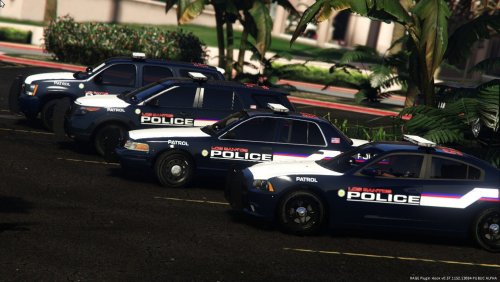 NOW THIS IS A TEXTURE PACK! Great job man. These Liveries look amazing!
 -
 @Lundy Wish you were more free so I could send it to you for a final looky for little errors like this that I'm pretty sure I would of just overlooked.
 -
Oh wow i had no idea. Thanks @Lundy ill see about changing it to those

