




opus49
Members
-
Joined
-
Last visited
Everything posted by opus49
-
-
-
-
Set Main.DisableBlipHiding to true in your LSPDFR.ini
-
 Thank you, this is quite helpful!!
 -
-
 Please stop telling people to ignore the warning in the default.ini. The documentation (and my own install video) explains why.
- 1,366 comments
- 87 reviews
-
-

- 1
-
-
The PDF contains all of the phrases. Grammar Police does not come with a 10-5. You might be referring to Immersive Dispatch which adds custom phrases. There should be a document in the Immersive Dispatch download that should help.
- 1,366 comments
- 87 reviews
-
-
- 1
-
-
I don't owe you anything. If you don't like it, don't use it. I've spent a year providing free support for a free plugin just to deal with people like you. Get over yourself.
- 1,366 comments
- 87 reviews
-
-
-
-
Sounds like you are using immersive dispatch. I would suggest removing all custom XMLs and try issuing "show me ten eight" and "request code three backup" and then upload your RPH log. Grammar Police isn't getting sound. Try setting up your mic for speech recognition in Windows via the control panel.
- 1,366 comments
- 87 reviews
-
-
It doesn't make sense. LSPDFR is still doing blip hiding. So either you have multiple installs, didn't modify the config correctly, or you have some truly unique issue that the LSPDFR team will have to investigate.
-
Then I recommend contacting the LSPDFR team. As long as you have that Blip Hiding error, you won't be able to use Grammar Police.
-
Attach it
-
You might think you did, but you didn't, or you wouldn't still have that error.
-
disable blip hiding
-
? That wasn't a question it was a statement. You still have the same error. That error is causing your crash. Until you fix it, you will continue to have crashes if you have Grammar Police installed. The way to fix it is to disable blip hiding.
-
You still have the same error which is caused by blip hiding.
-
[9/5/2021 12:42:48 PM.945] LSPD First Response: [WARN] Error while hiding ambient game blips: System.AccessViolationException: Attempted to read or write protected memory. This is often an indication that other memory is corrupt.
-
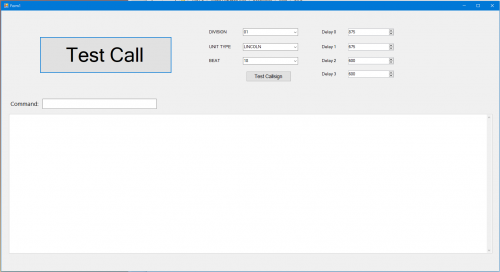 To use the tester, you would need to install speech recognition for US English via Windows Settings > Time & Language > Language > Preferred languages
- 46 comments
- 1 review
-
-
Log?


