


gsp318
Members
-
Joined
-
Last visited
Everything posted by gsp318
-
Turning off anti virus did not work for me.
-
Since the rockstar game launcher update, my rage hook will not load. I have downloaded the updated Ragehook, and it starts up and says “determine game branch” and then shuts off. I click it again and nothing happens. GTA V will launch just fine by its self from the launcher. If someone knows a fix or has this same problem please PM me so I can fix my game please. If this has already been answered and I over looked it in another discussion then I apologize (just fwd me the link). Thanks for any help.
-
I’m looking at buying a desktop to play LSPDFR on. I bought this one, got it home, installed GTA 5 and the game took up the entire hard drive so I had no more room for LSPDFR or any other mods. https://www.bestbuy.com/site/hp-pavilion-gaming-desktop-amd-ryzen-5-series-8gb-memory-amd-radeon-rx-580-1tb-hard-drive-128gb-solid-state-drive-shadow-black-with-a-brushed-hairline-pattern/6280608.p?skuId=6280608 So now I am looking to buy this one: https://www.digitalstorm.com/configurator.asp?id=1864480 does anyone have experience with this digital storm brand?Crashes my game after about 10 mins...I take the car out and everything goes back code 4. Something to look into...
- 18 comments
- 11 reviews
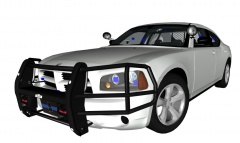 I haven't really seen an accurate GSP charger yet...if you're a fan of them.
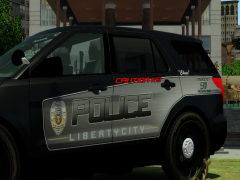 I work two K9's for two different purposes "Zeno" & "Khloe"I really suck at recognizing what specs I need lol...I just know what I have now isn't working enough. It works but it crashes when I use high poly mods.What's the best gaming laptop out there then? I've googled several but what is the best?I'd love to have a tower...they're even cheaper but I do a lot of traveling and plus I work the night shift at work from 7p-7a...and were aloud to have laptops and id love to take the game on the go with me...do you guys know of any better/cheaper laptops with close to the same specs? @jokermods I'm looking to spend the 1200-1300 lol This is what I'm running now on my tower...and I can't run ELS 7 because of XP and I cant run high poly mods because my memory runs out fast... Operating System Microsoft Windows XP Professional 32-bit SP3 CPU Intel Pentium E2180 @ 2.00GHz 41 °C Conroe 65nm Technology RAM 3.00GB Dual-Channel DDR2 @ 332MHz (5-5-5-15) Motherboard Dell Inc. 0RY007 (Socket 775) 40 °C Graphics DELL IN1910N (1024x768@60Hz) 1024MB GeForce 9500 GT (EVGA) 52 °C Hard Drives 233GB Seagate ST3250310AS (SATA) 37 °C Optical Drives Optiarc DVD+-RW AD-7200S Audio Realtek High Definition AudioThese processors are what I have to choose from...and they are over priced but what other laptops would be good enough to play with all these mods? I've only heard of alien ware being the best from folks ive talked to. 4th Generation Intel® Core™ i7-4700MQ processor (6MB Cache, up to 3.4GHz) 4th Generation Intel® Core™ i7-4800MQ processor (6MB Cache, up to 3.7GHz) 4th Generation Intel® Core™ i7-4900MQ processor (8MB Cache, up to 3.8 GHz) 4th Generation Intel® Core™ i7-4930MX processor (8MB Cache, up to 3.9 GHz)I'm looking to purchase a new alien ware laptop...but before I spend that kind of money, are these specs good enough to play GTA IV with a lot of high poly mods? If not can you guys tell me where I could find a lap top that will? OPERATING SYSTEM Windows® 7 Home Premium 64-bit, English edit MEMORY 8GB Dual Channel DDR3L at 1600MHz edit HARD DRIVE 750GB SATA 3Gb/s (7,200 RPM) edit VIDEO CARD NVIDIA® GeForce® GTX 770M with 3GB GDDR5 edit LCD PANEL 17.3" WLED HD+ (1600 x 900) Anti-Glare Display edit SUPPORT 1 Year Alienware Basic SupportHello all, I've finally gotten my Zmodeler2 back up and working again so I've decided to take advantage of all the unlocked parts and try to mod a few cars for you guys...I know some of the basics but I run into a few problems here and there that I'm seeking help with. I've watched tutorials and Googled a lot of stuff and still couldn't get help because I suck and watching and learning, I kind of need to be shown stuff. So please don't bother with posting stuff like "Try Google" or any other smart ass remark. All I'm asking to see is if anyone would please like to assist me in making my first modded car for the community?
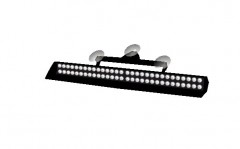 I run with 2 of these in my crown vic....great light.Then what's the point in having all the other equipment? Like GPS, Radar, Video System? You hardly see those unless you're in car view either...just curious. I never understood that.
- 11 comments
- 2 reviews
Could you do an updated version with a console in the middle of the car for light/siren control?- 11 comments
- 2 reviews
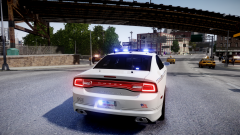 It looks really good from the pic...
Will this car have a console/dash cam/radar/etc?It's every time I change from the hood view back to normal view...if that makes sense?GTA IV FATAL ERROR: ZLIB20 "Invalid resource detected-Please re-instal the game. -3
It looks really good from the pic...
Will this car have a console/dash cam/radar/etc?It's every time I change from the hood view back to normal view...if that makes sense?GTA IV FATAL ERROR: ZLIB20 "Invalid resource detected-Please re-instal the game. -3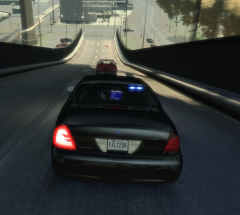 It's one of police wag's CVPI's it's in his download section on GPM

