


echo04
Members
-
Joined
-
Last visited
Everything posted by echo04
-
Ok, I thought I may have been missing something but I'm not. Ugh
-
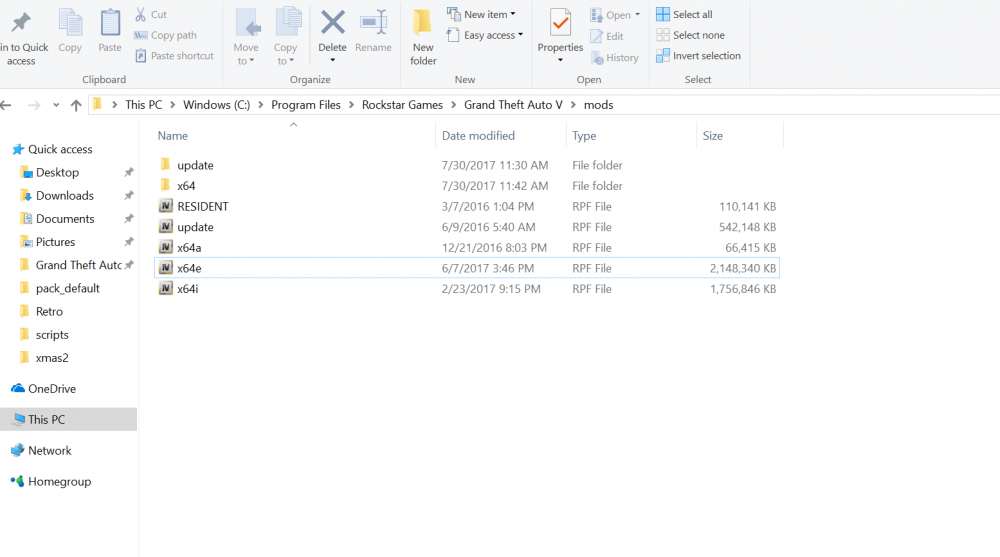
Ok, now can you send me a picture of whats inside your update "folder"?
-
Can you send me a picture of your mods folder?
-
Yeah, I've attached my openiv log. As I said, sound modifications are working without issue that require openiv to install them. Just no cars or EUP
-
All, I've wanted to open this up to everyone in a new topic as myself and an experienced support member can't figure it out at all. RPH, LSPDFR, plugins, scripts are all working with really no issue. Absolutely none of my car mods are showing up, ped mods ect. However, I do have one car mod that does appear when I spawn it as I placed it in the x64e pack rather than in a patchday and just never replaced it back. My sound replacements work i.e sirens, weapon sounds. Damage mods are working fine. My game was just fine three days ago when I played last, I jumped back on a couple days later and I'm running into this issue now and can't figure it out. It is also not recognizing that my EUP is installed. I know for a fact it IS installed as I used it before. I have installed and reinstalled the ASIs via the tools tab in OpenIV. I am out of ideas, please help. I've attached my RPH log and OpenIV log. RagePluginHook.log OpenIV.log
-
Are your vehicle mods working?
-
Sure does, and you know whats funny.... a single car mod appears when I spawn it, and thats because I installed it in the x64e spot over top of the default car, before I learned to install the mods in the patchday... so now I'm even more confused.
-
So I used the auto installer when this first came out and installed quick and easy. Played the game fine until about two days ago. My game loads and it says that EUP is not installed... Incorrect, it is installed as I have been playing with it in game. I have also lost my car mods so I'm thinking it may be an issue in communication between OpenIV and RPH?
-
I'm at a loss, I redid my mods folder after following the tutorial, still same issue. No car mods, EUP ect.
-
What do you have as the most recent patchday
-
Correct, its there. OpenIV.log
-
Honestly, I've never run into an issue with my mods folder. I had this issue before I saw the update, then I updated thinking it would correct the issue but no dice.
-
Hahah I'll give that a shot. Possibly but the thing that I'm scratching my head over is that I didn't touch anything, I just came back to my game jacked. The last time I played the game was fine, I shut down and came back to this two days later..
-
Yep they are, that was the first thing I checked. Also uninstalled and reinstalled.
-
Nope, still nothing. Thats why I think there is an issue with OpenIV not communicating with RPH. Sirenmastery, sticky wheels, ect works fine. Seems to just be anything to do with OpenIV
-
Sorry, I knew that. It is all correct. I bring up EUP again because it utilizes an Autoinstaller which worked perfect for me before, but now with that even showing its not installed in the game (i get a pop-up message saying its not installed) leads me to believe there is an obvious lack of communication between OpenIV and RPH
-
It is all the correct path on my end
-
They are in the file, not the rpf
-
Ok so I need to delete which of those? Also, I placed all my vehicle mods into the latest patchday and still no change, no vehicle mods, EUP, anything
-
Sorry, specifically, which two should I look into? I see the one update "folder", which other one should I look at?
-
Yeah I uploaded the old photo. Common, DLC, Resident and Script have been removed. Which update should I delete then? Ok, I'll move my cars to the latest patchday.
-
What specifically do you want to see in OpenIV? I have my vehicles installed in Patchday11
-
Ugh, I've tried everything I can think of, it WILL NOT recognize any vehicle mods at all what-so-ever.
-
Yeah, I've taken it out and put it back in, still no fix. I'll keep trying things. Let me know if you come up with another option. Thanks!
-
Removing HeroCop corrected the LSPDFR issue, thank you! I can't read let alone understand any of the RPH logs and ect. Any thoughts as to why my vehicles and EUP aren't loading?

