Leaderboard
-
-

-
-
Antonio79866
MembersPoints2Posts




Popular Content
Showing content with the highest reputation on 05/13/2026 in Posts
-
LCPDFR Online Services returns - track your stats
LAPDFR GET reacted to EricBills for a post in a topic
1 pointWhen i go to link my account after i put my api in it says there was an error and to go to lcpd.fr/legacylink to get my api even though i already entered my api into the file.1 point -
LCPDFR Online Services returns - track your stats
LAPDFR GET reacted to ZH540 for a post in a topic
1 pointApologies @Cyan,I hit search and it came up with this. I obviously misread the title or something mate. Can you point me in the right direction so I don't cause further confusion here? I've been trying it via the LSPDFR in game pause but it keeps telling me to either log in or head here to activate it. All done.1 point -
LCPDFR Online Services returns - track your stats
LAPDFR GET reacted to Cyan for a post in a topic
1 pointThis topic is about LCPDFR, not LSPDFR. You should be able to use the built in Pause Menu in LSPDFR to activate LSPDFR Sync.1 point -
LCPDFR Online Services returns - track your stats
LAPDFR GET reacted to ZH540 for a post in a topic
1 pointThanks again @LMS for your help. Sadly this is still not working. I keep checking it in game in the sync & character menu's but it says not recording data etc. I added the above lines and added under [Networking]. See attached image (I removed my unique number obviously). Sorry to be a pain in the arse.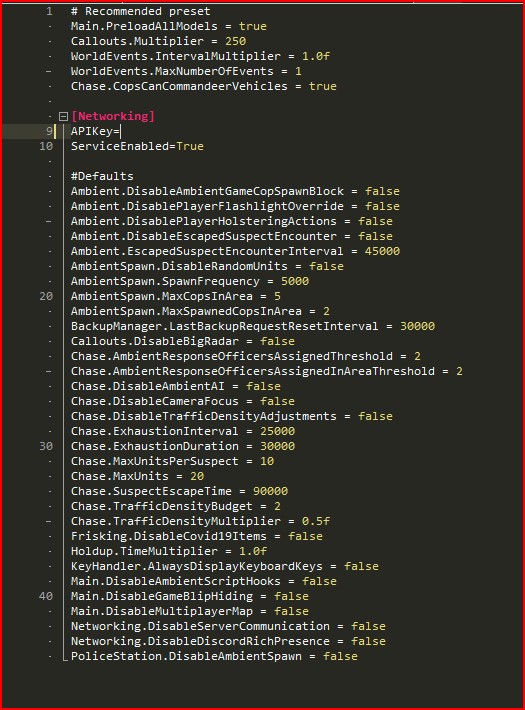 1 point
 -
LCPDFR Online Services returns - track your stats
LAPDFR GET reacted to LMS for a post in a topic
1 pointIt should be added to the correct category, in this case under "Networking".1 point -
LCPDFR Online Services returns - track your stats
LAPDFR GET reacted to ZH540 for a post in a topic
1 pointThank you @LMS. I just wanted help & also confirmation I wasn't about to shaft the whole lot lol. I'll drop it in there shortly. Quick question, can the line be added anywhere or a specific place?1 point -
LCPDFR Online Services returns - track your stats
LAPDFR GET reacted to LMS for a post in a topic
1 pointIf it is missing, you can just add it.1 point -
LCPDFR Online Services returns - track your stats
LAPDFR GET reacted to ZH540 for a post in a topic
1 pointI have this very same issue, @Cyan should we add this text into the ini ourselves or is there a problem with the file?1 point -
LCPDFR Online Services returns - track your stats
LAPDFR GET reacted to Edziuks1 for a post in a topic
1 pointBy oppening the .ini file i cant find the "APIkey=" thing, its not in the file itself. Should i add those lines or mabye download a different .ini?1 point -
LCPDFR Online Services returns - track your stats
LAPDFR GET reacted to Antonio79866 for a post in a topic
1 pointwhat i mean is if i can still link this account to my in game lcpdfr profile1 point -
LCPDFR Online Services returns - track your stats
LAPDFR GET reacted to Cyan for a post in a topic
1 pointCan you clarify what you mean? Your stats do show a few entries.1 point -
LCPDFR Online Services returns - track your stats
LAPDFR GET reacted to Cyan for a post in a topic
1 point@qawsApologies, this should now be fixed.1 point