




Redressing

By DukSezQuak
- 930 views
- View DukSezQuak's images
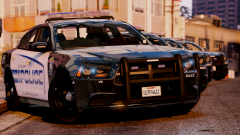
The City of Los Santos Council has passed a motion to redesign the existing police fleet. After council was presented with various quotes from various design companies, they chose three designs to send to the police department members for them to make the choice on which design they liked the most.
"The idea was to give the members the voice - they're the ones using these vehicles, they're the ones who knows whats best for not only them, but our communities." said Mayor Ivan Ofulitch.
The police officers decided on this design, and a final quote is in the works to be obtained for the first quarter of 2018 to phase in a total of 100 new cruisers on the streets.
Recommended Comments
Join the conversation
You can post now and register later. If you have an account, sign in now to post with your account.